

Budget Planner App - FloosYo
AttenYo LLC Finance iPhoneiPadiPod touch
Budget Planner App - FloosYo is a free Finance app for iPhone and iPad by AttenYo LLC. Rated 4.5/5 from 4 ratings. Requires iOS 26.1.
- Rating
- 4.5
- 4 ratings
- Price
- Free
- on the App Store
- Size
- 51 MB
- Age 4+
- Updated
- Oct 8
- 2026 · v1.3.1
Screenshots
About Budget Planner App - FloosYo
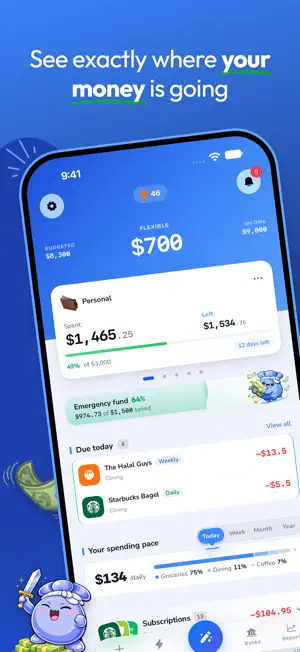
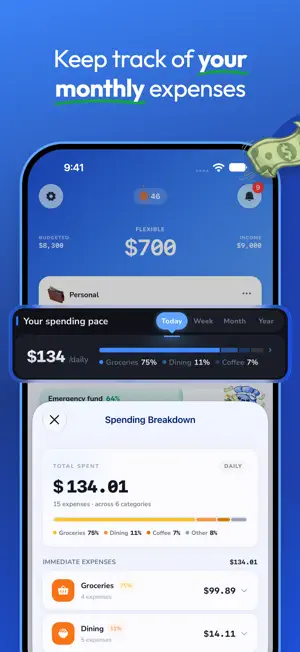
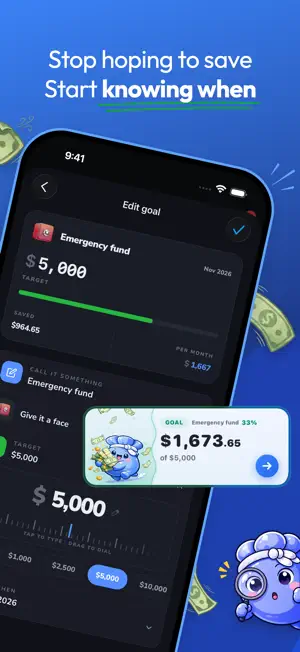
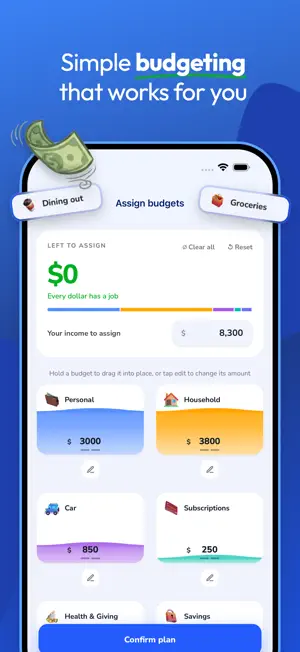
Plan every dollar. See what comes next. FloosYo is a subscription app. Every feature described below requires an active subscription. New accounts start with a free trial. FloosYo helps you turn income, bills, recurring expenses, and everyday spending into a clear plan, so you can understand where your money is headed before it gets there. Most finance apps show you what already happened. FloosYo helps you prepare for what happens next. See your spending month by month. Plan your income across the categories that matter. Track bills, subscriptions, and daily habits before they become surprises. Connect your bank to bring in transactions automatically, or add expenses yourself. Track your savings goal, customize your categories, and understand how a choice today can affect your week, month, and year. A $5 daily coffee is $1,825 a year. A barely used $39 gym membership is $468 a year. Small expenses stop looking small when you see the full picture. FloosYo gives every dollar context, so you can decide what to keep, what to skip, and what deserves your attention. HOW IT WORKS 1. Build your plan Set up your income, budgets, bills, subscriptions, and spending categories in one place. Customize your categories and track your savings goal. FloosYo helps you give every dollar a purpose. 2. See what comes next Review your spending pace, monthly reports, upcoming bills, and recurring costs. Connect your bank to bring in transactions automatically and detect recurring charges and subscriptions. See the impact of your choices across days, weeks, months, and years. 3. Stay ahead Track what is due, spot costs that are adding up, skip spending you do not need, and keep building habits that support your goals. INCLUDED WITH YOUR SUBSCRIPTION • Income and budget planning • Optional bank linking with automatic transaction imports • Automatic subscription and recurring expense detection • Monthly spending reports and trends • Subscription and recurring bill tracking • Upcoming due-date reminders • Future cost projections • Daily, weekly, monthly, and yearly spending views • Voice, typing, and paste expense entry • Savings tracking and streaks • Savings goal tracking • Custom categories, colors, and icons • Home screen widgets • Light and dark mode PRIVATE BY DEFAULT Your financial data stays private. We do not sell your data. No bank linking required. Bank linking is completely optional. Bank connections are read-only. FloosYo cannot move your money. Built for people who want a clear plan for their money, without complicated spreadsheets or overwhelming budgeting systems. Simple. Clear. Human. SUBSCRIPTIONS FloosYo is available as a monthly or yearly auto-renewing subscription. The price is shown in the app before you buy. Subscriptions renew automatically unless canceled at least 24 hours before the end of the current period. Charges are applied to your Apple ID account. You can manage or cancel your subscription anytime in your App Store account settings after purchase. Privacy Policy: https://floosyo.com/en/privacy Terms of Use: https://floosyo.com/en/terms
Ratings & reviews
4.5
4 ratings
What’s new
Version 1.3.1 · Updated October 8, 2026
1. Header Colors Choose from 15 beautiful gradients for your dashboard header. Settings → Header Colors Preview each color on your budget before choosing. 2. Card Backgrounds Give each budget its own unique look. Tap ••• on any budget card → Edit Budget → Card Background.
App privacy
The developer, AttenYo LLC, reported these privacy practices to Apple.
Data Linked to You
The following data, which may be collected and linked to your identity, may be used for the following purposes:
- Usage Data: Product Interaction
- Purchases: Purchase History
- Financial Info: Other Financial Info
- Contact Info: Email Address, Name
- Identifiers: User ID
Used for: Analytics, App Functionality
Alternatives to Budget Planner App - FloosYo
Looking for apps like Budget Planner App - FloosYo? Here are 6 similar apps on the App Store. The highest rated is Daily Spending Planner (5.0/5), and all 6 are free to download.
-
 Daily Spending Planner
5.0
Daily Spending Planner
5.0
-
 Bento: Budget & Money Tracker
4.5
Bento: Budget & Money Tracker
4.5
-
 Vocca
5.0
Vocca
5.0
-
 Stowe: Track Money & AI Budget
5.0
Stowe: Track Money & AI Budget
5.0
-
 AI Expense Tracker: Spent
5.0
AI Expense Tracker: Spent
5.0
-
 Roo Money
4.8
Roo Money
4.8
| App | Rating | Price | Last updated | Compare |
|---|---|---|---|---|
| Budget Planner App - FloosYo | 4.5 / 5 (4 ratings) | Free | October 8, 2026 | |
| Daily Spending Planner | 5.0 / 5 (5) | Free | Oct 22, 2026 | Compare |
| Bento: Budget & Money Tracker | 4.5 / 5 (4) | Free | Oct 18, 2026 | Compare |
| Vocca | 5.0 / 5 (2) | Free | Sep 16, 2026 | Compare |
| Stowe: Track Money & AI Budget | 5.0 / 5 (1) | Free | Oct 28, 2026 | Compare |
| AI Expense Tracker: Spent | 5.0 / 5 (2) | Free | Jul 23, 2026 | Compare |
| Roo Money | 4.8 / 5 (16) | Free | Oct 2, 2026 | Compare |