

Lumi: Budget & Expense Tracker
Andrii Hermanov Finance iPhoneiPadiPod touch
Lumi: Budget & Expense Tracker is a free Finance app for iPhone and iPad by Andrii Hermanov. Rated 5.0/5 from 2 ratings. Requires iOS 15.1.
- Rating
- 5.0
- 2 ratings
- Price
- Free
- on the App Store
- Size
- 71 MB
- Age 4+
- Updated
- Nov 12
- 2026 · v3.02.7
Screenshots
Save to Pinterest


About Lumi: Budget & Expense Tracker
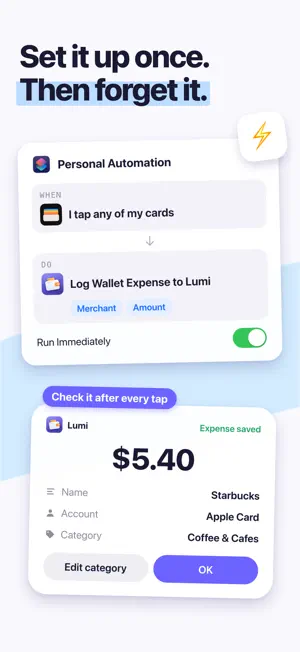
Lumi is built for people who've tried spreadsheets and manual tracking and know: a system only works when it doesn't get in the way. —————————————————————— AUTOMATIC LOGGING Set up a Shortcut once. Pay with Apple Pay — one tap, and the expense is logged. No manual entry, no opening the app. Works in the moment: at the checkout, in a cab, at a café. Back Tap — double-tap the back of your iPhone and Lumi instantly opens in recording mode. No searching for the app, no unlocking the screen, no scrolling through widgets. Especially handy when your hands are full or there's no time to spare. —————————————————————— SPENDING FORECAST Lumi shows not just where your money went, but where you'll be at month-end. The forecast updates with every entry and compares your current spending pace to your history. If expenses are climbing faster than usual, Lumi warns you in advance. —————————————————————— RECEIPT SCANNER Point your camera at a receipt — Lumi automatically reads the amount, date, and merchant. No manual input. —————————————————————— CATEGORY BUDGETS Set limits by category: groceries, subscriptions, restaurants. Live progress bars show the real picture at a glance. Lumi alerts you before a limit is reached. —————————————————————— GOALS & SAVINGS Create a goal — a vacation, an emergency fund, new kit. Lumi tracks progress and calculates the projected achievement date. —————————————————————— SUBSCRIPTIONS & RECURRING PAYMENTS All recurring expenses in one place. Payment reminders — so nothing catches you off guard. —————————————————————— DETAILS THAT MATTER Multi-currency with live rates. Home Screen widgets. iCloud sync. Works offline. Available in English, German, Spanish, Romanian, Ukrainian, Russian, and more. —————————————————————— LUMI PREMIUM — FREE TRIAL Shortcut for auto-logging via Apple Pay Back Tap for instant recording without opening the app Unlimited AI receipt scanning Month-end spending forecast Unlimited budgets and savings goals Subscription tracking PDF export Multi-currency Start free. No payment details required. —————————————————————— You already know how to budget. Lumi makes it faster and more accurate than any spreadsheet. Terms of Use (EULA): https://www.apple.com/legal/internet-services/itunes/dev/stdeula/
What’s new
Version 3.02.7 · Updated November 12, 2026
Purchases from bank notifications — on iOS 27, Lumi logs an expense as soon as your bank's purchase notification arrives. Any card, not just Apple Pay. A forecast for each account — pick an account and the month forecast counts only its own spending, income and bills, in its own currency. Recurring payments, fixed — a transaction you mark as recurring now shows its schedule and lets you cancel the series; a payment on the 31st lands on the last day of shorter months. Fixes and polish — setup screens scroll properly on smaller iPhones, and CSV import explains what to do with very large files.
App privacy
The developer, Andrii Hermanov, reported these privacy practices to Apple.
Data Not Collected
The developer does not collect any data from this app.
Alternatives to Lumi: Budget & Expense Tracker
Looking for apps like Lumi: Budget & Expense Tracker? Here are 6 similar apps on the App Store. The highest rated is Lode: AI Expense Tracker (5.0/5), and all 6 are free to download.
-
 Lode: AI Expense Tracker
5.0
-
 frugl: Budget & Grow
5.0
-
 Control: Budget Tracker
4.4
-
 Qalta AI: Expense Tracker
4.6
-
 Expensa: Expense Tracker
3.9
-
 Skarbo: Budget Expense Tracker
4.6
| App | Rating | Price | Last updated | Compare |
|---|---|---|---|---|
| Lumi: Budget & Expense Tracker | 5.0 / 5 (2 ratings) | Free | November 12, 2026 | |
| Lode: AI Expense Tracker | 5.0 / 5 (8) | Free | Nov 18, 2026 | Compare |
| frugl: Budget & Grow | 5.0 / 5 (5) | Free | Oct 24, 2026 | Compare |
| Control: Budget Tracker | 4.4 / 5 (14) | Free | Nov 23, 2026 | Compare |
| Qalta AI: Expense Tracker | 4.6 / 5 (17) | Free | Nov 23, 2026 | Compare |
| Expensa: Expense Tracker | 3.9 / 5 (10) | Free | Nov 15, 2026 | Compare |
| Skarbo: Budget Expense Tracker | 4.6 / 5 (9) | Free | Nov 19, 2026 | Compare |