

JustNow: Time Log
Xylea Productivity iPhoneiPadiPod touch
JustNow: Time Log is a free Productivity app for iPhone and iPad by Xylea. Rated 5.0/5 from 7 ratings. Requires iOS 26.0. Updated October 14, 2026.
- Rating
- 5.0
- 7 ratings
- Price
- Free
- on the App Store
- Size
- 9 MB
- Age 4+
- Updated
- Oct 14
- 2026 · v1.2.0
Screenshots



About JustNow: Time Log
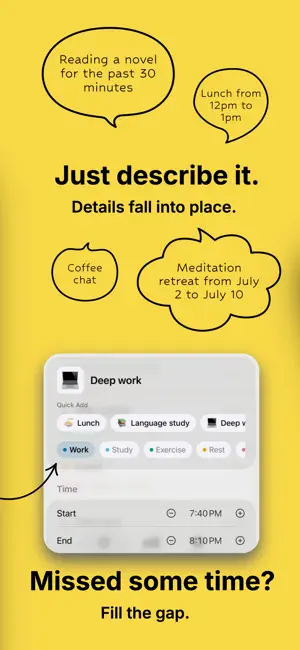
Most time tools start with good intentions and a perfect plan. JustNow starts with what actually happened. Log what you did. Keep what you thought. See both in one timeline. Record activities in plain language and save thoughts as they come. An hour of reading, a conversation, an idea after a movie—keep the things that make up your day, without planning it all in advance. RECORD IN PLAIN LANGUAGE • Type or say “read for an hour” or “coffee with Sam.” • Turn activities into entries with start and end times, an emoji, and a category. • Record something you just finished, or specify a time to log it afterward. • Use on-device voice transcription instead of typing. • Let Apple Intelligence work out times and categories on supported devices. • JustNow remembers your category and emoji choices. KEEP YOUR THOUGHTS • Jot down an idea, a feeling, or a moment you want to remember. • Each thought has its own timestamp and appears in your timeline alongside your activities. • One thought each day is free. Add more per day or write about earlier days with JustNow Unlimited. SEE WHERE YOUR TIME GOES • Follow your day in a simple timeline and review how you spent your time. • Fill in the gaps you want to remember, or start fresh from now. • Keep activities organized with automatic categories. Rename them, merge them, or add your own. MAKE RECORDING EFFORTLESS • Log frequent activities with one tap from a Home Screen widget. • Check your ongoing counter at a glance. • Export your records as JSON anytime. JUSTNOW UNLIMITED Go beyond today. Revisit past days, add more thoughts per day and to earlier days, explore long-term trends, search your history, create unlimited custom categories, sync across your devices, and import your exported JSON on another device. Choose the option that suits you: • Monthly subscription: US$2.99 per month. • Lifetime access: US$9.99 as a one-time purchase. No recurring fees. Both options unlock the same Unlimited features. Prices above are for the U.S. App Store; prices in other countries and regions may vary. Your local price is shown before purchase. The monthly subscription renews automatically unless canceled at least 24 hours before the end of the current billing period. Manage or cancel your subscription in your App Store account settings. PRIVATE BY DESIGN No account to create. No ads. No analytics. Voice transcription and intelligent processing happen on your device. Your records stay on your device, or in your own private iCloud database if you enable sync. Work, rest, distractions, and the thoughts in between. It all counts as life. Terms of Use: https://www.apple.com/legal/internet-services/itunes/dev/stdeula/
Ratings & reviews
5.0
7 ratings
What’s new
Version 1.2.0 · Updated October 14, 2026
This update makes everyday logging quicker and your history easier to explore. • Thoughts: Daily Notes grow into Thoughts. Capture several ideas, feelings or moments a day, each with its own time, shown in your timeline alongside your activities. Review lists the thoughts for any day and lets you add one for that date. One thought for today is free each day; Unlimited unlocks more and lets you add thoughts to earlier days. • Welcome back after 12 hours: when more than 12 hours have passed, the app and widget show a recovery card. Fill the gap in one tap, or start fresh from now without creating an entry. • Find thoughts by date: choose a single day or a date range when searching thoughts; with a date set, no keyword is needed to browse. • Share JustNow: send the App Store link to friends from Settings, where a short welcome from the developer also appears on your first visit. • Saved Activities: save an activity’s name, emoji and category, then find it as you type or tap it in your library to log. Duplicate names are prevented, and changes to saved activities leave past entries untouched. • Your Quick Add, your way: choose up to six saved activities for your timeline and widgets. You can also browse your full library when filling a gap, without changing its time range. • More flexible history search: Unlimited members can filter by category, a single day or a date range—with or without keywords. Edit entries or swipe to delete while keeping your filters in place. • Arrange your categories: Unlimited members can reorder categories in Settings, with the same order reflected throughout the app. • Upgrade to Lifetime: monthly subscribers can purchase Lifetime access and manage their existing subscription in Settings. Monthly renewal is not cancelled automatically; the app provides a reminder. • A clearer logging experience: enjoy a wider input field, larger controls, rotating examples and guidance for Saved Activities. Long activity names wrap naturally, and deleting several saved activities only requires confirmation for the first deletion during each visit. • A tidier large widget: shortcut rows sit closer together. Long buttons can span a full row and wrap to two lines; a compact two-column layout keeps all six shortcuts visible when space is limited. • Export everything, import anywhere: Export Data now includes your categories, thoughts and saved activities alongside your entries. Unlimited members can import that file on another device when iCloud is not an option; nothing already on the device is overwritten. If you import before turning iCloud sync on, the duplicate copies that appear once sync catches up are removed automatically. • Reuse a name: after you delete or merge a category, its name is free to use again. • Purchases unlock right away: Unlimited features open as soon as your purchase is confirmed, and Restore Purchases is suggested if access has not appeared. • Smoother category reordering: the row you hold stays full width while the others slide aside as you drag. • Fixes: the widget no longer appears empty right after an update. Filling a gap now preserves its full duration across midnight, including when logging from a widget. Subscription status refreshes more smoothly, and purchased Lifetime access remains active when a monthly subscription ends. Search filters and results stay in place when you switch between Review, Trends and Search, and the large widget centers your latest entry closer to the shortcuts.
App privacy
The developer, Xylea, reported these privacy practices to Apple.
Data Not Collected
The developer does not collect any data from this app.
Alternatives to JustNow: Time Log
Looking for apps like JustNow: Time Log? Here are 6 similar apps on the App Store. The highest rated is MindPass: App Blocker (5.0/5), and 5 of the 6 are free to download.
-
 AtelierRecords for Collectors
-
 ClassLog: Attendance Tracker
-
 MindPass: App Blocker
5.0
MindPass: App Blocker
5.0
-
 ServiceArchive
5.0
ServiceArchive
5.0
-
 DoTask: Plan & Focus & Review
-
 Cairn: Countdown & Days Since
5.0
Cairn: Countdown & Days Since
5.0
| App | Rating | Price | Last updated | Compare |
|---|---|---|---|---|
| JustNow: Time Log | 5.0 / 5 (7 ratings) | Free | October 14, 2026 | |
| AtelierRecords for Collectors | – | Free | Oct 14, 2026 | Compare |
| ClassLog: Attendance Tracker | – | 1.99 USD | Sep 22, 2026 | Compare |
| MindPass: App Blocker | 5.0 / 5 (7) | Free | Oct 15, 2026 | Compare |
| ServiceArchive | 5.0 / 5 (1) | Free | Oct 22, 2026 | Compare |
| DoTask: Plan & Focus & Review | – | Free | Oct 24, 2026 | Compare |
| Cairn: Countdown & Days Since | 5.0 / 5 (1) | Free | Oct 24, 2026 | Compare |
Compare JustNow: Time Log with the top alternatives: ratings, updates, ASO score and keyword gaps →