

SteadyMemo: Calendar Notes
Yeongsang Kim Productivity iPhoneiPadiPod touch
SteadyMemo: Calendar Notes is a free Productivity app for iPhone and iPad by Yeongsang Kim. Requires iOS 15.0. Updated September 14, 2026.
- Price
- Free
- on the App Store
- Size
- 33 MB
- Age 4+
- Updated
- Sep 14
- 2026 · v1.1.0
Screenshots

About SteadyMemo: Calendar Notes
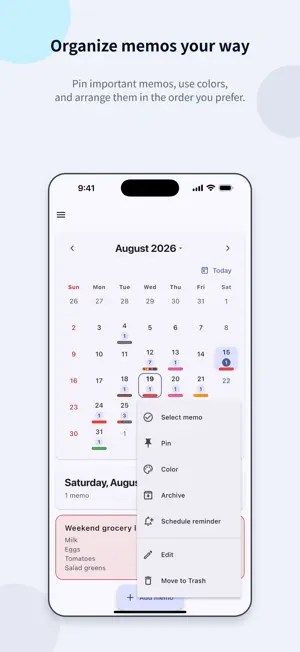
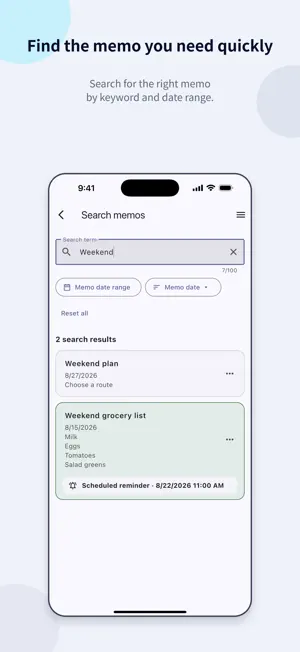
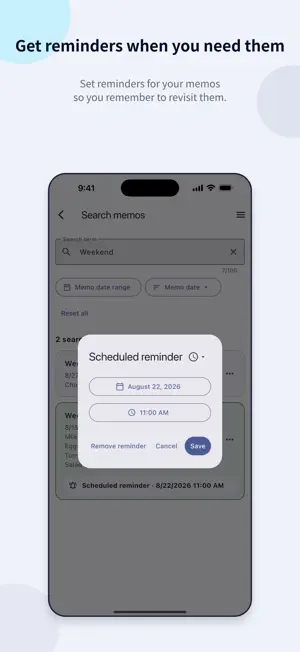
Organize plans, ideas, and everyday records by date. SteadyMemo is an app for writing and organizing memos by date. Choose a day on the calendar, add a memo, and find it easily whenever you need it. Pin important memos or use colors to tell them apart, and move finished records to the Archive. Set a reminder for a memo you need to remember, then return to it at the right time. [What you can do with SteadyMemo] - Keep memos by date and see each day's plans and records at a glance - Find the memo you want quickly using the calendar or search - Pin important memos, organize them with colors, and archive finished records - Use scheduled reminders to revisit memos when they matter - Start writing memos without creating an account [Key features] 1. Calendar memos - Create and edit memos by date from the monthly calendar - See which dates have memos and how many are saved for each date 2. Search and organize - Search titles and content - Narrow results to a date range and sort by memo date or date added - Pin memos, assign colors, and change their order within each date - Move finished memos to the Archive and restore them when needed - Restore deleted memos from Trash for 30 days or delete them permanently 3. Scheduled reminders - Choose a date and time to set a reminder for a memo - Set a reminder for each memo, with either one notification or up to 3 additional notifications at your chosen interval until confirmed - Use reminders for schedules, appointments, and tasks you do not want to miss 4. Backup and restore - With automatic backups enabled, all memos are backed up to iCloud Drive when you open the app, at most once a day - Create a backup file manually whenever you need one - Load a saved backup file to restore memos 5. App theme - Choose a theme color to suit your taste - Choose from Default, Soft, and Flat styles [Data and permissions] Memo content is stored on your device. You can write, search, and organize memos without creating an account or connecting to the internet. Automatic backups require iCloud Drive. Backup files are saved in the SteadyMemo/Backups folder in iCloud Drive. Saving a backup does not automatically restore memos in the app on another device. You can restore memos by loading a backup file saved automatically or manually. The app does not add its own encryption to backup files, so keep them in a secure location that other people cannot access. Reminder settings are included, but only reminders scheduled for a future time are restored. Scheduled reminders require notification permission on your iPhone. Terms of Use (EULA): https://www.apple.com/legal/internet-services/itunes/dev/stdeula/ Privacy Policy: https://steadyseller.com/home/en/privacy-policy
What’s new
Version 1.1.0 · Updated September 14, 2026
- Added automatic backups. When enabled, all notes are backed up to iCloud Drive when you open the app, at most once a day. - Added app theme settings. Choose your preferred color and style.
App privacy
The developer, Yeongsang Kim, reported these privacy practices to Apple.
Data Linked to You
The following data, which may be collected and linked to your identity, may be used for the following purposes:
- Location: Coarse Location
- Usage Data: Product Interaction, Advertising Data
- Purchases: Purchase History
- Contact Info: Email Address, Phone Number
- User Content: Photos or Videos, Customer Support
- Identifiers: User ID, Device ID
Used for: Third-Party Advertising, Developer’s Advertising or Marketing, Analytics, App Functionality, Other Purposes
Data Not Linked to You
The following data, which may be collected but is not linked to your identity, may be used for the following purposes:
- Identifiers: Device ID, User ID
- Diagnostics: Performance Data, Other Diagnostic Data, Crash Data
- Other Data: Other Data Types
Used for: Third-Party Advertising, Developer’s Advertising or Marketing, Analytics, App Functionality
Alternatives to SteadyMemo: Calendar Notes
Looking for apps like SteadyMemo: Calendar Notes? Here are 6 similar apps on the App Store.
-
 Five Hours
-
 Triorities
-
 Haru Danim: Time Tracker
-
 Why:Mind - 내 마음을 알아가는 투두리스트
-
 Smart Printer: iPrint & Scan
-
 CalendarM
| App | Rating | Price | Last updated | Compare |
|---|---|---|---|---|
| SteadyMemo: Calendar Notes | – | Free | September 14, 2026 | |
| Five Hours | – | 1.99 USD | Dec 24, 2025 | Compare |
| Triorities | – | Free | Jul 19, 2026 | Compare |
| Haru Danim: Time Tracker | – | Free | Sep 19, 2026 | Compare |
| Why:Mind - 내 마음을 알아가는 투두리스트 | – | Free | Aug 31, 2026 | Compare |
| Smart Printer: iPrint & Scan | – | Free | Sep 4, 2026 | Compare |
| CalendarM | – | 0.99 USD | Oct 19, 2023 | Compare |