

Haru Danim: Time Tracker
YECHAN SONG Productivity iPhoneiPadiPod touchApple Watch
Haru Danim: Time Tracker is a free Productivity app for iPhone and iPad by YECHAN SONG. Requires iOS 18.0. Updated October 11, 2026.
- Price
- Free
- on the App Store
- Size
- 31 MB
- Age 4+
- Updated
- Oct 11
- 2026 · v1.7.1
Screenshots


About Haru Danim: Time Tracker
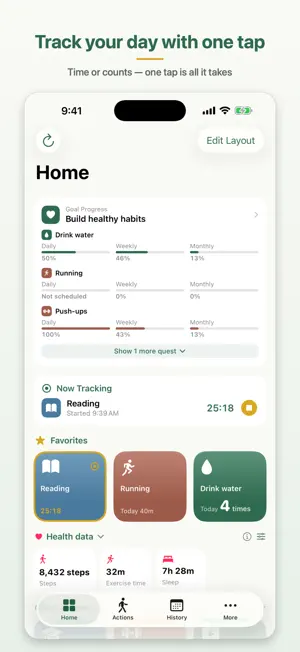
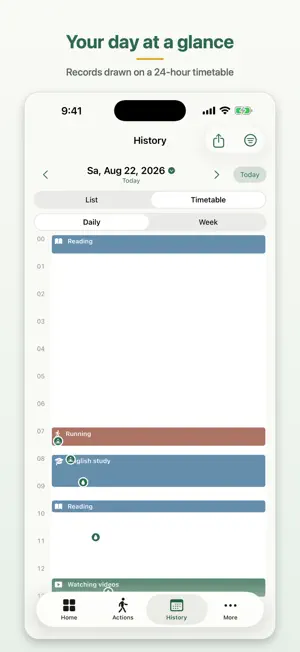
Haru Danim — a visit to your day A habit and time tracker: log time and counts with a single tap, and shape your day with goals and quests. ■ How it works • Create an "action" and tap once — time tracking (start/stop toggle) or count logging (+1), recorded instantly • Track several actions at the same time; while tracking, see it live in the Dynamic Island and on the Lock Screen • Organize actions with color-coded tags, find any action by name, and automatically ignore accidental short sessions and double-tapped counts ■ Goals & quests • Under a big "goal", create actionable "quests" — daily, weekly, monthly, or a custom period • Fine-grained rules: every day / specific weekdays or dates / reach-at-least or stay-under / count only until a daily deadline • Daily, weekly and monthly progress plus streaks and your best streak so far; goals are judged automatically when their end date passes • Set your own achievement threshold from 10–100% ■ History & stats • A daily list and a 24-hour timetable (day/week) show your records at a glance — simultaneous sessions sit side by side, and Apple Health water intake appears as dots at the time you drank • Charts by tag and by action (daily/weekly/monthly) with totals and averages • When charts feel empty early in a week or month, switch to a rolling last-7/30-days view • Export exactly what you see as a high-resolution image report • Back up all data to CSV files (free plan included) — Premium adds CSV import to restore records • Clear out long-accumulated records with Data Cleanup & Reset — with a CSV backup and a keepsake summary report before anything is deleted • See today's Apple Health data (steps, exercise, sleep and more) as tiles on the Home tab, and workout time by type in the Stats tab — values never leave your device ■ Go further with Premium • Unlimited actions, goals and quests • Home Screen & Lock Screen widgets — run and stop right from the widget, progress rings and charts • Really Big Widget — design a full-page widget block by block — actions, goals, a calendar (events + records), a 24-hour day grid, photos and more; date and text blocks come with fonts like serif and handwriting (iPhone on iOS 27 and later, iPad in landscape; building presets is free) • Launch from Control Center and the Action button • Apple Watch app and complications — track from your wrist, with an Action Log complication showing totals on your watch face • Siri Shortcuts — "Hey Siri, start tracking Reading in Haru Danim" • iCloud sync across iPhone, iPad and Mac • Diary on iPhone, iPad and Mac — a daily summary page plus free-form notes (Apple Pencil on iPad, finger drawing on iPhone, mouse and keyboard on Mac), with your own PDF page templates. The summary now includes a health-data card and a timetable with your sleep and workouts laid in • CSV import — bring actions and records back from your exported CSVs • Health quests — goals from Apple Health data like steps, sleep and workout types ("8,000 steps a day," "8 hours of sleep") ■ Privacy This app collects no personal data. Everything stays on your device and (if you turn on sync) in your own iCloud. Privacy Policy: https://github.com/notalentprogrammer/HaruDanim/blob/main/PRIVACY.md Terms of Use (Apple standard EULA): https://www.apple.com/legal/internet-services/itunes/dev/stdeula/ ■ About subscriptions Premium is available as a monthly/yearly auto-renewing subscription or a one-time lifetime purchase. Payment is charged to your Apple Account, and subscriptions renew automatically unless canceled at least 24 hours before the end of the period. You can cancel anytime in App Store subscription settings.
What’s new
Version 1.7.1 · Updated October 11, 2026
A new Goal Calendar, plus a more polished Really Big Widget. • Goal Calendar — from the calendar button in the Goals tab or 'Goal Calendar' in a goal's detail, see at a glance which days you kept your quests. Monthly calendar and weekly table, switch between the whole goal and single quests, and tap a day to jump to its records. A day is colored when you are on target as of that day • Really Big Widget — a new 'Goal Calendar' block shows which days you kept a goal right on the Home Screen (this month's calendar, this week's table or a one-line week). On the timetable, toggle sleep, workouts and water separately, pick which workout types to show, and choose whether overlapping events sit in the background or share lanes with records. The record filter now works like the History tab (start from everything, switch off what you don't want), and the time text under events is gone. Fixed today's date and records being invisible in the clear/tinted widget style • Diary notes — move photos, shapes and text boxes directly, no 'Arrange mode' needed. On iPad, tap once with a finger to select and then drag (the Pencil keeps writing); on iPhone and Mac, drag while 'Draw' is off. Fixed the page shrinking and growing when you start typing in a text box, the page now scrolls up when the keyboard covers it, and 'Style' now has a line-spacing slider. Fixed strokes getting cut off when saving kicked in mid-stroke or during a scroll, and saved strokes sometimes not showing when a page opened • The Goal Calendar now scales to the screen width on iPad and Mac • The health filter on the History and Diary timetables can now pick which workout types to show • Fixed the Home tab button staying in 'Tracking' after a session was stopped on another device • If you use multiple devices, please update the app on all of them
App privacy
The developer, YECHAN SONG, reported these privacy practices to Apple.
Data Not Collected
The developer does not collect any data from this app.
Alternatives to Haru Danim: Time Tracker
Looking for apps like Haru Danim: Time Tracker? Here are 6 similar apps on the App Store.
-
 유월의 토마토
-
 Dot: Simple Habit Tracker
-
 Lives: One Line a Day Journal
-
 TEMPO 템포: 타임블록 투두리스트&하루 일정 플래너
-
 KKUK - Lock Screen Habits
-
 Rotio - Routine Planner
| App | Rating | Price | Last updated | Compare |
|---|---|---|---|---|
| Haru Danim: Time Tracker | – | Free | October 11, 2026 | |
| 유월의 토마토 | – | Free | Aug 2, 2026 | Compare |
| Dot: Simple Habit Tracker | – | Free | Oct 18, 2026 | Compare |
| Lives: One Line a Day Journal | – | Free | Oct 17, 2026 | Compare |
| TEMPO 템포: 타임블록 투두리스트&하루 일정 플래너 | – | Free | Aug 24, 2026 | Compare |
| KKUK - Lock Screen Habits | – | Free | Oct 13, 2026 | Compare |
| Rotio - Routine Planner | – | Free | Oct 12, 2026 | Compare |