

KKUK - Lock Screen Habits
Sangcheol Kim Productivity iPhoneiPadiPod touchApple Watch
KKUK - Lock Screen Habits is a free Productivity app for iPhone and iPad by Sangcheol Kim. Requires iOS 18.0. Updated October 13, 2026.
- Price
- Free
- on the App Store
- Size
- 82 MB
- Age 4+
- Updated
- Oct 13
- 2026 · v1.7.1
Screenshots
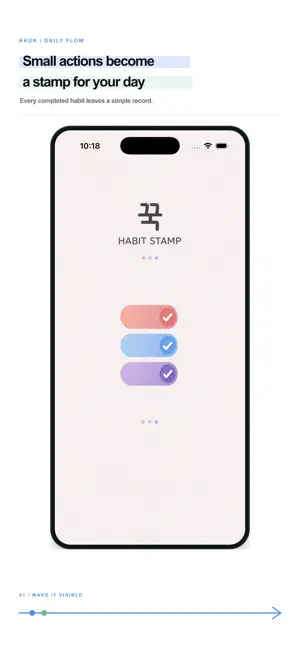


About KKUK - Lock Screen Habits
A to-do list erases what you finish. KKUK does the opposite — every day you follow through leaves one more stamp. Press one stamp today. Then watch them stack up on the calendar. ■ Press it without opening the app Open the app once and today's board appears on the Lock Screen and in the Dynamic Island. For a while after that you can press a stamp right there, without going back to the app. You can also press one from a Home Screen widget. ■ A press, not a tap One quick tap won't do it. Hold your finger until the ink fills all the way, and the stamp lands. Slide your finger aside to cancel a press you didn't mean. ■ Make your own stamp Build a stamp from 16 colors and an emoji. Which weekdays, how many times a day, which group it belongs to, and when it should remind you — set all of it per stamp. ■ See what you've kept · Calendar — every stamp you pressed this month on a single board. · Journal — leave a note and a photo beside the stamp. · Report — see how well you kept up by week, by month, and by year. The period you're looking at can be exported as a CSV file. · Monthly review — look back on the month that just ended. ■ Seven Home Screen widgets Today's Stamps · Recent check-ins · Calendar · Weekly report · Monthly report · Group weekly · Large calendar. Pick any size and keep it on your Home Screen. ■ Make it yours Twenty bundled typefaces — four drawn for Latin text, sixteen Korean. Light, dark, or follow your device. Portrait only. ■ Free to use 3 stamps, 3 groups, the last 30 days of records, this week's and this month's report, and the Today's Stamps widget. Watch a rewarded ad all the way through to add one more stamp, and the slot you earned stays yours. ■ KKUK Premium unlocks · Unlimited stamps and groups · Every record, including anything older than 30 days · Past reports and past monthly reviews · All seven widgets · iCloud sync to continue on another device · No ads ■ Subscription details · KKUK Premium Monthly — $1.99 / month · KKUK Premium Yearly — $12.99 / year Subscriptions renew automatically. Unless canceled at least 24 hours before the current period ends, a subscription renews at the same price, and payment is charged to your Apple Account at confirmation of purchase. You can manage or cancel subscriptions in Settings > Apple Account > Subscriptions on your device. Terms of Use https://www.apple.com/legal/internet-services/itunes/dev/stdeula/ Privacy Policy https://kkuk-app.web.app/en/privacy/ ■ Your records stay on your device Stamps, notes, and photos are stored on your device. There is no account and no sign-in. iCloud sync is off by default, and when you turn it on, records are copied only to your own private iCloud database. The developer cannot read them and does not keep them on a separate server.
What’s new
Version 1.7.1 · Updated October 13, 2026
■ A bigger Journal box The text box in Write Journal is taller now, so you can see more of what you're writing at a glance.
App privacy
The developer, Sangcheol Kim, reported these privacy practices to Apple.
Data Not Linked to You
The following data, which may be collected but is not linked to your identity, may be used for the following purposes:
- Location: Coarse Location
- Identifiers: Device ID
- Usage Data: Advertising Data
Used for: Third-Party Advertising
Alternatives to KKUK - Lock Screen Habits
Looking for apps like KKUK - Lock Screen Habits? Here are 6 similar apps on the App Store.
-
 그로브 노트
-
 DayWith: Tasks & Mini Room
-
 Snuumo: Chat-style Notes
-
 OnU - The Lightest To-Do
-
 EpiHem: Family Organizer
-
 WiCal - Widget Calendar
| App | Rating | Price | Last updated | Compare |
|---|---|---|---|---|
| KKUK - Lock Screen Habits | – | Free | October 13, 2026 | |
| 그로브 노트 | – | Free | Sep 24, 2026 | Compare |
| DayWith: Tasks & Mini Room | – | Free | Sep 24, 2026 | Compare |
| Snuumo: Chat-style Notes | – | Free | Oct 15, 2026 | Compare |
| OnU - The Lightest To-Do | – | Free | May 6, 2026 | Compare |
| EpiHem: Family Organizer | – | Free | Oct 19, 2026 | Compare |
| WiCal - Widget Calendar | – | Free | Sep 25, 2026 | Compare |