

Skein Notes
Tomasz Smieja Productivity iPhoneiPadiPod touchMac
Skein Notes is a free Productivity app for iPhone and iPad by Tomasz Smieja. Rated 5.0/5 from 1 ratings. Requires iOS 17.0. Updated October 3, 2026.
- Rating
- 5.0
- 1 ratings
- Price
- Free
- on the App Store
- Size
- 22 MB
- Age 4+
- Updated
- Oct 3
- 2026 · v1.1.0
Screenshots


About Skein Notes
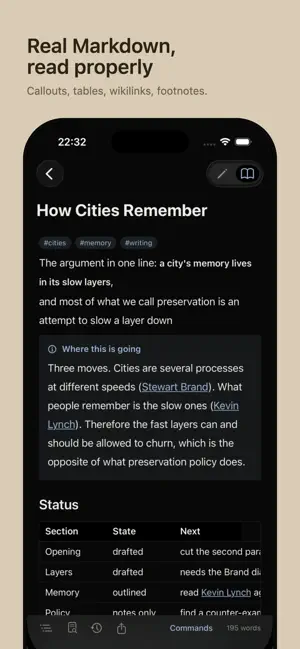
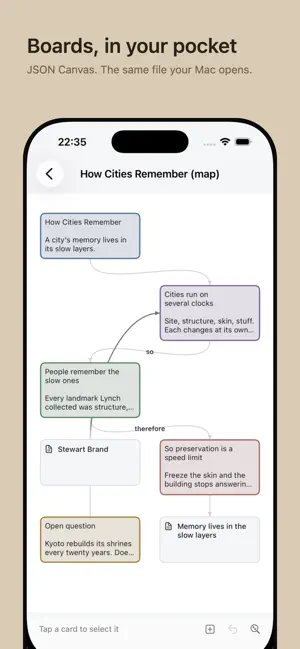
Skein is a notes app for people who want to keep their own files. Your vault is a folder of plain Markdown on your device or in iCloud Drive. Skein reads and writes those files directly — the same folder you open in Skein for Mac, or in any other editor. Nothing is locked in a database, and there is no service in the middle. Write it down before you lose it The app opens on a capture field. Type the thought and send it; the first line becomes the note's title and Skein files it where you told it to. No dialog, no folder picker, no naming a file before you have written anything. Find it again Search matches titles the moment you start typing and searches inside every note once the index is ready, ranked, with the matching lines and their line numbers — tap one and land on it. The Vault filters by name, by #tag or by folder in one field, and tags are real: tap one anywhere in the app to see everything carrying it. Real Markdown, properly Headings, lists, task lists, tables, footnotes, code blocks, callouts, ==highlights== and [[wikilinks]] — read cleanly and edited as text. A keyboard bar puts the things you actually reach for above the keys, including arrows that move by character and by word, and you can choose which of them appear. Type / for a command, #for a tag it already knows. Canvas Open a JSON Canvas board, move cards, connect them, colour them and write on them. The same file, the same format Obsidian writes, so a board made on the Mac opens here and back again. It keeps your writing safe Skein keeps earlier versions of a note as you edit, so you can go back to what you wrote this morning. When the same note has been changed in two places, Skein keeps both and asks — it never picks a winner quietly. Also Share text from any app straight into your vault. Four themes, including one for reading at night. Dynamic Type throughout, and full VoiceOver support. Skein does not have an account, a subscription for the basics, a server, or telemetry. Your notes never leave your device except through iCloud Drive, which is yours. Skein for Mac is a separate app on the same purchase.
What’s new
Version 1.1.0 · Updated October 3, 2026
Skein for iPhone catches up with the Mac. Capture goes to today's note in your Daily folder, as on the Mac, and New can start a note from any note in your templates folder. Reading looks like the Mac: pictures, embedded notes, PDFs, callouts, diagrams and maths, and tasks you can tick while you read. Edit a note's properties, follow links by alias or folder, and see which notes link to the one you are reading. Renaming a note updates every link to it, and can be undone. Search understands tag: and path:, and finds words on your boards. Boards show note previews, pictures and the first page of a PDF. Move notes between folders, delete a folder with Undo, and add photos from your library or by pasting. Shortcuts, Siri, Spotlight and skein:// links now work on iPhone, and the app follows your text size. In the editor: smart punctuation, lists that continue, find and replace, link suggestions and the Mac's typefaces.
App privacy
The developer, Tomasz Smieja, reported these privacy practices to Apple.
Data Not Collected
The developer does not collect any data from this app.
Alternatives to Skein Notes
Looking for apps like Skein Notes? Here are 6 similar apps on the App Store. The highest rated is Menu Bar Notes: Quick Capture (5.0/5), and all 6 are free to download.
-
 Recto MD
-
 md.too
-
 BitEditor
-
 Menu Bar Notes: Quick Capture
5.0
Menu Bar Notes: Quick Capture
5.0
-
 SnapNote: Offline AI Scanner
-
 qLog: Read & Recall
| App | Rating | Price | Last updated | Compare |
|---|---|---|---|---|
| Skein Notes | 5.0 / 5 (1 rating) | Free | October 3, 2026 | |
| Recto MD | – | Free | Oct 9, 2026 | Compare |
| md.too | – | Free | Sep 30, 2026 | Compare |
| BitEditor | – | Free | Sep 28, 2026 | Compare |
| Menu Bar Notes: Quick Capture | 5.0 / 5 (1) | Free | Sep 29, 2026 | Compare |
| SnapNote: Offline AI Scanner | – | Free | Oct 10, 2026 | Compare |
| qLog: Read & Recall | – | Free | Sep 21, 2026 | Compare |
Compare Skein Notes with the top alternatives: ratings, updates, ASO score and keyword gaps →