

Menu Bar Notes: Quick Capture
Olamide Ojumu Productivity iPhoneiPadiPod touchMac
Menu Bar Notes: Quick Capture is a free Productivity app for iPhone and iPad by Olamide Ojumu. Rated 5.0/5 from 1 ratings. Requires iOS 17.0.
- Rating
- 5.0
- 1 ratings
- Price
- Free
- on the App Store
- Size
- 1 MB
- Age 4+
- Updated
- Sep 29
- 2026 · v1.2
Screenshots


About Menu Bar Notes: Quick Capture
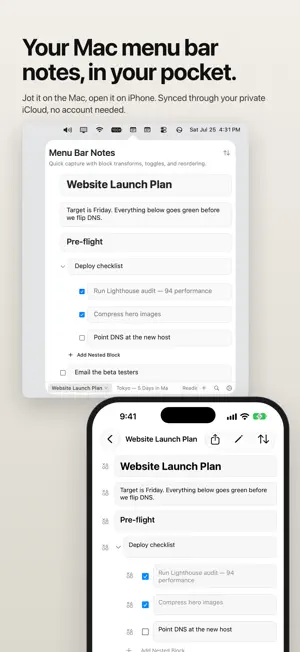
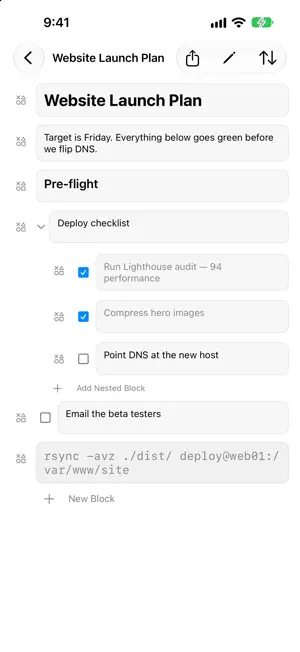
Easily reach into your menubar to quickly jot down a thought or reference, edit it on your synced iPhone and iPad app with your private iCloud keeping every device in step. No accounts or signups are needed and no data is collected. I always wanted a simple tool like this and I hope someone else finds it useful. On Mac, it sits in your menu bar. Click the icon or press ⌥⌘N from any app to open your notes, and click the icon again or press Esc to put them away. On iPhone and iPad, it's a clean, touch-first editor that stays out of your way. Markdown Style Blocks Every note is built from blocks: text, headings, collapsible toggles, to-dos with checkboxes, and code. Type shortcuts like "# ", "> ", or "[] " at the start of a line and the block transforms as you write. Toggles nest without limit, so a quick list can grow into a real outline. Browser Style Tabs Notes are tabs. Switch with ⌘1–⌘9, open a new note with ⌘T, close one with ⌘W. Privately Sync over iCloud- No Account Needed iCloud sync keeps iPhone, iPad, and Mac in step automatically. No account to create, no subscription — your notes live in your personal, private iCloud. Forgiving By Design Deleted notes and blocks go to the Trash, where they can be restored for 30 days. FEATURES • Block editor: text, Heading 1 and 2, toggles, to-dos, and code • Markdown-style shortcuts for instant block transforms • Collapsible toggle blocks with unlimited nesting • Duplicate any block along with its children • Menu bar quick capture on Mac, with a global ⌥⌘N (Option-Command-N) hotkey • Tabbed notes with full keyboard navigation on Mac • iCloud sync across iPhone, iPad, and Mac • 30-day Trash with restore • No accounts, no tracking, no data collection Menu Notes stores your notes on your device and syncs them through your own private iCloud database. We can't read them, and we wouldn't want to.
What’s new
Version 1.2 · Updated September 29, 2026
- Search: find any note by its name or its text. Tap a result to open the note right at that line. - Share or copy a whole note as Markdown from the editor. - Shortcuts and Siri: "New Note" and "Add to Note" capture text without opening the app. Find Notes and Get Note as Markdown are there for your own shortcuts.
App privacy
The developer, Olamide Ojumu, reported these privacy practices to Apple.
Data Not Collected
The developer does not collect any data from this app.
Alternatives to Menu Bar Notes: Quick Capture
Looking for apps like Menu Bar Notes: Quick Capture? Here are 6 similar apps on the App Store. The highest rated is Ratiba+: Family Organizer (5.0/5), and 5 of the 6 are free to download.
-
 Recto Notes
-
 Carbon - Calendar Mirror
-
 Nova Voice: AI Text to Speech
-
 Ratiba+: Family Organizer
5.0
Ratiba+: Family Organizer
5.0
-
 Countdown Reminder: Days Left
-
 ArrivalSentinel
| App | Rating | Price | Last updated | Compare |
|---|---|---|---|---|
| Menu Bar Notes: Quick Capture | 5.0 / 5 (1 rating) | Free | September 29, 2026 | |
| Recto Notes | – | Free | Sep 24, 2026 | Compare |
| Carbon - Calendar Mirror | – | Free | Sep 18, 2026 | Compare |
| Nova Voice: AI Text to Speech | – | Free | Sep 20, 2026 | Compare |
| Ratiba+: Family Organizer | 5.0 / 5 (3) | Free | Oct 19, 2026 | Compare |
| Countdown Reminder: Days Left | – | Free | Aug 27, 2026 | Compare |
| ArrivalSentinel | – | 4.99 USD | Jan 14, 2026 | Compare |