

SnapNote: Offline AI Scanner
森 柴 Productivity iPhoneiPadiPod touch
SnapNote: Offline AI Scanner is a free Productivity app for iPhone and iPad by 森 柴. Requires iOS 26.0. Updated October 10, 2026.
- Price
- Free
- on the App Store
- Size
- 110 MB
- Age 4+
- Updated
- Oct 10
- 2026 · v1.0.3
Screenshots
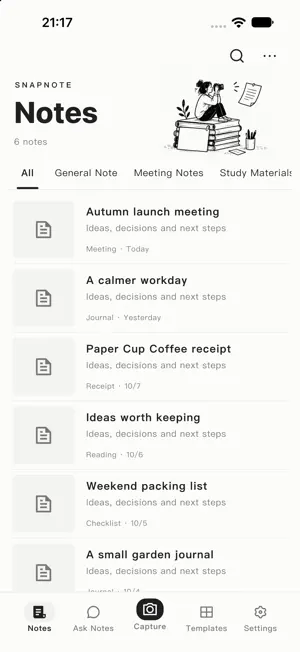


About SnapNote: Offline AI Scanner
Turn photos into notes you can use. SnapNote organizes receipts, tables, meeting notes, study materials, and everyday documents into readable, editable, searchable notes. After downloading and activating a local model, text recognition, organization, and Ask Notes run on your device. No app account or cloud AI API is required. From photos to notes Capture pages with the camera or import images from your photo library. Review, crop, and rotate pages, then choose a document type or template. Keep the original images, OCR text, and organized result together so you can check and edit the output. Ask your own documents Select saved notes to summarize key points, compare information, or create action lists. Source references help you return to the relevant note and verify the answer. Preview, save, and share generated Markdown and CSV files within the app. Organize your way Manage your library with document types, tags, favorites, and search. Use built-in templates for common tasks, or define your own structure and instructions with custom templates. Export note results in multiple formats for further editing or archiving. Made for iPhone Duo Browse a list and its details side by side on the inner display. Split views cover Notes, Ask Notes, Generated Files, Templates, and Settings. The outer display and standard iPhones retain a comfortable single-column experience. On-device processing and privacy Photos, recognized text, and notes are processed and stored on your device rather than sent to our document-processing servers. Initial model setup and model updates require an internet connection and sufficient storage. Once a model is ready, core features can work offline. AI output may contain mistakes; check it against the original material. Free and Pro Basic recognition, note management, and the basic model are free, with no per-use processing charge. Optional auto-renewable SnapNote Pro subscriptions unlock advanced models, multi-page batch recognition, PDF import, custom templates, and CSV export from Ask Notes. Monthly and annual plans are available. Prices, features, and availability are shown in the app's purchase screen. Apple handles payment; manage or cancel subscriptions in your Apple Account settings. Support: https://snapnote.bitanoworks.com/en/support Privacy Policy: https://snapnote.bitanoworks.com/en/privacy Terms of Use (EULA): https://www.apple.com/legal/internet-services/itunes/dev/stdeula/
What’s new
Version 1.0.3 · Updated October 10, 2026
• Added iPhone Duo split views for Notes, Ask Notes, Generated Files, Templates, and Settings. • Improved generated-file browsing with a separate list and content preview. • Refined note-type filters, sidebar sizing, menus, and dialog placement. • Improved keyboard dismissal and navigation while preserving your input. • Improved layouts on standard iPhones, across orientations, and with larger text. • Refined Chinese and English interfaces and fixed interaction issues.
App privacy
The developer, 森 柴, reported these privacy practices to Apple.
Data Not Collected
The developer does not collect any data from this app.
Alternatives to SnapNote: Offline AI Scanner
Looking for apps like SnapNote: Offline AI Scanner? Here are 6 similar apps on the App Store. The highest rated is Menu Bar Notes: Quick Capture (5.0/5), and 5 of the 6 are free to download.
-
 Menu Bar Notes: Quick Capture
5.0
Menu Bar Notes: Quick Capture
5.0
-
 Lofi Rain: Focus Timer
5.0
Lofi Rain: Focus Timer
5.0
-
 md.too
-
 Skein Notes
5.0
Skein Notes
5.0
-
 NameSpark: Never Forget Names
-
 Gratodo: Habit Tracker & To Do
| App | Rating | Price | Last updated | Compare |
|---|---|---|---|---|
| SnapNote: Offline AI Scanner | – | Free | October 10, 2026 | |
| Menu Bar Notes: Quick Capture | 5.0 / 5 (1) | Free | Sep 29, 2026 | Compare |
| Lofi Rain: Focus Timer | 5.0 / 5 (4) | Free | Sep 24, 2026 | Compare |
| md.too | – | Free | Sep 30, 2026 | Compare |
| Skein Notes | 5.0 / 5 (1) | Free | Oct 18, 2026 | Compare |
| NameSpark: Never Forget Names | – | 1.99 USD | Sep 16, 2026 | Compare |
| Gratodo: Habit Tracker & To Do | – | Free | Aug 11, 2026 | Compare |