

ScreenStash: Screenshot Boards
Matthew Smith Productivity iPhoneiPadiPod touch
ScreenStash: Screenshot Boards is a free Productivity app for iPhone and iPad by Matthew Smith. Requires iOS 18.0. Updated September 2, 2026.
- Price
- Free
- on the App Store
- Size
- 9 MB
- Age 4+
- Updated
- Sep 2
- 2026 · v1.2.1
Screenshots
About ScreenStash: Screenshot Boards
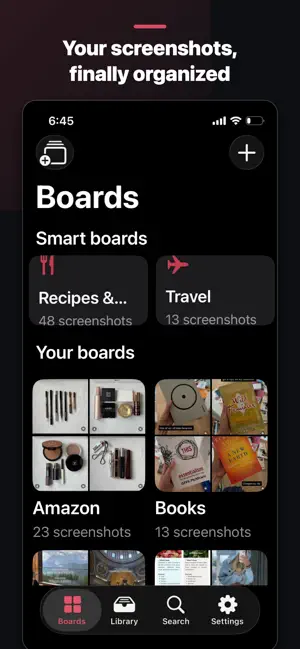
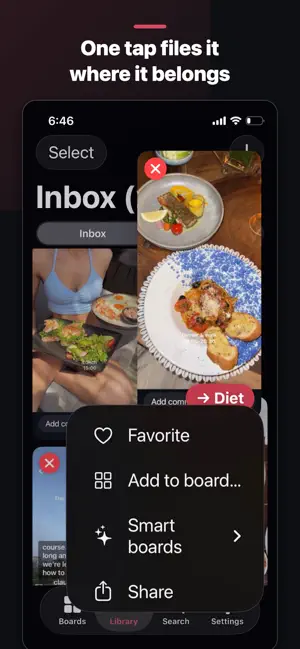
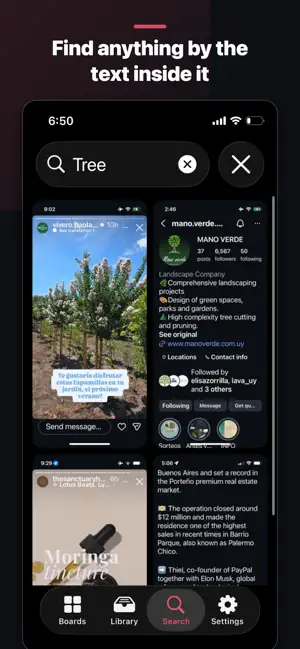
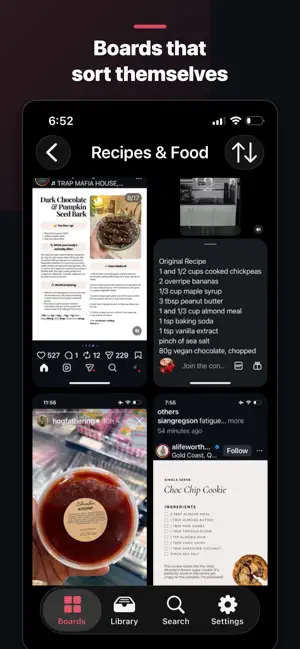
You screenshot everything — recipes, receipts, Wi-Fi passwords, gift ideas, workout plans. Then they vanish into your camera roll, never to be found again. ScreenStash gives every screenshot a home. ORGANIZE LIKE IT'S FUN Import your screenshots and file them onto visual boards with one tap. The Stash button learns where things go — receipts go where your receipts live. Made a mistake? Undo is always one tap away. AN INBOX THAT REACHES ZERO New screenshots land in your Inbox. File them, and they leave the pile. The pile only shrinks — so you always know what's left to sort, and clearing it feels great. SEARCH THE TEXT INSIDE YOUR SCREENSHOTS ScreenStash reads every screenshot with on-device text recognition. That recipe from March? Type "chicken." The beach house Wi-Fi? Type "wifi." Everything you've ever saved, instantly findable. BOARDS THAT SORT THEMSELVES Six smart boards automatically group receipts, recipes, travel documents, codes & Wi-Fi, places, and shopping — no filing required. Adjust anything by hand. CLEAN UP YOUR CAMERA ROLL After importing, ScreenStash offers to delete the originals from Photos — only with your confirmation, and only after every screenshot is verified safe inside the app. Reclaim gigabytes. PRIVATE BY DESIGN No accounts, and no server of ours ever sees your screenshots. Text recognition runs on your iPhone, and your library stays on your iPhone. The one thing ScreenStash measures is which ad brought you here and whether it led to a subscription — that's how a small app knows where to spend. It's a device identifier and a purchase event, never your screenshots or anything found inside them. iOS asks your permission first, and declining changes nothing about how the app works. FREE AND PRO Free is the full app: search, boards, one-tap filing — and a daily import allowance that never runs out. 100 screenshots land the day you install, then 50 more every day. Forever. Free. Sitting on years of screenshots? ScreenStash Pro imports your entire library at once — plus auto-import, smart boards, and iCloud backup to your own private iCloud. One $19.99 purchase. No subscription, ever. Yours for life. Requires iOS 18 or later. Terms of Use (EULA): https://www.apple.com/legal/internet-services/itunes/dev/stdeula/ Privacy Policy: https://screenstash.co/privacy.html
What’s new
Version 1.2.1 · Updated September 2, 2026
Your first import now brings in your 400 newest screenshots free, with 50 more each day.
App privacy
The developer, Matthew Smith, reported these privacy practices to Apple.
Data Used to Track You
The following data may be used to track you across apps and websites owned by other companies:
- Purchases: Purchase History
- Identifiers: Device ID
Data Linked to You
The following data, which may be collected and linked to your identity, may be used for the following purposes:
- Purchases: Purchase History
- Identifiers: Device ID
Used for: Developer’s Advertising or Marketing, Analytics
Data Not Linked to You
The following data, which may be collected but is not linked to your identity, may be used for the following purposes:
- Usage Data: Product Interaction
Used for: Analytics
Alternatives to ScreenStash: Screenshot Boards
Looking for apps like ScreenStash: Screenshot Boards? Here are 6 similar apps on the App Store. The highest rated is FyxFlow (5.0/5), and 5 of the 6 are free to download.
-
 FyxFlow
5.0
FyxFlow
5.0
-
 Noto Scribe
-
 Markdown My Words
-
 Nemos: Save, Find & Organize
5.0
Nemos: Save, Find & Organize
5.0
-
 Clarity Reader for Safari
-
 Jot Transcribe
4.6
Jot Transcribe
4.6
| App | Rating | Price | Last updated | Compare |
|---|---|---|---|---|
| ScreenStash: Screenshot Boards | – | Free | September 2, 2026 | |
| FyxFlow | 5.0 / 5 (1) | Free | Jan 15, 2026 | Compare |
| Noto Scribe | – | Free | Oct 9, 2026 | Compare |
| Markdown My Words | – | Free | Sep 16, 2026 | Compare |
| Nemos: Save, Find & Organize | 5.0 / 5 (3) | Free | Oct 5, 2026 | Compare |
| Clarity Reader for Safari | – | 2.99 USD | Jul 30, 2026 | Compare |
| Jot Transcribe | 4.6 / 5 (9) | Free | Oct 2, 2026 | Compare |