

Markdown My Words
YARON AMIR BENJAMIN DR. GOLDSTEIN Productivity iPhoneiPadiPod touch
Markdown My Words is a free Productivity app for iPhone and iPad by YARON AMIR BENJAMIN DR. GOLDSTEIN. Requires iOS 17.0. Updated September 16, 2026.
- Price
- Free
- on the App Store
- Size
- 10 MB
- Age 4+
- Updated
- Sep 16
- 2026 · v2.0
Screenshots
About Markdown My Words
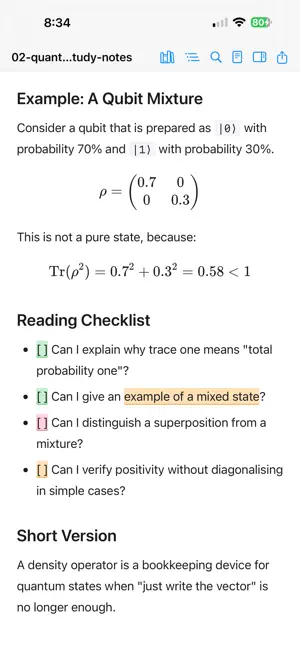
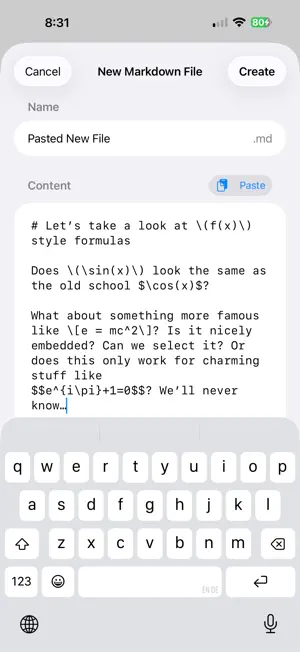
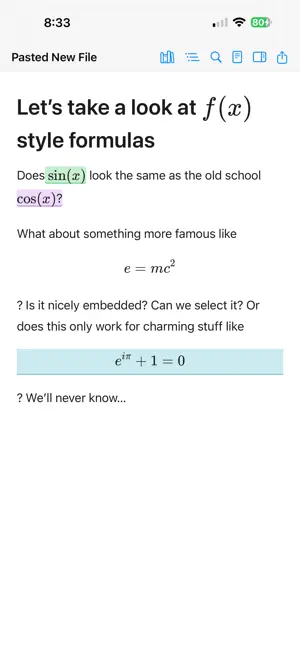
Markdown is everywhere now. It is in coding-agent plans, AI-generated research notes, README files, study guides, project specs, lecture material, technical drafts, and the surprisingly long “quick summary” an AI tool gave you at 1:13 a.m. Markdown My Words gives those documents a calmer place to live than a chat window. Open a folder of Markdown files, read them in a clean rendered view, highlight the passages that matter, and leave yourself precise notes. When you are done, export your comments as Markdown, TSV, CSV, or an annotated copy of the document. Your original file stays clean. Your thoughts stay attached. WHAT YOU CAN DO • Read Markdown in a quiet, comfortable layout • Navigate long documents with an automatic outline • Highlight passages in seven colours • Add notes to any highlight • Search and filter your annotations • Export feedback as Markdown, TSV, CSV, or annotated Markdown • Toggle source view when you want the raw text • Keep annotations beside your files as lightweight sidecar data WHY IT FEELS DIFFERENT Markdown My Words is built for focused reading, not fiddling. It works with ordinary .md files in folders you choose. Your annotations are stored separately, so the source document stays untouched and portable. That makes it useful for reviewing AI-generated plans, coding-agent proposals, study notes, research reports, technical docs, and long drafts you actually need to think through. PRIVATE BY DESIGN No account. No server. No tracking. No analytics. No document upload. Just your files, your notes, and a quieter way to think. Markdown My Words is for the moment after something generates a serious document for you — when you need to stop skimming, sit with it, question it, mark it up, and decide what you actually think.
What’s new
Version 2.0 · Updated September 16, 2026
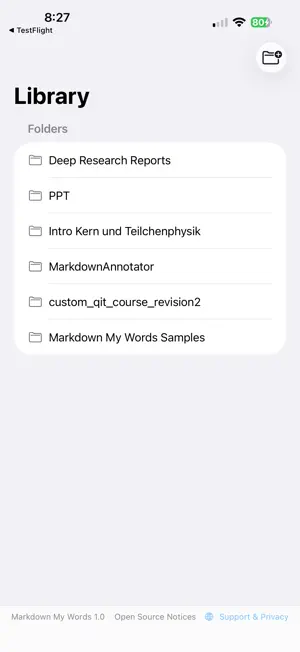
What's New in Markdown My Words 2.0 - Redesigned library — Compact, responsive navigation with inline subdirectory browsing and smarter recent documents that no longer show duplicates. - OKF v0.2 support — Full compatibility with the latest Open Knowledge Format specification, including trust and provenance metadata. - Offline annotations — View and edit your annotations even when the source document isn't accessible. Your work is saved and synced back automatically when the file becomes available again. - Sharing & export — Updated options for sharing annotated documents and exporting annotations. - iPhone Duo & adaptive layout — The app now adapts to larger screen layouts on iPhone Duo (inner display) and iPhone Plus/Max in landscape, showing the library sidebar and annotation panel side by side. - Reliability — Numerous improvements to file handling, document opening, and bookmark management for a smoother, more dependable experience.
App privacy
The developer, YARON AMIR BENJAMIN DR. GOLDSTEIN, reported these privacy practices to Apple.
Data Not Collected
The developer does not collect any data from this app.
Alternatives to Markdown My Words
Looking for apps like Markdown My Words? Here are 6 similar apps on the App Store. The highest rated is NotePlus - Markdown Editor (5.0/5), and all 6 are free to download.
-
 Tertiary Markdown
1.0
Tertiary Markdown
1.0
-
 Modrift
-
 Wisen: AI Notes & Knowledge
3.0
Wisen: AI Notes & Knowledge
3.0
-
 Plotted: Planner & To Do List
3.0
Plotted: Planner & To Do List
3.0
-
 NotePlus - Markdown Editor
5.0
NotePlus - Markdown Editor
5.0
-
 Bramble: Password Manager
4.8
Bramble: Password Manager
4.8
| App | Rating | Price | Last updated | Compare |
|---|---|---|---|---|
| Markdown My Words | – | Free | September 16, 2026 | |
| Tertiary Markdown | 1.0 / 5 (1) | Free | Jun 30, 2026 | Compare |
| Modrift | – | Free | Aug 19, 2026 | Compare |
| Wisen: AI Notes & Knowledge | 3.0 / 5 (1) | Free | Jul 12, 2026 | Compare |
| Plotted: Planner & To Do List | 3.0 / 5 (1) | Free | Sep 11, 2026 | Compare |
| NotePlus - Markdown Editor | 5.0 / 5 (1) | Free | Oct 18, 2026 | Compare |
| Bramble: Password Manager | 4.8 / 5 (6) | Free | Oct 28, 2026 | Compare |
Compare Markdown My Words with the top alternatives: ratings, updates, ASO score and keyword gaps →