

Noto Scribe
Meta Multiples Private Limited Productivity iPhoneiPadiPod touch
Noto Scribe is a free Productivity app for iPhone and iPad by Meta Multiples Private Limited. Requires iOS 15.1. Updated October 20, 2026.
- Price
- Free
- on the App Store
- Size
- 67 MB
- Age 4+
- Updated
- Oct 20
- 2026 · v2.2.3
Screenshots

About Noto Scribe
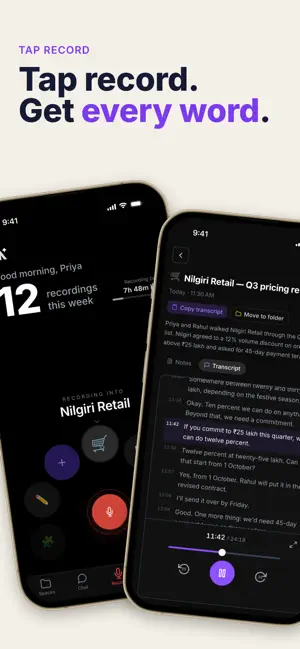
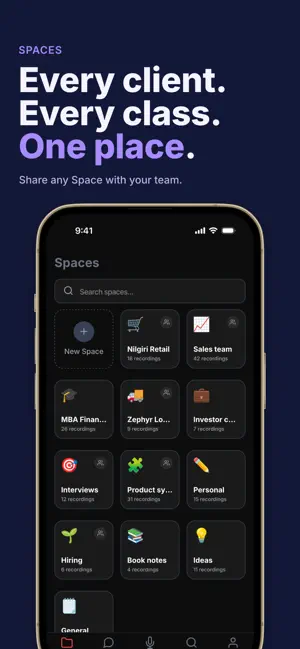
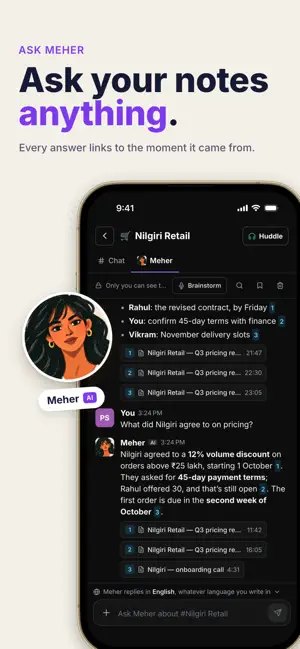
Turn your voice into knowledge. Noto Scribe is the fastest way to capture ideas, lectures, interviews, and meetings — then turn those recordings into something useful. One tap to record. AI does the rest. KEY FEATURES • One-Tap Recording Hit record and start talking. No setup, no fuss. Pause, resume, and jot notes inline. • Spaces — Organize Naturally Group recordings into Spaces for lectures, interviews, projects, or personal notes. Each Space builds its own knowledge base over time. • AI-Generated Knowledge Base Every recording is automatically transcribed and distilled — overviews, key people, decisions, and topics surface without you lifting a finger. • Ask Anything Search across an entire Space in plain English. Get answers with citations pointing back to the exact recording, so you can verify or dive deeper. • Save to Knowledge Base Found something useful in an answer? Save it back to the Space's KB or send it to your favorite LLM for further work. • Light, Dark & System Themes Looks great any time of day. Themes match your device automatically. • Privacy First Your recordings stay yours. Sign in with Google or email. No tracking, no ads. WHO IT'S FOR • Students who never want to miss a lecture detail • Journalists capturing interviews on the go • Founders & PMs running back-to-back calls • Researchers building reference libraries • Anyone who thinks faster than they type WHY NOTO SCRIBE Most voice recorders are dumb buckets — you record, then forget. Noto Scribe is different. Every recording gets transcribed, organized, and indexed. Months later, ask "what did we decide about pricing?" and get a real answer with the exact quote. Stop losing ideas. Start building knowledge. Download Noto Scribe and turn every conversation into something searchable.
What’s new
Version 2.2.3 · Updated October 20, 2026
Spaces and Home • Your spaces are cards. Each opens its own page with General, subspaces and Pages, and pages open right in the app. • Pick a space on Home and record into it. Its card shows the recording time left. • A bell for mentions, replies, missed huddles and team invites, with Clear all. • Rename a space or change its icon, and invite people by @username. Chat and DMs • The Chat tab is now DMs, with New message to start one and Clear chat in a 1:1. • Pinch to zoom pictures. Notes and recording • Tap a note to edit it on the page, with a formatting bar above the keyboard. • A warning when the mic hears nothing, and a "Still recording?" check after ten quiet minutes. Huddles and Meher • Huddle links open in the app, and guests can join from one. • Ask Meher from the Spaces tab to read every space you're in. Everywhere • Everyone picks an @username. Teams let you record on shared recording time. • Settings is one simple list, and setup is three steps. • Fixes and polish.
App privacy
The developer, Meta Multiples Private Limited, reported these privacy practices to Apple.
Data Linked to You
The following data, which may be collected and linked to your identity, may be used for the following purposes:
- Contact Info: Email Address, Name
- User Content: Audio Data
Used for: App Functionality
Alternatives to Noto Scribe
Looking for apps like Noto Scribe? Here are 6 similar apps on the App Store. The highest rated is Yantra: Second Brain (5.0/5), and all 6 are free to download.
-
 VoiceNote: On-Device AI Notes
-
 Yantra: Second Brain
5.0
Yantra: Second Brain
5.0
-
 Memura
5.0
Memura
5.0
-
 MemofyAI
-
 AI Note Taker & Voice Memo
-
 Mindverse: Private AI Notes
| App | Rating | Price | Last updated | Compare |
|---|---|---|---|---|
| Noto Scribe | – | Free | October 20, 2026 | |
| VoiceNote: On-Device AI Notes | – | Free | Jun 12, 2026 | Compare |
| Yantra: Second Brain | 5.0 / 5 (1) | Free | Oct 18, 2026 | Compare |
| Memura | 5.0 / 5 (1) | Free | Oct 10, 2026 | Compare |
| MemofyAI | – | Free | Jul 22, 2026 | Compare |
| AI Note Taker & Voice Memo | – | Free | Jun 24, 2026 | Compare |
| Mindverse: Private AI Notes | – | Free | Oct 18, 2026 | Compare |
Compare Noto Scribe with the top alternatives: ratings, updates, ASO score and keyword gaps →