

MemofyAI
Haruki Uriu Productivity iPhoneiPadiPod touch
MemofyAI is a free Productivity app for iPhone and iPad by Haruki Uriu. Requires iOS 16.0. Updated July 22, 2026.
- Price
- Free
- on the App Store
- Size
- 126 MB
- Age 4+
- Updated
- Jul 22
- 2026 · v0.19.0
Screenshots

About MemofyAI
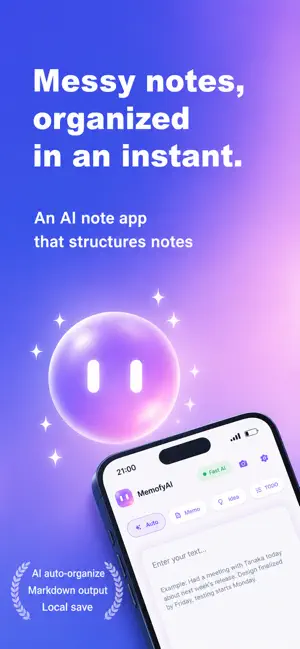
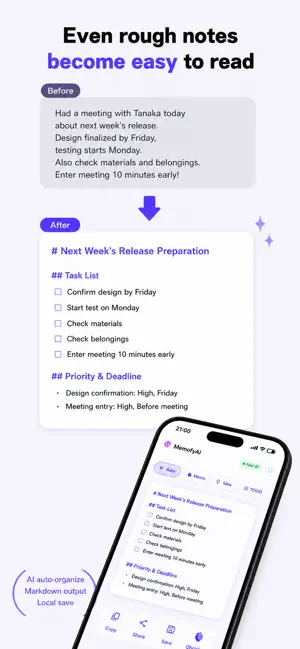
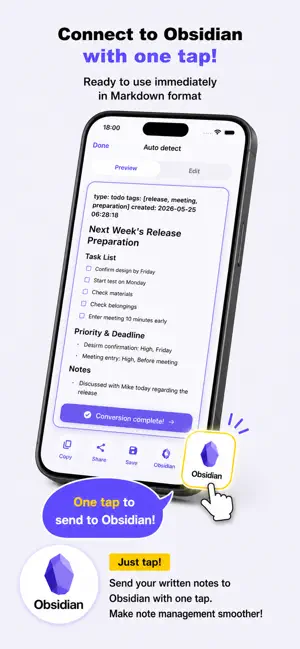
■ Your messy notes deserve better. Scribbled meeting notes you can't read later. Quick ideas jotted down between tasks. A to-do list buried in a wall of text. MemofyAI turns your rough, unstructured notes into perfectly organized documents — automatically. Just type (or paste) your messy text. AI instantly adds headings, bullet points, and structure. Done. ■ Perfect for... - Meeting notes that need to become proper minutes - Random ideas that deserve structure - To-do lists that need checkboxes and priorities - Lecture notes that need to be study-ready - Handwritten notes or whiteboards — just snap a photo ■ 5 Smart Modes 1. Auto-detect — AI figures out what kind of note it is and formats accordingly 2. Memo — General notes with clean headings and sections 3. Meeting Minutes — Adds date, attendees, decisions, and action items 4. TODO — Creates prioritized checklists 5. Idea — Organizes your brainstorm with next steps ■ Camera Input — Read Handwriting Instantly Point your camera at handwritten notes, a whiteboard, or printed text. The app reads it and organizes it automatically. No more typing things out by hand. ■ On-Device AI for Privacy Choose the on-device AI mode and the AI runs directly on your phone. - In on-device mode, your notes stay on your device - Nothing is uploaded to any cloud - No one else can see your data — ever Confidential work notes, personal journal entries, sensitive ideas — type freely. ■ Works Offline After downloading the on-device AI model, you don't need an internet connection. Use it on a plane, underground, or anywhere without signal. ■ Home Screen Widgets Add a widget to your home screen or lock screen. Start writing notes with a single tap — no need to open the app first. ■ Meet Memobee — Your AI Buddy A cute, friendly assistant that lives in the app. Tap Memobee to start organizing your notes. A small touch of joy in your productivity. ■ Use Your Notes Anywhere - Copy to clipboard and paste into any app - Share with colleagues or friends - Save as a file for backup - Works great with Obsidian and other note apps ■ Why MemofyAI? - AI organizes your notes automatically - 5 modes for every type of note - Camera reads handwriting and whiteboards - On-device AI mode keeps your notes on your phone - Works without internet - Home screen and lock screen widgets - No ads Download now and never struggle with messy notes again.
What’s new
Version 0.19.0 · Updated July 22, 2026
Now you can show off the notes you've tidied up. • Redesigned sharing: share your messy input and the tidied note together as a single image card • Cards now include the full tidied note — nothing gets cut off, even for long notes • Open the menu by swiping anywhere on the left half of the home screen, not just from the very edge • Various display and behavior fixes
App privacy
The developer, Haruki Uriu, reported these privacy practices to Apple.
Data Not Linked to You
The following data, which may be collected but is not linked to your identity, may be used for the following purposes:
- Diagnostics: Crash Data, Performance Data
- User Content: Other User Content
Used for: Analytics, App Functionality
Alternatives to MemofyAI
Looking for apps like MemofyAI? Here are 6 similar apps on the App Store. The highest rated is Wisen: AI Notes & Knowledge (3.0/5), and all 6 are free to download.
-
 screenshat
-
 Vault Notes by Hansson
-
 Mindverse: Private AI Notes
-
 Supremo AI
-
 brevva notes
-
 Wisen: AI Notes & Knowledge
3.0
Wisen: AI Notes & Knowledge
3.0
| App | Rating | Price | Last updated | Compare |
|---|---|---|---|---|
| MemofyAI | – | Free | July 22, 2026 | |
| screenshat | – | Free | Jul 28, 2026 | Compare |
| Vault Notes by Hansson | – | Free | Jul 3, 2026 | Compare |
| Mindverse: Private AI Notes | – | Free | Oct 2, 2026 | Compare |
| Supremo AI | – | Free | Oct 9, 2026 | Compare |
| brevva notes | – | Free | May 15, 2026 | Compare |
| Wisen: AI Notes & Knowledge | 3.0 / 5 (1) | Free | Jul 12, 2026 | Compare |
Compare MemofyAI with the top alternatives: ratings, updates, ASO score and keyword gaps →