

NDOT — Bead Pattern Studio
NING LI Graphics & Design iPhoneiPadiPod touch
NDOT — Bead Pattern Studio is a free Graphics & Design app for iPhone and iPad by NING LI. Requires iOS 17.0. Updated August 19, 2026.
- Price
- Free
- on the App Store
- Size
- 4 MB
- Age 4+
- Updated
- Aug 19
- 2026 · v1.2
Screenshots


About NDOT — Bead Pattern Studio
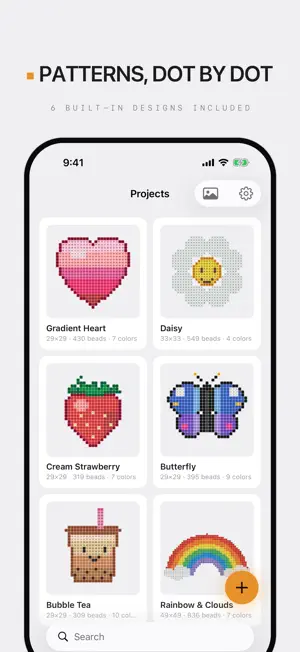
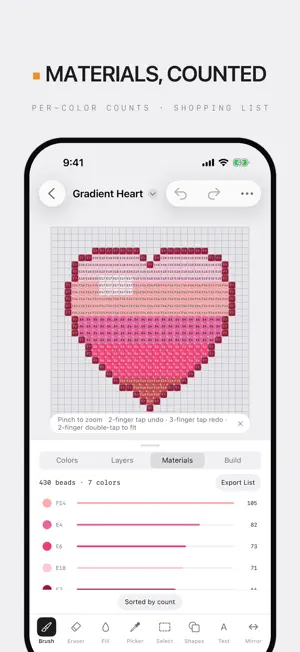
NDOT is an offline-first studio for fuse-bead patterns — from drawing a design dot by dot to placing real beads against the chart, in one app. DESIGN • A pro-grade editor: brush, eraser, fill, eyedropper, selection, line/rectangle/ellipse, mirror, layers • Real color codes from six brands: Perler, Hama, Artkal, MARD, CoCo, DoDo — 900+ colors in production • Custom palettes: build your own from the beads you actually own • Text tool with bitmap fonts, CJK included • Photo import: auto-matched to the nearest real bead colors, optional dithering • 6 built-in designs, ready to edit, build, or delete BUILD • Build mode: row by row, tap a cell for every bead you place — never lose your spot • Materials counted automatically: per-color totals and what's still missing • Bead inventory & shopping list: know what to buy, down to a bead • Board splitting: large patterns paginate per physical pegboard with alignment marks EXPORT • PNG at print-grade resolution, with optional grid and color codes • Vector PDF: crisp at any zoom; color or codes-only for B&W printing; optional materials page MADE FOR IPAD • Three-pane workspace: canvas, colors, layers and materials on one screen • Apple Pencil hover preview, palm rejection, drag-and-drop import PRIVACY & PURCHASE • Fully offline, collects no data; iCloud sync lives in your own iCloud Drive • The free version designs and exports PNG; Pro is a single one-time purchase — no subscription, Family Sharing supported Brand names are used solely to describe color-code compatibility; NDOT is not affiliated with these brands.
What’s new
Version 1.2 · Updated August 19, 2026
• Color-code labels on the canvas — every bead shows its code while you build (toggle in the ⋯ menu) • Text tool: vertical layout added, and CJK glyph orientation fixed • Search your project list • The screen stays awake in build mode • Dark beads are now clearly visible in dark mode, on canvas and in thumbnails • A new rainbow app icon, refined iPad panels, and many small polish fixes
App privacy
The developer, NING LI, reported these privacy practices to Apple.
Data Not Collected
The developer does not collect any data from this app.
Alternatives to NDOT — Bead Pattern Studio
Looking for apps like NDOT — Bead Pattern Studio? Here are 6 similar apps on the App Store. The highest rated is EasyBeads: Bead Craft Studio (5.0/5), and 5 of the 6 are free to download.
-
 Pixel Design: Fuse Beads
-
 EasyBeads: Bead Craft Studio
5.0
EasyBeads: Bead Craft Studio
5.0
-
 Perler Bead Studio
-
 Swift Pixels
4.7
Swift Pixels
4.7
-
 Spryt - Pixel Art Editor
-
 Glyphon
5.0
Glyphon
5.0
| App | Rating | Price | Last updated | Compare |
|---|---|---|---|---|
| NDOT — Bead Pattern Studio | – | Free | August 19, 2026 | |
| Pixel Design: Fuse Beads | – | Free | Sep 22, 2026 | Compare |
| EasyBeads: Bead Craft Studio | 5.0 / 5 (1) | Free | Jul 25, 2026 | Compare |
| Perler Bead Studio | – | Free | Sep 1, 2026 | Compare |
| Swift Pixels | 4.7 / 5 (14) | 1.99 USD | Feb 18, 2024 | Compare |
| Spryt - Pixel Art Editor | – | Free | May 6, 2026 | Compare |
| Glyphon | 5.0 / 5 (1) | Free | Oct 9, 2026 | Compare |