

Glyphon
Jussi Edlund Graphics & Design iPhoneiPadiPod touchMac
Glyphon is a free Graphics & Design app for iPhone and iPad by Jussi Edlund. Rated 5.0/5 from 1 ratings. Requires iOS 26.0. Updated October 9, 2026.
- Rating
- 5.0
- 1 ratings
- Price
- Free
- on the App Store
- Size
- 2 MB
- Age 4+
- Updated
- Oct 9
- 2026 · v1.1.3
Screenshots
About Glyphon
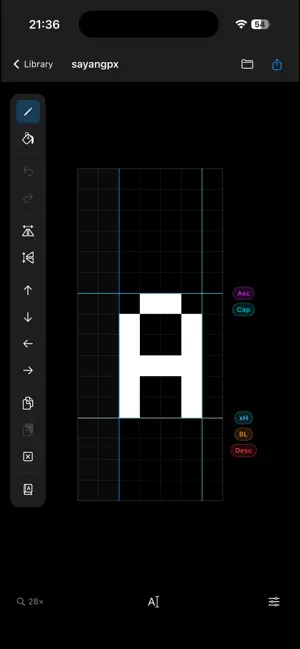
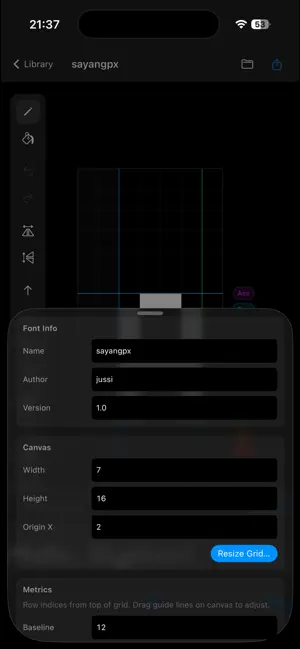
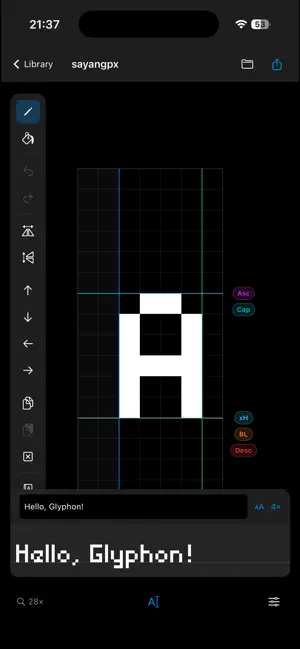
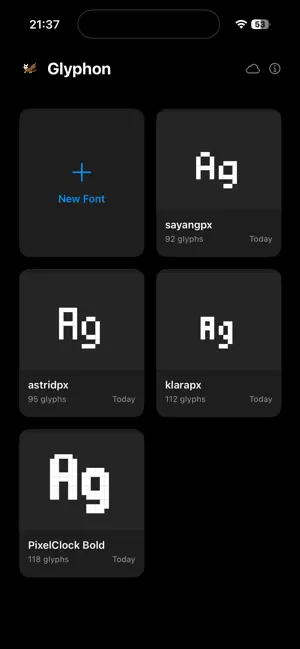
Glyphon is a pixel font editor built for anyone who loves the craft of bitmap typography. Whether you're designing a retro game font, a lo-fi display face, or a complete character set, Glyphon gives you the tools to draw, refine, and ship your typeface — at your desk or in your pocket. DRAW PIXEL-PERFECT GLYPHS Work in a large pixel grid with pinch-to-zoom, a toggleable grid overlay, and draggable typographic guides for baseline, cap height, x-height, ascender, and descender. Drag any guide directly on the canvas for instant precision. Every stroke is undo-able. FULL UNICODE SUPPORT Your font isn't limited to the ASCII alphabet. Add glyphs for any Unicode range — Basic Latin, Latin Extended, Cyrillic, Greek, Hiragana, Katakana, Box Drawing, and more — in a single step. EXPORT TO INDUSTRY FORMATS When your font is ready, export it as: - TTF — install directly on your Mac or share with other designers - BDF — the open bitmap standard used in embedded and terminal applications - JSON — a portable format for round-tripping with the Glyphon web app DESIGN WITH PRECISION - Per-glyph advance width with a live visual indicator on the canvas - Origin-aware horizontal flip that keeps your left-bearing columns in place - Shift pixels in any direction with a single tap or keyboard shortcut - Copy and paste pixel designs between glyphs - Flood fill for closed areas LIVE PREVIEW See your font render real text as you draw. Type any sentence into the preview strip to test spacing, rhythm, and readability at a glance. SYNC ACROSS YOUR DEVICES Start a typeface on your Mac, refine it on iPad, finish a stubborn glyph on your phone. iCloud sync keeps every font current on every device — automatically. Each font is still a self-contained file you own. DESIGNED FOR MAC, iPAD, AND iPHONE Glyphon is a native SwiftUI app, at home on every Apple device. On Mac, every action has a keyboard shortcut. On iPad, pinch to zoom and swipe between glyphs. On iPhone, the full editor fits in your pocket — draw a font in a boring meeting and it'll be waiting on your Mac when you get back.
What’s new
Version 1.1.3 · Updated October 9, 2026
Add emoji to your fonts: search by name or codepoint, or browse curated ranges. Exported fonts now work in design apps like Affinity, with clean merged outlines that convert to curves neatly. Also fixes a crash when opening damaged font files (thanks Kirk!).
App privacy
The developer, Jussi Edlund, reported these privacy practices to Apple.
Data Not Collected
The developer does not collect any data from this app.
Alternatives to Glyphon
Looking for apps like Glyphon? Here are 6 similar apps on the App Store. The highest rated is GlyphSnap: Photo to Font (5.0/5), and all 6 are free to download.
-
 Glyph Engine
-
 GlyphSnap: Photo to Font
5.0
GlyphSnap: Photo to Font
5.0
-
 Photo & Video Text: Kerve
-
 Doodle Jam: Drawing Together
-
 Stylish Text Art: Add Text+
4.5
Stylish Text Art: Add Text+
4.5
-
 Scribbles.ink
3.5
Scribbles.ink
3.5
| App | Rating | Price | Last updated | Compare |
|---|---|---|---|---|
| Glyphon | 5.0 / 5 (1 rating) | Free | October 9, 2026 | |
| Glyph Engine | – | Free | Jul 15, 2026 | Compare |
| GlyphSnap: Photo to Font | 5.0 / 5 (2) | Free | Oct 18, 2026 | Compare |
| Photo & Video Text: Kerve | – | Free | Aug 14, 2026 | Compare |
| Doodle Jam: Drawing Together | – | Free | Oct 13, 2026 | Compare |
| Stylish Text Art: Add Text+ | 4.5 / 5 (2) | Free | Sep 17, 2026 | Compare |
| Scribbles.ink | 3.5 / 5 (2) | Free | May 8, 2026 | Compare |
Compare Glyphon with the top alternatives: ratings, updates, ASO score and keyword gaps →