

Cutaway: Video Editor with AI
Yazan Aesmael Photo & Video iPhoneiPadiPod touch
Cutaway: Video Editor with AI is a free Photo & Video app for iPhone and iPad by Yazan Aesmael. Requires iOS 18.2. Updated October 27, 2026.
- Price
- Free
- on the App Store
- Size
- 147 MB
- Age 9+
- Updated
- Oct 27
- 2026 · v1.8.0
Screenshots


About Cutaway: Video Editor with AI
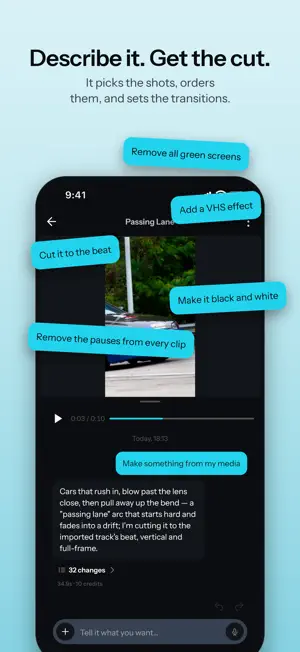
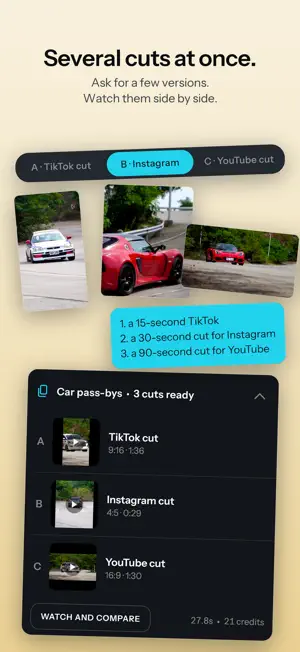
Tell Cutaway what you want, and it makes that cut. "Start with me talking, cut to the coffee break, then back again. Black and white, and caption every line." That is the instruction, and Cutaway follows it. Not a button that guesses at your footage: a sentence you wrote, or said, applied to your clips. Then it hands you the timeline. Every cut, caption, grade, effect and transition it made is an ordinary edit you can drag, retime, restyle or delete. A first cut you cannot argue with is worse than no first cut at all. WHAT YOU CAN ASK IT FOR • A cut from 15 seconds to five minutes, paced to what is actually in the footage • A style to follow: short film, vlog, montage, old film, or let it decide • Captions written to the cut and timed to the speech, in a style you pick • A color grade, described rather than dialed in • Transitions and effects chosen per cut, landing on the beat • Your screenshots, photos and video clips placed inside the shot • A green screen taken off one clip, or off every overlay at once • Narration in a chosen voice, written for the edit it is making • Music and sound effects generated for this video • Talking-head titles in a box, as a pill or behind your head, with punch-ins on the beat • Layouts: a card, a phone, side by side, stacked or a corner picture, moving from one to the next • Quick changes that land almost instantly: "mute the music", "make the title bigger" Type it, or say it: the AI chat takes voice typing. OR EDIT IT ALL YOURSELF • Timeline editing: split, trim and reorder • Speed ramps: slow a moment, rush the rest, or draw your own curve • Move, scale and rotate any clip, or give it a ready-made move: Ken Burns, drift, handheld, crash zoom • Keyframe any move so the frame drifts, pushes in, or settles • 47 transitions: dissolves, slides, whips, spins, glitches, cubes and more • Effects: CRT, VHS, film grain, glitch, speed lines and more • Film-style color filters, with intensity you can animate across a clip • Green screen on any clip, video or photo: it finds the screen's own color and sets the strength for you, or keeps just the person with no screen at all, with any picture you like behind • Captions, text in 292 fonts that can type on letter by letter, stickers, and photos or videos over your video, at any opacity or blend mode • Voiceover recorded with the in-app mic, as many takes as you need, and the in-app camera • Portrait, square or landscape: one project, any shape • Export to Photos at full quality FREE, AND NOT A DEMO The whole manual editor is free. No watermark on your exports, no ads, and no trial that expires. Most editors that hand you a timeline take something back at export; this one does not. The AI features run on credits, bought or subscribed, and a new account gets free credits to try them. Importing, editing, recording voiceover, the camera and export never cost anything. YOUR FOOTAGE STAYS ON YOUR DEVICE Editing and export run on the device, so there is no upload step and no render queue waiting on someone else's servers. Your video files never leave your iPhone or iPad. When you use an AI feature, it sends only what that feature needs, and none of it is used to train AI. We take no rights to anything you make. Made for people who post often and would rather describe the edit than build it. Terms of Use: https://www.apple.com/legal/internet-services/itunes/dev/stdeula/ Privacy Policy: https://cutaway.design/privacy
What’s new
Version 1.8.0 · Updated October 27, 2026
More for talking heads, titles that move, and layouts that change as the video goes. TALKING HEADS - Keyword titles in a box, as a pill, or behind your head, placed from your outline so they stay readable. - A punch-in and a sound on the beat, and a mark on the words that matter. - Under a cut-out, the look colours the background, never you. - On a shot of two people, the frame follows whoever is talking. TEXT AND MOTION - Titles can type on, letter by letter: Type on is in the Text sheet's In tab. - A new Pairs tab in the fonts sets a title in two faces, serif with sans or sans with sans. - A key word in a title can be marked, with its lead-in line sitting over it. - Text on a bright frame gets a plate under it, so it always reads. LAYOUTS - Ask for a card, a phone, side by side, stacked or a corner picture. The layout can change through the video and moves into the next one with a whoosh. - Fit and Fill change only the zoom, so a picture never slides off into black. SOUND - Hits, whooshes, ticks and risers, placed on the beat or where you ask. - Cuts asked to land on the beat land on it, and the AI tells you when one could not. - The AI's music ends with the picture, with a fade. - Every export is levelled for posting, with no clipping. CREDITS - New here? Sign in when you first ask the AI and get 50 free credits, and your ask carries on. - Out of credits mid-ask: top up or pick a plan, and the ask runs once the credits land. - Plans show credits, not minutes. - A run that makes no edit gives back every credit it spent. - Rate us from Settings. MORE RELIABLE - A dropped connection is retried and charged once, instead of stopping the run. - Send feedback from Settings with your logs attached. After a crash, the app offers to send it. - Deleting a video while the AI works on it stops the work first. - Follow-ups remember what was left open, and every reply names each change it made. - More quick changes run instantly: fit or fill every clip, type on, mark a word, a layout. - Long exports no longer run out of memory. - One side pane at a time on iPad, and what you typed is kept. - The keyboard goes away when you tap outside a field. - A new "See what it does" demo, over new sample clips. Tell us what breaks: [email protected]
App privacy
The developer, Yazan Aesmael, reported these privacy practices to Apple.
Data Linked to You
The following data, which may be collected and linked to your identity, may be used for the following purposes:
- Identifiers: Device ID, User ID
- Usage Data: Product Interaction
- Purchases: Purchase History
- Location: Coarse Location
- Contact Info: Email Address, Name
- User Content: Photos or Videos, Audio Data, Customer Support, Other User Content
- Diagnostics: Crash Data, Performance Data, Other Diagnostic Data
Used for: Analytics, App Functionality
Data Not Linked to You
The following data, which may be collected but is not linked to your identity, may be used for the following purposes:
- Identifiers: User ID
- Usage Data: Product Interaction
Used for: Analytics, App Functionality
Alternatives to Cutaway: Video Editor with AI
Looking for apps like Cutaway: Video Editor with AI? Here are 6 similar apps on the App Store. The highest rated is PulseCut - AI Video Editor (5.0/5), and all 6 are free to download.
-
 1 Tap Cut - AI Video Editor
-
 Voxcene: AI Captions for Video
-
 Cut Away Pro
-
 Scriptcue - Teleprompter
-
 Repurpy: Video Editor SideKick
-
 PulseCut - AI Video Editor
5.0
PulseCut - AI Video Editor
5.0
| App | Rating | Price | Last updated | Compare |
|---|---|---|---|---|
| Cutaway: Video Editor with AI | – | Free | October 27, 2026 | |
| 1 Tap Cut - AI Video Editor | – | Free | Oct 29, 2026 | Compare |
| Voxcene: AI Captions for Video | – | Free | Oct 10, 2026 | Compare |
| Cut Away Pro | – | Free | Aug 21, 2026 | Compare |
| Scriptcue - Teleprompter | – | Free | Sep 9, 2026 | Compare |
| Repurpy: Video Editor SideKick | – | Free | Sep 11, 2026 | Compare |
| PulseCut - AI Video Editor | 5.0 / 5 (1) | Free | Jul 21, 2026 | Compare |