

PulseCut - AI Video Editor
Thomas PIQUEPAILLE Photo & Video iPhoneiPadiPod touchMac
PulseCut - AI Video Editor is a free Photo & Video app for iPhone and iPad by Thomas PIQUEPAILLE. Rated 5.0/5 from 1 ratings. Requires iOS 17.0.
- Rating
- 5.0
- 1 ratings
- Price
- Free
- on the App Store
- Size
- 71 MB
- Age 4+
- Updated
- Jul 21
- 2026 · v2.0.8
Screenshots


About PulseCut - AI Video Editor
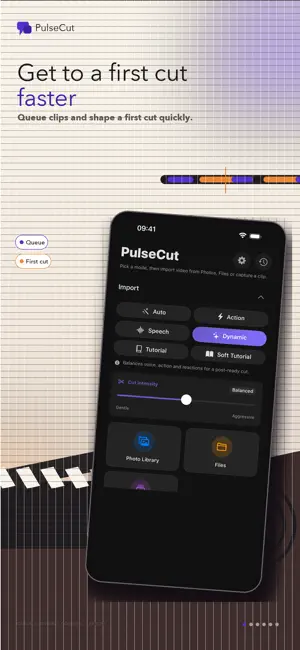
Shorten talking videos without uploading them. PulseCut detects silence and long pauses directly on your iPhone, iPad, or Mac. Import a video, review the suggested cuts, adjust the result, and export when you are satisfied. Your original video stays under your control. MADE FOR SPOKEN VIDEO • Remove silence and long pauses • Keep speech and useful moments • Preview the result before exporting • Fine-tune detected segments on the timeline • Choose modes for interviews, tutorials, action, and social video A LOCAL WORKFLOW Video analysis and editing run on your device. PulseCut does not require an account and does not upload your footage to a PulseCut cloud service. Apple’s on-device speech recognition can create optional SRT captions when supported by your device and language. EXPORT WITH CONTROL • Export a finished video or separate clips • Save to Photos, Files, or the share sheet • Preserve compatible 4K and HDR sources with PulseCut Plus • Use batch export, platform templates, and background resume with PulseCut Plus • Return to previous exports from History TRY IT BEFORE UPGRADING Your first successfully completed project of up to 10 minutes is free. After that, the Free plan includes 30 minutes of editing per calendar month, with 1080p exports and no watermark. PulseCut Plus unlocks unlimited on-device processing with the same Plus features whether you choose monthly, annual, or lifetime access. Available options and localized prices are shown in the app before purchase. PulseCut is an editing assistant, not an automatic publishing service. Always preview your cut before sharing it. Apple Standard EULA: https://www.apple.com/legal/internet-services/itunes/dev/stdeula/
What’s new
Version 2.0.8 · Updated July 21, 2026
PulseCut is now easier to understand and faster to use: • A clearer path from import to export • Improved silence detection and cut review • A simpler premium offer • Reliability, performance, and localization fixes
App privacy
The developer, Thomas PIQUEPAILLE, reported these privacy practices to Apple.
Data Not Collected
The developer does not collect any data from this app.
Alternatives to PulseCut - AI Video Editor
Looking for apps like PulseCut - AI Video Editor? Here are 6 similar apps on the App Store. The highest rated is Silence Remover (5.0/5), and all 6 are free to download.
-
 Remove Silence
-
 Silence Remover
5.0
Silence Remover
5.0
-
 Video Silence Remover
-
 CutSense: UGC Silence Cutter
-
 SilenceCut - Remove Silence
-
 Snipvana - Remove Silence
| App | Rating | Price | Last updated | Compare |
|---|---|---|---|---|
| PulseCut - AI Video Editor | 5.0 / 5 (1 rating) | Free | July 21, 2026 | |
| Remove Silence | – | Free | Jun 15, 2026 | Compare |
| Silence Remover | 5.0 / 5 (3) | Free | Sep 28, 2026 | Compare |
| Video Silence Remover | – | Free | Oct 15, 2026 | Compare |
| CutSense: UGC Silence Cutter | – | Free | Jul 23, 2026 | Compare |
| SilenceCut - Remove Silence | – | Free | Oct 22, 2026 | Compare |
| Snipvana - Remove Silence | – | Free | Aug 11, 2026 | Compare |