

Voxcene: AI Captions for Video
NF Brandminds Studio Ltd Photo & Video iPhoneiPadiPod touch
Voxcene: AI Captions for Video is a free Photo & Video app for iPhone and iPad by NF Brandminds Studio Ltd. Requires iOS 16.4. Updated October 10, 2026.
- Price
- Free
- on the App Store
- Size
- 74 MB
- Age 4+
- Updated
- Oct 10
- 2026 · v1.2
Screenshots


About Voxcene: AI Captions for Video
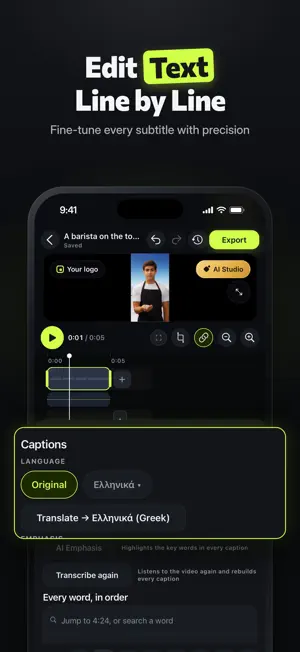
Voxcene helps creators, businesses, and agencies turn recordings into polished video with editable AI captions, premium styles, dubbing, and exports sized for every channel. Record in the app or import footage, review uncertain words fast, and ship content in minutes. Whether you make social media clips, podcast video, tutorials, interviews, or client content, Voxcene keeps the workflow focused. Start with automatic captions and word-by-word timing, then edit text, fix line breaks, and refine words without redoing the whole project. Confidence review takes you straight to low-certainty moments so you can review faster instead of proofreading every second. What you can do with Voxcene: • Record with a teleprompter or import existing videos • Create editable captions with automatic timing • Style subtitles with karaoke, word pop, editorial, and other premium templates • Add shapes, stickers, emoji, and your logo with Elements • Remove filler words from your captions, and cut silences with jump-cut suggestions you review first (Premium) • Translate subtitles and add dual-language captions with Premium • Dub your video into another language with an AI voice with Premium • Export 9:16, 4:5, 1:1, and 16:9 projects, plus SRT, VTT, ASS, TXT, and JSON files Also with Premium: • Podcast: upload an episode and get an edit that cuts to whoever is talking, plus short vertical clips ready to post • Generate with AI: turn an idea into a narrated, captioned video • Layouts for interviews, reactions, and split screens • Logo intro: your logo, filmed into a cinematic opening shot • Brand Music: an original song written for your brand Premium caption styles are built for readable, on-brand text. Use karaoke for word-by-word emphasis, editorial looks for interviews, or bold styles for short-form hooks and highlight clips. Because captions stay editable, you can tune spelling, timing, and line layout after transcription instead of starting over. Built for Greek and designed for multilingual work, Voxcene handles diacritics, punctuation, and natural line breaks with strong language support from available providers. It is a practical captions app for creators who need clean text on screen, clear review tools, and polished styles without a bloated editor. If you are comparing caption tools, a video editor, or lightweight editing apps, Voxcene focuses on the parts that matter most for publishing: accuracy, speed, readability, and delivery-ready exports. Use Voxcene to create short-form content for Reels, Shorts, stories, promos, explainers, course lessons, talking-head clips, and branded videos. Agencies can standardize styles with templates and brand kits, while solo creators can move from record to review to export in one studio. The app also works well for podcast video and interview clips when you want captions, pacing fixes, and format-ready versions for different feeds. Your original videos stay on your device and are never modified: Voxcene works on a copy. You can delete any project, or your whole account, from inside the app. That privacy-first setup is especially helpful when you work with client footage, unreleased content, or internal company video. Free to try, with Basic and Premium subscriptions that unlock longer videos, more transcription minutes, translations, dubbing, and brand kit features. Prices are shown in the app. Subscriptions renew automatically unless canceled at least 24 hours before the end of the current period. If you want an AI video studio centered on captions, review, style, and fast export, Voxcene gives you a focused way to create and edit videos for everyday publishing. Terms of Use: https://www.voxcene.com/terms/ Privacy Policy: https://www.voxcene.com/privacy/
What’s new
Version 1.2 · Updated October 10, 2026
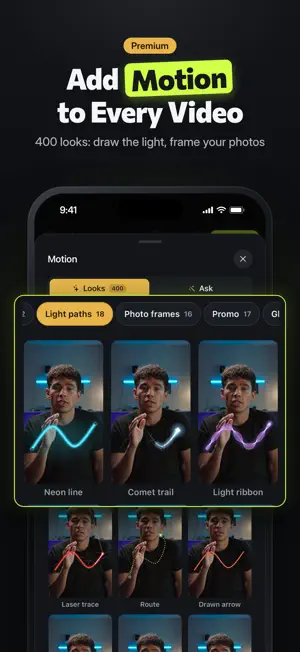
New: Motion. 400 ready-made motion looks — titles, captions, charts, particles, light, camera moves, transitions and more — each with its own sound and in your brand's colour, playing right in the gallery. Basic includes 30; Premium has all 400, plus Ask: say what your video should do — a title that slams in, the screen breaking like glass — and it's made, timed to your words. Search them, keep favourites, change a look after you add it, move, pinch and twist it on the picture, slide it on the timeline, and undo any change. New in Motion: draw a line on the picture and neon light runs along it, as fast or as slow as you choose. Photo frames show moments of your video or your own photos, and a blank clip in any colour or gradient gives your motion a clean start. Also new: a bigger, resizable preview, titles you can pinch and turn, and seconds that stay in view as the timeline scrolls. Voxcene now speaks 50 languages on the App Store, with new screenshots and app previews. Japanese, Chinese and Thai captions now read naturally, without spaces between characters, and long Korean captions wrap neatly. Everything from 1.1 is here: Podcast, Elements, Effects, Logo intro, Generate with AI, Brand Music and Layouts.
App privacy
The developer, NF Brandminds Studio Ltd, reported these privacy practices to Apple.
Data Linked to You
The following data, which may be collected and linked to your identity, may be used for the following purposes:
- Purchases: Purchase History
- Contact Info: Email Address
- User Content: Emails or Text Messages, Photos or Videos, Audio Data
- Identifiers: User ID
Used for: App Functionality
Alternatives to Voxcene: AI Captions for Video
Looking for apps like Voxcene: AI Captions for Video? Here are 6 similar apps on the App Store.
-
 CueCam 口播相机-跟读提词器 换脸录制 双摄
-
 VibeCap - Reels & Subtitles
-
 MIRA - Film Filter Camera
-
 Latente
-
 Repurpy: Video Editor SideKick
-
 Cutaway: Video Editor with AI
| App | Rating | Price | Last updated | Compare |
|---|---|---|---|---|
| Voxcene: AI Captions for Video | – | Free | October 10, 2026 | |
| CueCam 口播相机-跟读提词器 换脸录制 双摄 | – | Free | Oct 24, 2026 | Compare |
| VibeCap - Reels & Subtitles | – | Free | Sep 21, 2026 | Compare |
| MIRA - Film Filter Camera | – | Free | Oct 23, 2026 | Compare |
| Latente | – | Free | Jun 4, 2026 | Compare |
| Repurpy: Video Editor SideKick | – | Free | Sep 11, 2026 | Compare |
| Cutaway: Video Editor with AI | – | Free | Oct 27, 2026 | Compare |