

Daily & Weekly Planner: To-Do
RANA RESIDOGLU Productivity iPhoneiPadiPod touch
Daily & Weekly Planner: To-Do is a free Productivity app for iPhone and iPad by RANA RESIDOGLU. Requires iOS 17.0. Updated October 3, 2026.
- Price
- Free
- on the App Store
- Size
- 10 MB
- Age 4+
- Updated
- Oct 3
- 2026 · v1.1.1
Screenshots

About Daily & Weekly Planner: To-Do
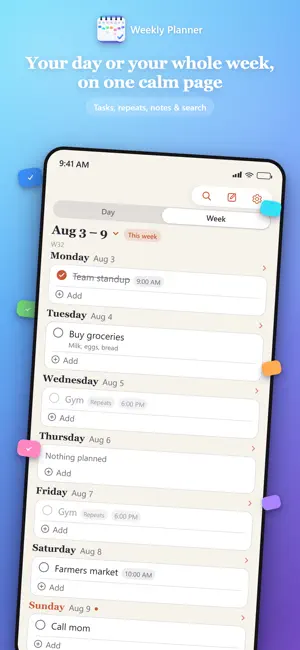
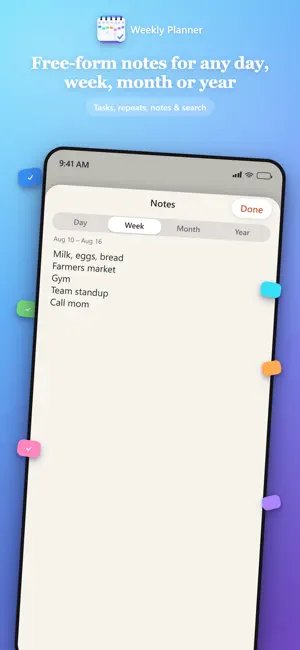
Daily & Weekly Planner is a calm, paper-inspired planner that gives you two views of your day: focus on today alone, or step back and see your whole week at a glance. Switch between them with a tap, and each remembers exactly where you left it. Open the app and see all seven days at once, styled like ink on warm paper. Swipe sideways to move between weeks, past or future, ten years in either direction, and tap Today to snap right back to now. A quick search finds any task or note across every week in seconds. Add a task to any day in a couple of taps. Give it a title, and only attach a time if the task actually needs one — untimed tasks simply sit in the day without a clock next to them. Mark things done with a single tap, add a short note for extra context, and reorder the tasks within a day by hand. Plans change. Move a task to a different day, or duplicate it when next week needs the same thing again — both take one swipe and a tap, no retyping required. Tasks can also repeat on their own — daily, weekly, monthly, or yearly — perfect for routines and for birthdays or anniversaries you never want to forget. Each week also carries its own free-form note, handy for a theme for the week, a shopping list, or anything that doesn't belong to a single day. The app adapts to how you already think about weeks: choose whether yours starts on Monday, Saturday, Sunday, or whatever your system already uses. Light and dark appearance are both fully designed, and the app can follow your system setting automatically or use whichever one you pick. Prefer to focus on one day at a time? Switch to the day view with a tap — the two stay in sync, and tapping a day's header in the week view jumps straight into it. Add an optional reminder to any timed task, choose from four accent colors and four system fonts to make the app feel like yours, and keep a running note for the day, the week, the month, or the year. Repeating tasks can now follow specific weekdays and stop on a date you choose. There is nothing else going on behind the scenes. Daily & Weekly Planner makes no network requests of its own, does not ask for an account, does not show ads — everything you type stays stored on your device, period. Subscription purchases and renewals are handled entirely by Apple's App Store. Every feature unlocks with a Premium subscription, described below. If you want a planner that stays out of your way and simply shows you your day or your week, Daily & Weekly Planner was built for exactly that. Daily & Weekly Planner unlocks fully through an auto-renewable Premium subscription. Choose Weekly ($0.99), Monthly ($2.99), or Yearly ($9.99 — about $0.19 per week). Prices vary by region and currency. Your subscription renews automatically unless canceled at least 24 hours before the current period ends; manage or cancel anytime in your App Store account settings. Terms of Use (EULA): https://www.apple.com/legal/internet-services/itunes/dev/stdeula/. Privacy Policy: https://tukenmez.github.io/weekly-planner/privacy.html
What’s new
Version 1.1.1 · Updated October 3, 2026
Fixed an issue where the week and day views could open on the wrong date. Thank you to everyone who reported it.
App privacy
The developer, RANA RESIDOGLU, reported these privacy practices to Apple.
Data Not Linked to You
The following data, which may be collected but is not linked to your identity, may be used for the following purposes:
- Purchases: Purchase History
- Identifiers: User ID
Used for: App Functionality
Alternatives to Daily & Weekly Planner: To-Do
Looking for apps like Daily & Weekly Planner: To-Do? Here are 6 similar apps on the App Store. The highest rated is Weekly Agenda Planner (5.0/5), and all 6 are free to download.
-
 Weekly Agenda Planner
5.0
Weekly Agenda Planner
5.0
-
 Tasks: To-Do List & Planner
-
 Weeklane: To-Do & App Blocker
4.7
Weeklane: To-Do & App Blocker
4.7
-
 Lunaco: Secure Calendar·Tasks
-
 Week Plan
-
 Time Blocking: Day Planner
1.0
Time Blocking: Day Planner
1.0
| App | Rating | Price | Last updated | Compare |
|---|---|---|---|---|
| Daily & Weekly Planner: To-Do | – | Free | October 3, 2026 | |
| Weekly Agenda Planner | 5.0 / 5 (1) | Free | Sep 17, 2025 | Compare |
| Tasks: To-Do List & Planner | – | Free | Sep 9, 2026 | Compare |
| Weeklane: To-Do & App Blocker | 4.7 / 5 (3) | Free | Oct 13, 2026 | Compare |
| Lunaco: Secure Calendar·Tasks | – | Free | Sep 6, 2026 | Compare |
| Week Plan | – | Free | Mar 2, 2026 | Compare |
| Time Blocking: Day Planner | 1.0 / 5 (2) | Free | Aug 19, 2026 | Compare |