

Lunaco: Secure Calendar·Tasks
Jong Joon Sun Productivity iPhoneiPadiPod touch
Lunaco: Secure Calendar·Tasks is a free Productivity app for iPhone and iPad by Jong Joon Sun. Requires iOS 15.0. Updated September 6, 2026.
- Price
- Free
- on the App Store
- Size
- 113 MB
- Age 4+
- Updated
- Sep 6
- 2026 · v1.7.001
Screenshots


About Lunaco: Secure Calendar·Tasks
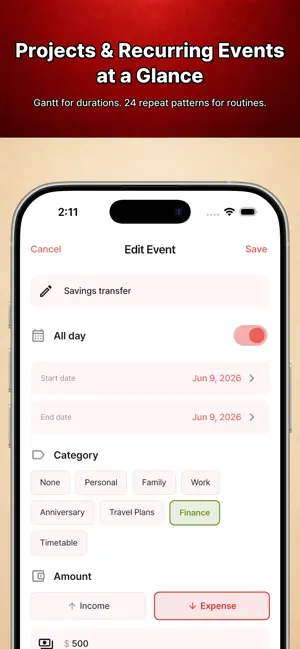
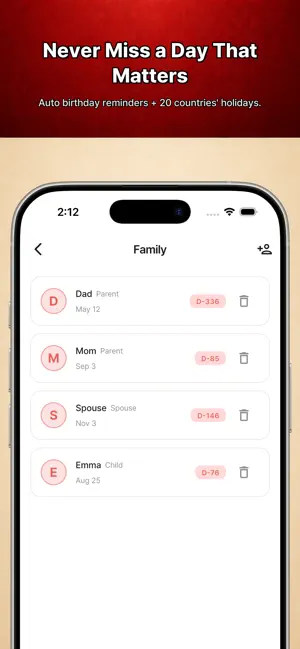
Ever softened the wording of a calendar entry before saving it? That quiet edit is self-censorship. You did it because someone might see. Lunaco has no server. Entries you want locked stay locked. Write them as they are. No sign-up, nothing behind a paywall. [NOTHING LEAVES YOUR PHONE] Your events, family records and notes live on the device only, and your calendar data is not transmitted. No account to log into, none to be leaked. It works the same in airplane mode. What you write into events, family records, trips and tasks is encrypted on the device, and the key never leaves it. (Holidays are fetched once from an external API. Minimal data is processed for analytics and ads - see our privacy policy.) [A CALENDAR YOU CAN ACTUALLY WRITE IN] If you keep entries in your head because they can't go in the calendar, that is the calendar's problem. Save an entry as private and a curtain hides it. It opens only after a PIN or biometric check. Title, note, location and attendees are encrypted with AES-256-GCM and never surface in widgets, notifications or search. [BACKUPS ARE ENCRYPTED TOO] A full backup is encrypted with AES-256-GCM, locked by PIN, passphrase or recovery code, and builds up automatically in your own iCloud or Google Drive. Change phones and one file brings it all back - only text is stored, so years fit in a few MB. [SEND ONLY WHAT YOU MEAN TO SEND] Pick a date range or a category, or export one trip or timetable. It merges into the other person's calendar, and duplicates can be skipped or overwritten. Pair by QR and the file opens on that device alone. [SCHEDULING, AT THE LEVEL OF A DEDICATED APP] - 23 repeat types - daily, weekly, biweekly, third Monday, every N days. Combine up to 5. - Gantt bars - multi-day events stretch across the calendar, splitting into lanes when they overlap. - 225 stickers in 14 categories, so a month reads at a glance. - Amounts - income and expenses, with a monthly summary bar. - Categories - 8 built in, add 6 of your own, 18-colour palette. - Quick entry - long-press a date, or paste several lines and let dates and times be read out. - Birthdays and anniversaries repeat yearly, with a countdown widget. [TASKS] Create tasks by date and check them off. Sweep what slipped with "move to today". They sit alongside your events, encrypted the same way. [TIMETABLES] School timetables by period, university timetables by time slot. Colour-code subjects, note teacher and room, track six attendance states. If your weeks differ - rotating shifts, alternating labs - set a 1 to 6 week rotation. The weekly view puts both on one timeline. [TRIPS] Destination, dates, day-by-day plans and packing in one place. Packing works in two steps: choose what you're taking, then tick off what's packed. Costs can be entered as an expression and converted at current rates. [ALSO IN THE BOX] - ICS import - repeating events unfold intact, and imports can be rolled back - Moon phases, holidays for 20 countries - PDF export - month, week, day, year - Wallpaper studio - timetable or trip over 15 backgrounds - Widgets - today, mini, moon phase, countdown, timetable, trip - Notifications - several per event, snooze, hidden titles - 10 themes, dark mode, two text sizes, adaptive tablet layout, 20 languages [RECORDS ARE SEEDS] Keeping a diary is hard, but a calendar you already fill in daily — and Lunaco keeps those entries as plain text, still readable ten years from now. Lunaco. A calendar you can write in as it is. -------------------- Lunaco. Record your entire daily life with a single calendar. Privacy Policy: https://maeilapp.com/en/dal/privacy Terms of Service: https://maeilapp.com/en/dal/terms Lunaco does not operate any servers and does not collect or transmit your personal data — events, family information, notes — outside your device. All data is stored only on your device. Developer: Intuition Lab Email: [email protected]
What’s new
Version 1.7.001 · Updated September 6, 2026
- New name Lunaco and a new icon - Tasks: move or change dates, confirm before deleting - Stability improvements
App privacy
The developer, Jong Joon Sun, reported these privacy practices to Apple.
Data Used to Track You
The following data may be used to track you across apps and websites owned by other companies:
- Identifiers: Device ID
Data Linked to You
The following data, which may be collected and linked to your identity, may be used for the following purposes:
- Identifiers: Device ID
Used for: Third-Party Advertising
Data Not Linked to You
The following data, which may be collected but is not linked to your identity, may be used for the following purposes:
- Location: Coarse Location
- Usage Data: Advertising Data, Product Interaction
- Diagnostics: Crash Data, Performance Data
Used for: Third-Party Advertising, Analytics, App Functionality
Alternatives to Lunaco: Secure Calendar·Tasks
Looking for apps like Lunaco: Secure Calendar·Tasks? Here are 6 similar apps on the App Store. The highest rated is 대한민국 달력 (5.0/5), and all 6 are free to download.
-
 AIBAI
AIBAI
-
 Task Calendar - Todo & Planner
-
 대한민국 달력
5.0
대한민국 달력
5.0
-
 baton. - the handoff timer
-
 Filo: To-Do List & AI Planner
-
 Weeva
Weeva
| App | Rating | Price | Last updated | Compare |
|---|---|---|---|---|
| Lunaco: Secure Calendar·Tasks | – | Free | September 6, 2026 | |
| AIBAI | – | Free | Jul 26, 2026 | Compare |
| Task Calendar - Todo & Planner | – | Free | Oct 2, 2026 | Compare |
| 대한민국 달력 | 5.0 / 5 (1) | Free | Sep 30, 2026 | Compare |
| baton. - the handoff timer | – | Free | Sep 3, 2026 | Compare |
| Filo: To-Do List & AI Planner | – | Free | Sep 30, 2026 | Compare |
| Weeva | – | Free | Aug 5, 2026 | Compare |