

MPP File Viewer: Gantt Chart
EUTOPIX LABS Business iPhoneiPadiPod touchMacApple Watch
MPP File Viewer: Gantt Chart is a free Business app for iPhone and iPad by EUTOPIX LABS. Rated 1.0/5 from 1 ratings. Requires iOS 17.0.
- Rating
- 1.0
- 1 ratings
- Price
- Free
- on the App Store
- Size
- 13 MB
- Age 4+
- Updated
- Oct 25
- 2026 · v1.3.0
Screenshots



About MPP File Viewer: Gantt Chart
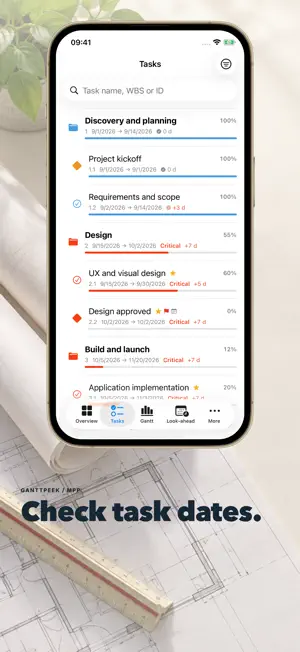
Review received schedules before your next meeting. Open Microsoft Project or Primavera files, compare updates and keep decisions beside the plan. REVIEW THE NEXT UPDATE • Inspect Gantt charts, task dates and available resources. Share PDF reports and CSV tables. • Group saved revisions and compare an update with your reviewed baseline. • Save weekly minutes and carry open actions forward with owners and due dates. Reviewed minutes keep a fixed copy of what was discussed. BRING IN A SPREADSHEET Choose an XLSX sheet, heading row and task columns, then check every task row before opening. Selected formula and error cells are rejected; formulas are not calculated. CSV, TSV and tab-delimited TXT can also use column mapping. CREATE A SMALL PLAN Set task names, dates, progress and notes in an editable local draft. Valid drafts save automatically. Export CSV or Project XML with manual task dates. There is no MPP writing or dependency rescheduling. ONE DISTINCT FILE FREE Open one distinct file free and reopen that unchanged file. A changed revision counts as a new file. For more files, choose an annual or monthly subscription, a nonrenewing seven-day pass or a one-time lifetime purchase. Subscriptions renew automatically unless cancelled; the seven-day pass does not renew. Prices and terms appear before purchase. LOCAL PROCESSING AND YOUR CHOICES Received originals stay read-only; created drafts are editable. File processing and meeting notes are local. Basic usage sharing is optional, off by default and changeable in settings. Usage counts contain no document text or recordings. No account is required. FORMAT AND LANGUAGE NOTES Opens MPP/MPT, Project XML, Primavera XER/P6 XML, MPX and supported tables. XLSX limits include 25 MiB input and 25,000 task rows; XLS, XLSM and encrypted workbooks are not supported. Password-protected MPP is not supported. Available fields depend on the source. This is not a certified scheduling or contractual-verification system. App interface: English, German, French, Spanish, Italian, Brazilian Portuguese, Polish, Japanese and Simplified Chinese. Other language settings use a supported language or English. Independently developed by Eutopix Labs. Not affiliated with, endorsed by, sponsored by or certified by Microsoft or Oracle. Primavera is a registered trademark of Oracle. Terms of Use: https://ganttpeek.com/terms/ Privacy Policy: https://ganttpeek.com/privacy/
What’s new
Version 1.3.0 · Updated October 25, 2026
• Saved project reviews connect weekly minutes and unfinished actions. • Import XLSX with sheet and column mapping, then validate task rows. Formulas are not calculated. • Create simple manual plans with valid-draft autosave and CSV or Project XML export.
App privacy
The developer, EUTOPIX LABS, reported these privacy practices to Apple.
Data Not Collected
The developer does not collect any data from this app.
Alternatives to MPP File Viewer: Gantt Chart
Looking for apps like MPP File Viewer: Gantt Chart? Here are 6 similar apps on the App Store. The highest rated is ChatMPP (5.0/5), and all 6 are free to download.
-
 Construction Gantt
-
 Plainview – Schedule Analytics
-
 ChatMPP
5.0
ChatMPP
5.0
-
 Bill Compass
-
 ProjectKiller: MPP Editor
-
 Website Builder Offline
| App | Rating | Price | Last updated | Compare |
|---|---|---|---|---|
| MPP File Viewer: Gantt Chart | 1.0 / 5 (1 rating) | Free | October 25, 2026 | |
| Construction Gantt | – | Free | Oct 19, 2026 | Compare |
| Plainview – Schedule Analytics | – | Free | Jul 31, 2026 | Compare |
| ChatMPP | 5.0 / 5 (1) | Free | Dec 14, 2025 | Compare |
| Bill Compass | – | Free | Oct 22, 2026 | Compare |
| ProjectKiller: MPP Editor | – | Free | Oct 27, 2026 | Compare |
| Website Builder Offline | – | Free | Oct 27, 2026 | Compare |