

Construction Gantt
Mengtong Pan Productivity iPhoneiPadiPod touch
Construction Gantt is a free Productivity app for iPhone and iPad by Mengtong Pan. Requires iOS 17.0. Updated October 19, 2026.
- Price
- Free
- on the App Store
- Size
- 50 MB
- Age 4+
- Updated
- Oct 19
- 2026 · v4.1
Screenshots



About Construction Gantt
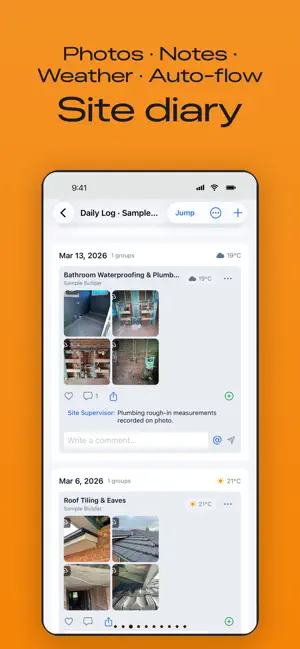
Construction Gantt is a visual project management tool built for builders, sub-contractors, renovation teams and owner-builders — and just as handy for any individual or team that needs to plan work and track it through to done. Plan the schedule, run the jobsite, and keep a photo diary in one app. And every time you complete a task, the app has a little surprise waiting for you — come and see what it is. GANTT SCHEDULE - Drag-and-drop Gantt chart with tasks, subtasks (WBS) and dependencies - Auto-cascading dates: change one task and downstream tasks follow - Holiday and working-week aware (skips weekends and public holidays) - Smart auto-sum phases: parent duration rolls up from subtasks, or set it manually - Export schedules to PDF, share or print directly CALENDAR AND REMINDERS - Month, Day and Events — three calendar views - Tasks and to-dos appear in the calendar automatically - Deliveries, meetings and bookings with alarm reminders and a choice of ringtones - Overdue to-dos roll forward to Today until you tick them off TO-DO LIST AND DAILY LOG - Quick to-dos with subtasks, due dates and reminders - Attach photos and videos; completed work publishes to the Daily Log - Export daily logs by date range JOBSITE DIARY - Photo groups tied to each task, with weather, GPS, comments and likes - Mention teammates with @ and they get notified - Clock in / clock out with location and work-hour history TEAM - Invite your team with a join code, on any plan - Cloud sync across iPhone, iPad and Mac LEARN THE APP - Short tutorial videos built into the app: search by what you want to do Available in English and Simplified Chinese. Subscriptions (monthly), each starting with a 7-day free trial: Unlimited Planner — 1 seat, 200 MB storage; Pro — 1 seat, 2 GB; Team — 5 seats, 15 GB; Business — 15 seats, 60 GB, plus Project Story with AI writing; Enterprise — 30 seats, 200 GB, plus Project Story with AI writing. Every plan includes unlimited projects and tasks. People you invite can use the app for as long as your plan is active on Team and above, or free for 30 days on Unlimited Planner and Pro. Contractors and viewers never use a seat. Cancel anytime; cancelling during the free trial ends the trial immediately. Terms of Use: https://www.apple.com/legal/internet-services/itunes/dev/stdeula/ Privacy Policy: https://www.apple.com/legal/privacy/
What’s new
Version 4.1 · Updated October 19, 2026
New tutorial videos: tap the orange play icon on the Projects page or next to Today on the Gantt chart, or find Tutorials in Settings, and search by what you're trying to do. Contractors and viewers no longer see buttons for adding tasks, and you can switch between companies on the Team page. Plus several fixes.
App privacy
The developer, Mengtong Pan, reported these privacy practices to Apple.
Data Linked to You
The following data, which may be collected and linked to your identity, may be used for the following purposes:
- Purchases: Purchase History
- Location: Precise Location
- Contact Info: Email Address
- User Content: Photos or Videos
- Identifiers: User ID
Used for: App Functionality
Alternatives to Construction Gantt
Looking for apps like Construction Gantt? Here are 6 similar apps on the App Store.
-
 Aimward: Goal & Focus Planning
-
 Screenshot Cleaner: SnapMop
-
 NearbiGantt: Gantt & Tasks
-
 Gantt Chart: Project Timeline
-
 Phaseboard
-
 Task Manager Progress
| App | Rating | Price | Last updated | Compare |
|---|---|---|---|---|
| Construction Gantt | – | Free | October 19, 2026 | |
| Aimward: Goal & Focus Planning | – | Free | Sep 21, 2026 | Compare |
| Screenshot Cleaner: SnapMop | – | Free | Oct 6, 2026 | Compare |
| NearbiGantt: Gantt & Tasks | – | Free | Sep 12, 2026 | Compare |
| Gantt Chart: Project Timeline | – | Free | Oct 28, 2026 | Compare |
| Phaseboard | – | Free | Oct 22, 2026 | Compare |
| Task Manager Progress | – | Free | Sep 21, 2026 | Compare |
Compare Construction Gantt with the top alternatives: ratings, updates, ASO score and keyword gaps →