

Gantt Chart: Project Timeline
YOSHIYUKI UEMATSU Productivity iPhoneiPadiPod touch
Gantt Chart: Project Timeline is a free Productivity app for iPhone and iPad by YOSHIYUKI UEMATSU. Requires iOS 18.0. Updated October 16, 2026.
- Price
- Free
- on the App Store
- Size
- 3 MB
- Age 4+
- Updated
- Oct 16
- 2026 · v1.7
Screenshots

About Gantt Chart: Project Timeline
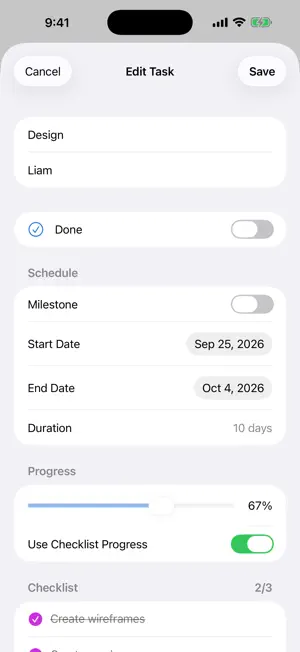
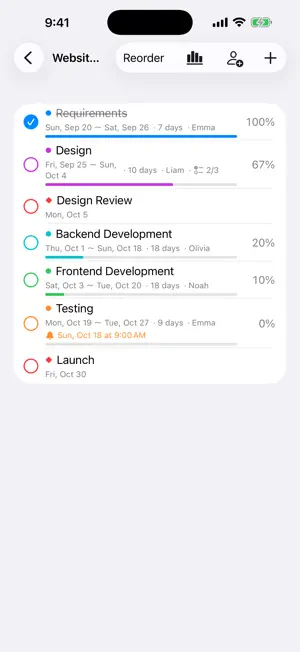
A simple, easy-to-read Gantt chart app for iPhone and iPad. See your project schedule as bars and adjust dates directly with your finger. ■ Pro Schedules for Real Work (Pro, NEW) • Turn your schedule into a PDF to share with clients, managers, or partners, or print it • Start from templates: home renovation, website project, event, moving, and exam prep • Task dependencies: when a task runs long, the tasks after it shift automatically (shown with arrows) • Pro includes everything in Premium. Premium owners can upgrade to Pro at a reduced price ■ Send as a File or Link (Premium) • Send a project as a file or a link by AirDrop, Mail or Messages • Open or paste the link and the project is added in the other person’s app (no server needed) • Save to File exports the project as JSON wherever you like ■ Attach Images (Premium) • Attach images to tasks (up to 10 per project) • See every task’s images together in the Images view • In projects shared via Google Drive, images reach the other person too ■ Now on Mac too • The same app runs on your Mac. If you already own Premium, everything is unlocked there as well ■ Clear Gantt chart • Switch between day, week and month views • Today is marked with a red line; weekends are shaded • Task names and dates stay pinned while you scroll in any direction • Milestones (◆) supported ■ Adjust schedules by touch • Touch and hold a bar and drag to move it by days • Drag either end of a bar to lengthen or shorten it • Tap to edit details ■ Progress and checklists (checklists: Premium) • Completion checkmarks and progress for every task • Add a checklist to a task and let its completion drive progress automatically • Overall project progress is calculated for you ■ Reminders (Premium) • Get notified on the start date, the day before, the end date, the day before the end, or at a custom time • Move the schedule and reminders follow along ■ Share with your team (Premium) • Share and sync projects with others using Google Drive • Edits to different tasks made at the same time are both kept • Each person who shares needs Premium ■ Delay tracking & working days (Premium) • Tasks behind schedule turn red, and overdue tasks stand out • Skip weekends and public holidays (about 250 countries and regions) and count durations in working days • Bars snap to working days when you move them ■ Designed for iPad too • Project list and Gantt chart side by side • Dark Mode supported The free version includes 1 project with up to 5 tasks. Premium (one-time in-app purchase) unlocks unlimited projects and tasks, plus checklists, reminders and sharing. No account needed. Your data stays on your device.
What’s new
Version 1.7 · Updated October 16, 2026
• New Pro: PDF export and printing, templates, and task dependencies (when a task runs long, the ones after it shift automatically) • Premium owners can upgrade to Pro at a reduced price • Duplicate and delete tasks from the long-press menu • You’re now asked to confirm before deleting a project or task • Gantt, list, and image views are now in one View menu
App privacy
The developer, YOSHIYUKI UEMATSU, reported these privacy practices to Apple.
Data Not Collected
The developer does not collect any data from this app.
Alternatives to Gantt Chart: Project Timeline
Looking for apps like Gantt Chart: Project Timeline? Here are 6 similar apps on the App Store.
-
 NearbiGantt: Gantt & Tasks
-
 Aimward: Goal & Focus Planning
-
 期限カレンダー
-
 Yoko Timeline
-
 MPP Viewer
-
 Deadline Countdown Tracker
| App | Rating | Price | Last updated | Compare |
|---|---|---|---|---|
| Gantt Chart: Project Timeline | – | Free | October 16, 2026 | |
| NearbiGantt: Gantt & Tasks | – | Free | Sep 12, 2026 | Compare |
| Aimward: Goal & Focus Planning | – | Free | Sep 21, 2026 | Compare |
| 期限カレンダー | – | Free | Oct 12, 2026 | Compare |
| Yoko Timeline | – | Free | Sep 25, 2026 | Compare |
| MPP Viewer | – | 9.99 USD | Aug 14, 2026 | Compare |
| Deadline Countdown Tracker | – | Free | Aug 15, 2026 | Compare |