

ProjectKiller: MPP Editor
JACKWAGON SURFERS LLC Business iPhoneiPadiPod touchMac
ProjectKiller: MPP Editor is a free Business app for iPhone and iPad by JACKWAGON SURFERS LLC. Requires iOS 17.0. Updated October 27, 2026.
- Price
- Free
- on the App Store
- Size
- 6 MB
- Age 4+
- Updated
- Oct 27
- 2026 · v1.5
Screenshots



About ProjectKiller: MPP Editor
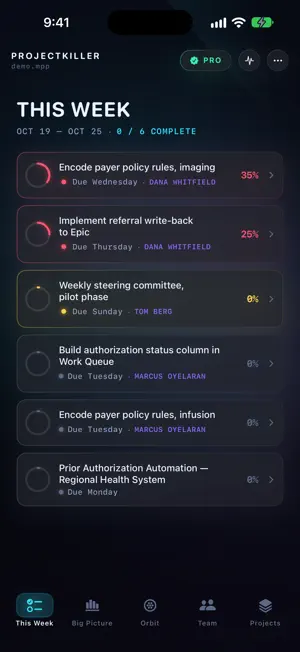
Open a client's .mpp on your Mac, iPad or iPhone, edit it, and send it back with every byte you didn't touch exactly as Microsoft Project wrote it. ProjectKiller is a native scheduler for Mac, iPad and iPhone, including both screens of iPhone Duo, for people who receive Microsoft Project files and have to return them intact. Real file compatibility Open and save genuine Microsoft Project (.mpp) files — no lossy conversion, no import/export roundtrip surprises. CSV and XML import/export are also built in. Professional scheduling engine Full Critical Path Method (CPM) scheduling with forward and backward pass calculations, so you always know which tasks actually drive your deadline. Task dependencies, recurring tasks, and effort-driven scheduling are all supported. Resource management that catches real problems Over-allocation detection works across every project you have open — not just within a single file — so you can spot when the same person is double-booked across two initiatives before it becomes a crisis. Cost tracking & Earned Value Management Track budget vs. actuals with full EVM metrics — BCWP, BCWS, CV, SV, CPI, and SPI — plus support for up to 10 numbered baselines, matching how Project's own baseline system works. AI-powered planning assistant Describe your project in plain language and get a draft task list. Ask the assistant to resolve resource over-allocations, suggest realistic task durations, or summarize overall project health. Custom views and reporting Build custom views with filters and grouping to see exactly the slice of the project you need, then export clean PDF or PNG reports for stakeholders. Start free with up to 2 projects and 75 tasks each, no credit card required. Upgrade to Pro for larger projects, full .mpp export, and expanded AI usage. Pro is an auto-renewing subscription, billed monthly or annually until cancelled. The perpetual licence and AI credit top-ups are one-time purchases and never renew. Manage or cancel subscriptions in your App Store account settings. Terms of Use (EULA): https://www.apple.com/legal/internet-services/itunes/dev/stdeula/ Privacy Policy: https://projectkiller.app/privacy
What’s new
Version 1.5 · Updated October 27, 2026
Small improvements and fixes.
App privacy
The developer, JACKWAGON SURFERS LLC, reported these privacy practices to Apple.
Data Not Linked to You
The following data, which may be collected but is not linked to your identity, may be used for the following purposes:
- Usage Data: Product Interaction
- User Content: Other User Content
- Identifiers: Device ID
Used for: Analytics, App Functionality
Alternatives to ProjectKiller: MPP Editor
Looking for apps like ProjectKiller: MPP Editor? Here are 6 similar apps on the App Store. The highest rated is ChatMPP (5.0/5), and all 6 are free to download.
-
 roadbar
-
 Site Reports – Photo to PDF
-
 MPP File Viewer: Gantt Chart
1.0
MPP File Viewer: Gantt Chart
1.0
-
 ChatMPP
5.0
ChatMPP
5.0
-
 NORO
NORO
-
 GanttchartAI: GanttChart by AI
5.0
GanttchartAI: GanttChart by AI
5.0
| App | Rating | Price | Last updated | Compare |
|---|---|---|---|---|
| ProjectKiller: MPP Editor | – | Free | October 27, 2026 | |
| roadbar | – | Free | May 12, 2026 | Compare |
| Site Reports – Photo to PDF | – | Free | Aug 5, 2026 | Compare |
| MPP File Viewer: Gantt Chart | 1.0 / 5 (1) | Free | Oct 25, 2026 | Compare |
| ChatMPP | 5.0 / 5 (1) | Free | Dec 14, 2025 | Compare |
| NORO | – | Free | Jul 10, 2025 | Compare |
| GanttchartAI: GanttChart by AI | 5.0 / 5 (1) | Free | Oct 30, 2026 | Compare |