

Vocal Remover·Extract Acapella
HyperMind Ltd. Music iPhoneiPadiPod touch
Vocal Remover·Extract Acapella is a free Music app for iPhone and iPad by HyperMind Ltd. Requires iOS 17.0. Updated October 6, 2026.
- Price
- Free
- on the App Store
- Size
- 246 MB
- Age 4+
- Updated
- Oct 6
- 2026 · v1.3
Screenshots


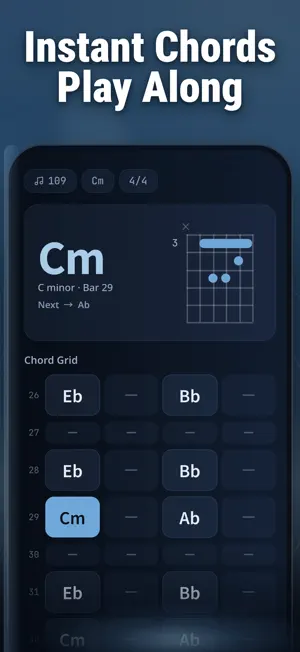

About Vocal Remover·Extract Acapella
Split any song into its separate tracks with AI. This vocal remover and acapella extractor pulls clean vocals, backing tracks, and eight individual instruments out of any audio or video file — no studio hardware, no phase-cancel tricks. It is built for singers who need karaoke versions, producers hunting samples, students practicing an instrument, and podcasters cleaning noisy recordings — all on iPhone, in minutes. WHAT YOU CAN DO • AI stem separation: split one song into lead vocal, drums, bass, piano, acoustic guitar, electric guitar, synth, strings, and wind — each as an independent track • Vocal remover: strip the singer to create karaoke, instrumental, or backing-track versions that keep the original mix character • Acapella extractor: isolate the vocal only, ready for covers, remixes, DJ sets, and sampling • Instrument isolation: solo or mute any single instrument and build a custom practice mix • Per-track volume: rebalance every separated stem with independent volume control • Background noise removal: clean hiss, hum, and room noise from songs, podcasts, and video audio • BPM and key tools: auto-detect tempo, then change speed or pitch without hurting audio quality • Format support: import MP3, WAV, FLAC, AAC, OGG, AIFF, MP4, AVI, MKV; export at the original format and bitrate with zero quality loss HOW PEOPLE USE IT A wedding singer imports a 4-minute pop song, removes the lead vocal, and exports a karaoke track after roughly one minute of AI processing. A guitar student mutes only the guitar stem, slows the remaining band to 80% speed at the original pitch, and plays along. A podcast editor separates narration from street noise recorded on a phone. A DJ pulls a clean acapella and layers it over a new instrumental the same afternoon. Compared with old-school tricks: • Karaoke prep — minutes per song with AI separation vs hours re-recording a backing band • Sampling — clean isolated stems vs muddy EQ-filtered loops • Practice — solo one instrument at adjustable BPM vs fighting the full mix FAQ Q: How do I remove vocals from a song? A: Import the file, run AI separation, and save the instrumental track. The vocal and the band come out as two independent files. Q: Can I extract only the acapella? A: Yes. Keep the vocal stem, mute everything else, and export it at the original quality. Q: Does it work with video files? A: Yes. Import MP4, AVI, or MKV; the app separates the soundtrack and exports the stems you choose. Q: How many instruments can it isolate? A: Eight instrument groups plus the lead vocal: drums, bass, piano, acoustic guitar, electric guitar, synth, strings, and wind. Q: Will exporting reduce audio quality? A: No. Files export at their original format and bitrate — lossless in, lossless out. Q: Can it clean background noise too? A: Yes. The noise removal mode detects and reduces environmental noise in recordings and video audio. Q: Is this a trimming or transcription app? A: No. It does not cut, merge, or transcribe files. It does one job deeply: separating a mixed song into clean, independent tracks. Turn the next song you love into vocals, a backing track, and eight clean instrument stems. Import once, tap Separate, and start singing, sampling, or practicing today. Subscription Information: - Subscription Options: Weekly and Yearly. - Pricing: Weekly subscription at $5.99/week, Yearly subscription at $32.99/year. - Payment: Charges will be applied to your iTunes account upon confirmation of purchase. Renewal: Your subscription will automatically renew within 24 hours prior to the end of the current period, and your iTunes account will be charged accordingly. Cancellation: To cancel, please do so at least 24 hours before the end of the current period via Settings > iTunes & App Store > Apple ID > Subscriptions. Privacy Policy: https://vocalremover.hautekit.com/privacy Terms of Service: https://vocalremover.hautekit.com/terms
What’s new
Version 1.3 · Updated October 6, 2026
What's new: • Fixed several issues for more reliable processing • Polished workflow and UI details for a smoother experience Thanks for the feedback — it keeps making the app better.
App privacy
The developer, HyperMind Ltd., reported these privacy practices to Apple.
Data Not Linked to You
The following data, which may be collected but is not linked to your identity, may be used for the following purposes:
- Usage Data: Product Interaction
- Diagnostics: Crash Data
Used for: Analytics, App Functionality
Alternatives to Vocal Remover·Extract Acapella
Looking for apps like Vocal Remover·Extract Acapella? Here are 6 similar apps on the App Store. The highest rated is Stemelo: AI Vocal Remover (5.0/5), and all 6 are free to download.
-
 OverDrive Chords & Stems
-
 Vocal remover: Audio separator
-
 VocalErase: Vocal Remover
-
 Stemelo: AI Vocal Remover
5.0
Stemelo: AI Vocal Remover
5.0
-
 WaveCraft-Vocal Remover Studio
-
 Coolo: Vocal Remover AI
| App | Rating | Price | Last updated | Compare |
|---|---|---|---|---|
| Vocal Remover·Extract Acapella | – | Free | October 6, 2026 | |
| OverDrive Chords & Stems | – | Free | Oct 8, 2026 | Compare |
| Vocal remover: Audio separator | – | Free | Sep 25, 2026 | Compare |
| VocalErase: Vocal Remover | – | Free | Oct 6, 2026 | Compare |
| Stemelo: AI Vocal Remover | 5.0 / 5 (3) | Free | Oct 6, 2026 | Compare |
| WaveCraft-Vocal Remover Studio | – | Free | Oct 9, 2026 | Compare |
| Coolo: Vocal Remover AI | – | Free | Jul 28, 2026 | Compare |