

WaveCraft-Vocal Remover Studio
SignalRender Technology Co., Ltd Music iPhoneiPadiPod touch
WaveCraft-Vocal Remover Studio is a free Music app for iPhone and iPad by SignalRender Technology Co., Ltd. Requires iOS 17.0. Updated November 5, 2026.
- Price
- Free
- on the App Store
- Size
- 71 MB
- Age 4+
- Updated
- Nov 5
- 2026 · v2026.10.31
Screenshots
Save to Pinterest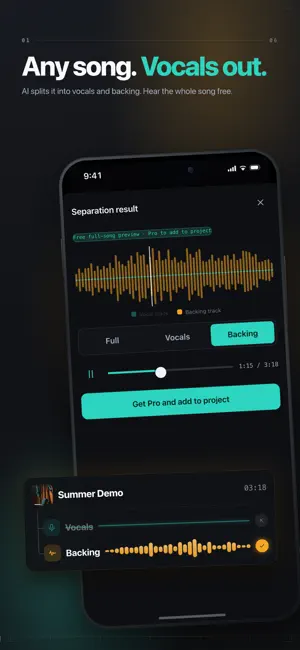


About WaveCraft-Vocal Remover Studio
Bring a song. Make it yours. WaveCraft works on the songs you already have: an audio file in Files, or the sound of a video in your Photos. Pull a song apart, shape how it sounds, and export it in full quality. REMOVE VOCALS, KEEP THE MUSIC AI splits any song into vocals and instrumental. Make a karaoke or backing track, or pull out an a cappella. Hear the whole separated song free before you decide; Pro is only needed to add the result to your project. SING ALONG, MAKE A COVER Use the backing track as your stage: record your own vocal on top, line it up and mix it in. MAKE A SONG SOUND BETTER Studio effects with 30+ presets, from EQ, compression and reverb to delay and chorus, each with a before/after A/B so you hear exactly what changed. Shift the pitch or change the tempo to practice or to sing in your key. Clean up noise and even out loudness in one tap. FROM VIDEO TO AUDIO Take the sound out of any video, whether it is a live performance, a lesson or a clip, and start working on it. EXPORT IN FULL QUALITY WAV, FLAC, ALAC or AAC, up to 32-bit float. Free, always: every effect and preset, pitch and tempo, denoise, loudness, unlimited tracks and lossless export. Pro adds: keeping AI vocal separation results, auto-mix, the mastering chain, stem export and batch export. End User License Agreement (EULA): https://www.apple.com/legal/internet-services/itunes/dev/stdeula/
What’s new
Version 2026.10.31 · Updated November 5, 2026
What's new in WaveCraft • Hear before you pay: run AI vocal separation on your own song and listen to the whole result for free. Pro is only needed to add it to your project. • Start from your own song: the welcome screens now take you straight to a track in Files or a video in Photos, with the right tool ready. • Importing just works: pick videos from Photos, .mov files give up their audio, and when a file can't be read you are told why. Still free, forever: every effect and preset, pitch and tempo, unlimited tracks, and lossless WAV / ALAC / FLAC export. Pro adds keeping AI vocal separation results, auto-mix, the mastering chain, stem export and batch export.
App privacy
The developer, SignalRender Technology Co., Ltd, reported these privacy practices to Apple.
Data Not Linked to You
The following data, which may be collected but is not linked to your identity, may be used for the following purposes:
- Usage Data: Product Interaction
- Diagnostics: Crash Data, Performance Data
Used for: Analytics, App Functionality
Alternatives to WaveCraft-Vocal Remover Studio
Looking for apps like WaveCraft-Vocal Remover Studio? Here are 6 similar apps on the App Store. The highest rated is Burnish: AI Audio Mastering (5.0/5), and all 6 are free to download.
-
 Burnish: AI Audio Mastering
5.0
-
 Audio Studio_Pro
5.0
-
 Stemelo: Vocal Remover
5.0
-
 Audio Studio - Vocal Remover
4.9
-
 Audio Master: Pro Music Editor
3.7
-
 DJ Mixer Studio
5.0
| App | Rating | Price | Last updated | Compare |
|---|---|---|---|---|
| WaveCraft-Vocal Remover Studio | – | Free | November 5, 2026 | |
| Burnish: AI Audio Mastering | 5.0 / 5 (1) | Free | Nov 7, 2026 | Compare |
| Audio Studio_Pro | 5.0 / 5 (5) | Free | Jul 28, 2026 | Compare |
| Stemelo: Vocal Remover | 5.0 / 5 (3) | Free | Nov 12, 2026 | Compare |
| Audio Studio - Vocal Remover | 4.9 / 5 (14) | Free | Nov 6, 2026 | Compare |
| Audio Master: Pro Music Editor | 3.7 / 5 (3) | Free | Oct 24, 2026 | Compare |
| DJ Mixer Studio | 5.0 / 5 (4) | Free | Oct 7, 2026 | Compare |