

DJ Mixer Studio
Giovanni Emanuele Spina Music iPhoneiPadiPod touch
DJ Mixer Studio is a free Music app for iPhone and iPad by Giovanni Emanuele Spina. Rated 5.0/5 from 3 ratings. Requires iOS 15.0. Updated October 7, 2026.
- Rating
- 5.0
- 3 ratings
- Price
- Free
- on the App Store
- Size
- 18 MB
- Age 4+
- Updated
- Oct 7
- 2026 · v3
Screenshots

About DJ Mixer Studio
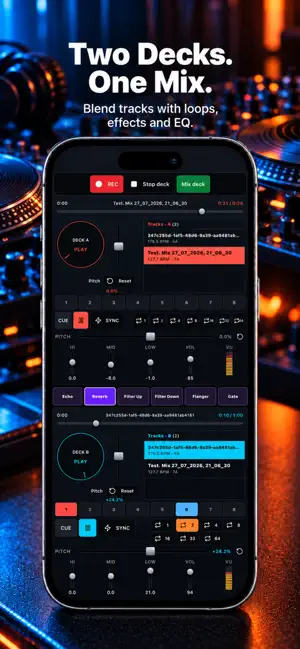
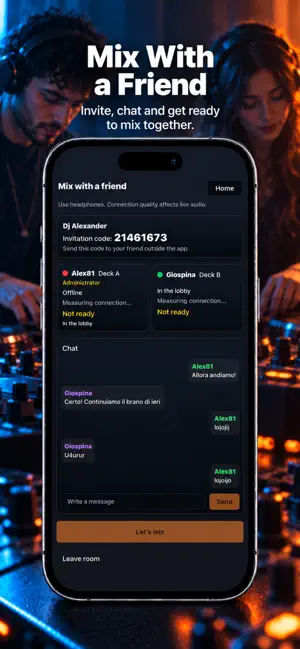
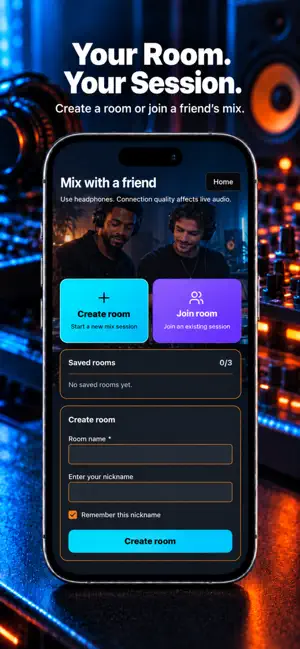
Turn your music into a mix of your own. DJ Mixer Studio brings together two decks, waveforms, effects, an equalizer and recording tools to help you choose tracks, build transitions and shape your sessions. Import your audio files, prepare a project and start mixing. Work solo, even offline with music saved on your device, or share an online session with a friend: two people, one deck each and a mix to create together. YOUR MUSIC, ORGANIZED Import tracks from your device and find them in your library. Search and sort by name, BPM, duration or key, then assign them to deck A or deck B. Prepare your selection and choose the next track without losing sight of your mix. TWO DECKS, CONTROL OF YOUR SOUND Follow your tracks with waveforms: red for deck A, blue for deck B. Adjust pitch, use CUE and SYNC, and set loops to work on transitions. Use the crossfader to balance the two decks and the master to control overall volume. Shape highs, mids and lows with the three-band equalizer. Adjust each deck's volume and watch the level meters as you blend tracks. EFFECTS AND TRANSITIONS Change the mood with Echo, Reverb, Filter Up, Filter Down, Flanger and Gate. Explore effects, shape your track entrances and highlight transitions. All six controls are also within reach on the mixer page. Choose how you work: use the mixer view with its library and waveforms, or switch to Mix deck to focus on both decks' controls. Auto-Mix and a microphone feature are also available. RECORD, LISTEN, DOWNLOAD Record your sessions and find them in Recordings. Listen back, rename your mixes and download them to your device. Compare your practice sessions and revisit the transitions you want to improve. PROJECTS TO RETURN TO Save your projects to continue later. Pick up your work and try new combinations without starting from scratch each time. MIX ONLINE WITH A FRIEND, TOO Want to create a session together? Open “Mix with a friend”, create a private room and share the invitation code. Your friend joins from their own device: one of you controls deck A, the other deck B. Choose tracks, prepare your controls and plan transitions using the built-in chat. Both of you can set up your mix before starting; when you are ready, the administrator can start recording the shared session. YOUR ROOMS, YOUR SESSIONS Name your rooms and find them among your saved rooms. Create up to 3 private rooms and return to sessions with names, settings and chat preserved. Join an existing room or invite a friend to keep working together. FROM PRACTICE TO YOUR NEXT MIX Practice loops, explore effects, prepare a track selection or record a full session. Solo or together, decide how to use your DJ studio. Solo mode lets you mix local audio files offline. Sessions with a friend require an Internet connection, and network quality affects live audio. Headphones are recommended for online mixing.
What’s new
Version 3 · Updated October 7, 2026
• Now you can mix online with a friend, with each player controlling one deck. • New Mix deck view for simpler, faster control of both decks at the same time. • Added 6 new effect buttons: Echo, Reverb, Filter Up, Filter Down, Flanger and Gate.
App privacy
The developer, Giovanni Emanuele Spina, reported these privacy practices to Apple.
Data Used to Track You
The following data may be used to track you across apps and websites owned by other companies:
- Identifiers: Device ID
- Usage Data: Advertising Data
Data Linked to You
The following data, which may be collected and linked to your identity, may be used for the following purposes:
- Usage Data: Product Interaction
- Purchases: Purchase History
- User Content: Emails or Text Messages, Audio Data, Other User Content
- Identifiers: User ID
Used for: Analytics, App Functionality
Data Not Linked to You
The following data, which may be collected but is not linked to your identity, may be used for the following purposes:
- Identifiers: Device ID
- Usage Data: Advertising Data
- Diagnostics: Crash Data, Performance Data
Used for: Third-Party Advertising, App Functionality
Alternatives to DJ Mixer Studio
Looking for apps like DJ Mixer Studio? Here are 6 similar apps on the App Store. The highest rated is Club DJ Pro: Virtual Mixer App (4.1/5), and all 6 are free to download.
-
 DJ Mixer - Mix Music & Remix
-
 Melodic Studio: Create Music
1.0
Melodic Studio: Create Music
1.0
-
 Club DJ Pro: Virtual Mixer App
4.1
Club DJ Pro: Virtual Mixer App
4.1
-
 AlyDeejay: Dj App & AI Automix
-
 SoundPad: Sampler & DAW
-
 AI DJ Studio: Stems & Mixer
| App | Rating | Price | Last updated | Compare |
|---|---|---|---|---|
| DJ Mixer Studio | 5.0 / 5 (3 ratings) | Free | October 7, 2026 | |
| DJ Mixer - Mix Music & Remix | – | Free | Sep 27, 2026 | Compare |
| Melodic Studio: Create Music | 1.0 / 5 (2) | Free | Sep 20, 2026 | Compare |
| Club DJ Pro: Virtual Mixer App | 4.1 / 5 (34) | Free | Sep 24, 2026 | Compare |
| AlyDeejay: Dj App & AI Automix | – | Free | Oct 15, 2026 | Compare |
| SoundPad: Sampler & DAW | – | Free | Jul 23, 2026 | Compare |
| AI DJ Studio: Stems & Mixer | – | Free | Sep 3, 2026 | Compare |
Compare DJ Mixer Studio with the top alternatives: ratings, updates, ASO score and keyword gaps →