

VocalErase: Vocal Remover
Ali Ozgur Music iPhoneiPadiPod touch
VocalErase: Vocal Remover is a free Music app for iPhone and iPad by Ali Ozgur. Requires iOS 15.1. Updated October 23, 2026.
- Price
- Free
- on the App Store
- Size
- 37 MB
- Age 4+
- Updated
- Oct 23
- 2026 · v1.2.0
Screenshots


About VocalErase: Vocal Remover
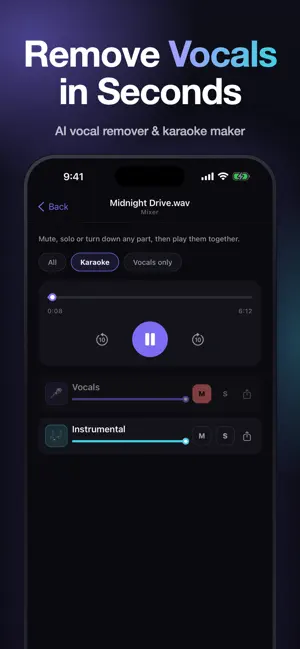
Remove vocals from any song, or split it into up to 6 separate stems. VocalErase uses AI to turn your MP3, WAV or FLAC files into karaoke tracks, acapellas and backing tracks, right from your iPhone. CHOOSE HOW YOU WANT TO SPLIT • Vocals + Instrumental: the classic vocal remover, perfect for karaoke tracks and acapellas • 4 stems: vocals, drums, bass and other instruments, so you can mute or remix any part • 6 stems: adds guitar and piano (piano is still experimental) MIX YOUR STEMS IN THE MIXER • Play all stems together and mute, solo or turn down any part • One-tap Karaoke and Vocals-only presets • Skip 10 seconds and scrub to any point in the song • Download or share any stem as a 320 kbps MP3 WHAT YOU CAN DO • Make karaoke and backing tracks by removing the lead vocal • Extract an acapella to remix, sample or study • Isolate drums, bass or guitar to learn parts by ear • Practice along with the band, minus your instrument • Preview every stem in the app, then download or share it as a 320 kbps MP3 SIMPLE PRICING, NO SUBSCRIPTION • Start free: every new account gets 2 credits • 1 credit splits a song of up to 4 minutes into vocals + instrumental. Songs up to 8 minutes cost 2 credits • 4-stem and 6-stem splits use more credits, and the cost is shown before you start • Buy a credit pack whenever you need one. Credits never expire • Free credits work for vocals + instrumental. Any credit pack unlocks every mode • If a job fails, your credits are refunded automatically MADE TO BE EASY • No sign-up needed: start separating right away, and optionally save your account with email or Sign in with Apple • Works with MP3, WAV, FLAC, M4A and OGG files up to 50 MB and 8 minutes • Your history keeps recent songs ready to play: 24 hours on free credits, 7 days after your first purchase, or keep any song forever for 1 credit • Available in English, Portuguese, Spanish and Turkish FAIR USE Use VocalErase only with audio you own or have the right to process.
What’s new
Version 1.2.0 · Updated October 23, 2026
What's new in 1.2.0: • New mixer: play every stem together and mute, solo or turn down any part • One-tap Karaoke and Vocals-only presets • A cleaner Home screen that shows the price before you start • Friendlier upload errors, and file checks before you upload • Accessibility and stability improvements
App privacy
The developer, Ali Ozgur, reported these privacy practices to Apple.
Data Linked to You
The following data, which may be collected and linked to your identity, may be used for the following purposes:
- Contact Info: Email Address
- Usage Data: Product Interaction
- Purchases: Purchase History
Used for: Analytics, App Functionality
Data Not Linked to You
The following data, which may be collected but is not linked to your identity, may be used for the following purposes:
- User Content: Audio Data
- Identifiers: User ID
Used for: Analytics, App Functionality
Alternatives to VocalErase: Vocal Remover
Looking for apps like VocalErase: Vocal Remover? Here are 6 similar apps on the App Store. The highest rated is Vocal Remover - Music Splitter (5.0/5), and all 6 are free to download.
-
 Vocal Remover - Music Splitter
5.0
-
 Stemix: Vocal Remover
-
 Stem Splitter - OffgridStem
5.0
-
 Riftone: AI Stem Splitter
-
 Audio Noise Cleaner AI
-
 Tunio Pro: guitar tab to reel
| App | Rating | Price | Last updated | Compare |
|---|---|---|---|---|
| VocalErase: Vocal Remover | – | Free | October 23, 2026 | |
| Vocal Remover - Music Splitter | 5.0 / 5 (1) | Free | Aug 24, 2026 | Compare |
| Stemix: Vocal Remover | – | Free | Oct 20, 2026 | Compare |
| Stem Splitter - OffgridStem | 5.0 / 5 (2) | Free | Oct 11, 2026 | Compare |
| Riftone: AI Stem Splitter | – | Free | Oct 21, 2026 | Compare |
| Audio Noise Cleaner AI | – | Free | Oct 9, 2026 | Compare |
| Tunio Pro: guitar tab to reel | – | Free | Aug 15, 2026 | Compare |