

Stowe: Voice Daily Planner
Anurag Agnihotri Productivity iPhoneiPadiPod touchMacApple Watch
Stowe: Voice Daily Planner is a free Productivity app for iPhone and iPad by Anurag Agnihotri. Rated 5.0/5 from 1 ratings. Requires iOS 26.0.
- Rating
- 5.0
- 1 ratings
- Price
- Free
- on the App Store
- Size
- 92 MB
- Age 4+
- Updated
- Sep 27
- 2026 · v2.6
Screenshots


About Stowe: Voice Daily Planner
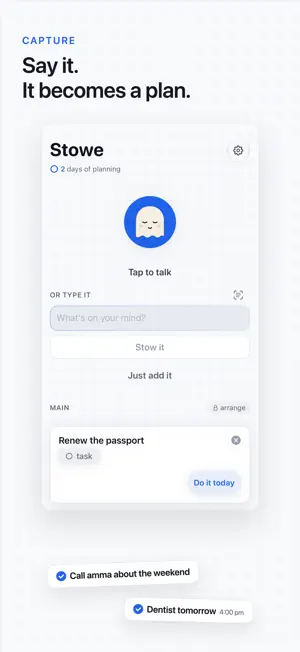
Say what's on your mind and Stowe turns it into a short plan for today: three to five things you can actually finish. Talk, type, paste a list or ask Siri. Your words stay yours, and the day arrives already sorted. NEW • Suggestions from your calendar. On iPhones with Apple Intelligence, Stowe reads your events in any language and suggests the small task that gets you ready: prep before a meeting, packing before a trip, a gift before a birthday. Other iPhones read English event titles. It uses the calendar access you already gave Stowe; turn it off in Settings › Suggestions. • Ask Siri "What does Stowe suggest?" and add a suggestion from there. • Today as a timeline: a quiet time rail with a mark for now. • Share to Stowe from any app, paste a list, or scan several pages at once. • Bring in from Reminders: copy the ones you pick, once. Nothing in Reminders changes. CAPTURE Hold the mic and say it all at once: water the plants every three days, call mom tomorrow, gym at seven. Stowe splits that into separate cards, spots what repeats and when things are due, and lets you fix any guess with one tap. Swipe a card right to do it today, or left to let it go. Hindi-English mid-sentence works too (kal gym jaana hai), and your phrasing is never rewritten. Suggestions wait beside the mic, worked out on your iPhone from what you have added before. TODAY Three to five cards, laid out by time of day, with one progress ring. Not the backlog: what is due, plus one or two things that move something forward. Tap to complete, swipe to defer. NOW AND FOCUS One thing, full screen. Start a focus timer here or with Siri, and it stays on your Lock Screen while it runs, with Pause and Stop. SIRI, SHORTCUTS AND WIDGETS Add tasks with Siri, ask what is left today, or start a focus timer. Finish, change, move or ring a task by name, and break one into steps with Pro. Shortcuts gets an Add Tasks from Text action, and a Scan control can go in Control Center or on the Action button. Home Screen and Lock Screen widgets are free. JOURNAL Fifteen seconds in the evening: what you did, and one tap to roll the rest to tomorrow. Unfinished never shows as failure. Your run counts the days you plan, not the days you finish, and a banked freeze holds it while you are away. PRIVATE BY DESIGN Voice capture, transcription and sorting happen on your device, so capture works in airplane mode. No account. With iCloud on, your lists sync through your own private iCloud. Stowe reads your calendar on your device to show today's events beside your plan and on Now, and to shape suggestions; it never changes your calendar, and nothing from it leaves your devices. Stowe counts anonymous app usage, never your words. ON YOUR WRIST AND DESK Stowe runs on iPhone, iPad and Mac. Capturing on Apple Watch is free. STOWE PRO Capture, today's plan, suggestions and widgets are free. Stowe Pro adds today's plan on Apple Watch, every day of your journal back to the first with weekly reflections, export and backup, Refine (tidy a rambling draft using only your own words), Break this down into small steps, notes and photos on a card, more lists arranged your way, a morning read-aloud and alternate app icons. Pro Monthly and Pro Annual are auto-renewing subscriptions. Pro Annual includes a 7-day free trial for eligible new subscribers; Pro Monthly has no trial. Payment is charged to your Apple Account when you confirm, or when the free trial ends. A subscription renews unless canceled at least 24 hours before the end of the current period. Manage or cancel it in your Apple Account's subscription settings. Requires iOS 26 or later. Sharing, scanning, swipes on Capture, Siri by task name, Add Tasks from Text and the Scan control need iOS 27. Reading events in any language needs an iPhone with Apple Intelligence. Privacy Policy: https://www.getstoweapp.com/privacy Terms of Use (EULA): https://www.apple.com/legal/internet-services/itunes/dev/stdeula/
What’s new
Version 2.6 · Updated September 27, 2026
Stowe 2.6 — Break it down gets a lot better at steps. • Break it down now works out what a task actually means before writing any steps. If a task is too vague to break down, it says so instead of inventing steps. • Break it down now understands the world a little better. When a task names something real — a form, a scheme, a service — Stowe looks it up before writing the steps. Only a short search phrase leaves your phone, nothing is kept, and you can turn it off under Settings › Break it down. • Steps stay with the task. They no longer reset each day. • The step list has its own look, tinted by the task it belongs to. Today shows a short "2 of 5 steps" count instead of every step laid open, and Break this down is in the edit form too. • Steps are easier to work with: bigger text and a bigger tap target for checking one off, and a confirm button when you add or rewrite a step. • Suggestions no longer depend on how full today's plan is, and there's no fixed cap — you see whatever genuinely clears the bar. • Each kind of item now has a faint background wash in its own color. • A calmer first minute. Type one thing or pick a few from a short list, see today’s plan take shape under them, and keep it — three screens, no permissions asked until you need them. Voice arrives on Capture once your plan is kept. Stowe still runs capture on the device — voice capture, transcription and structuring happen locally, so capture works in airplane mode. Break it down, Suggestions and Refine may use Apple's Private Cloud Compute when helpful.
App privacy
The developer, Anurag Agnihotri, reported these privacy practices to Apple.
Data Not Linked to You
The following data, which may be collected but is not linked to your identity, may be used for the following purposes:
- Usage Data: Product Interaction
- Purchases: Purchase History
Used for: Analytics, App Functionality
Alternatives to Stowe: Voice Daily Planner
Looking for apps like Stowe: Voice Daily Planner? Here are 6 similar apps on the App Store. The highest rated is CloudDisk – S3 Drive (5.0/5), and all 6 are free to download.
-
 AI Daily Planner - today
3.0
-
 CloudDisk – S3 Drive
5.0
-
 Notes: To do list & Reminders
-
 Consigo — To-Do & App Blocker
-
 Gaveki — ADHD Focus App
-
 Done - AI handles your To-Do
5.0
| App | Rating | Price | Last updated | Compare |
|---|---|---|---|---|
| Stowe: Voice Daily Planner | 5.0 / 5 (1 rating) | Free | September 27, 2026 | |
| AI Daily Planner - today | 3.0 / 5 (2) | Free | Dec 15, 2024 | Compare |
| CloudDisk – S3 Drive | 5.0 / 5 (1) | Free | Oct 18, 2026 | Compare |
| Notes: To do list & Reminders | – | Free | Sep 8, 2026 | Compare |
| Consigo — To-Do & App Blocker | – | Free | Oct 9, 2026 | Compare |
| Gaveki — ADHD Focus App | – | Free | Oct 19, 2026 | Compare |
| Done - AI handles your To-Do | 5.0 / 5 (1) | Free | Oct 15, 2026 | Compare |