

Consigo — To-Do & App Blocker
Marco Tulio De Avila Santos Productivity iPhoneiPadiPod touch
Consigo — To-Do & App Blocker is a free Productivity app for iPhone and iPad by Marco Tulio De Avila Santos. Requires iOS 17.0. Updated October 9, 2026.
- Price
- Free
- on the App Store
- Size
- 15 MB
- Age 4+
- Updated
- Oct 9
- 2026 · v1.0.3
Screenshots

About Consigo — To-Do & App Blocker
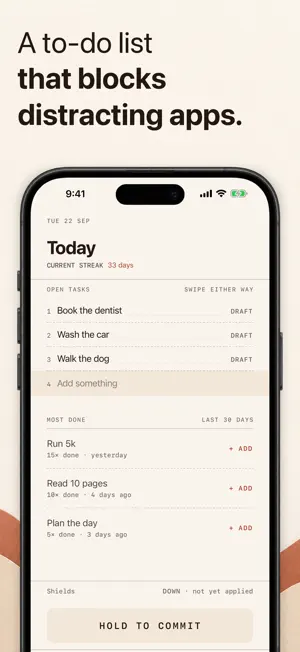
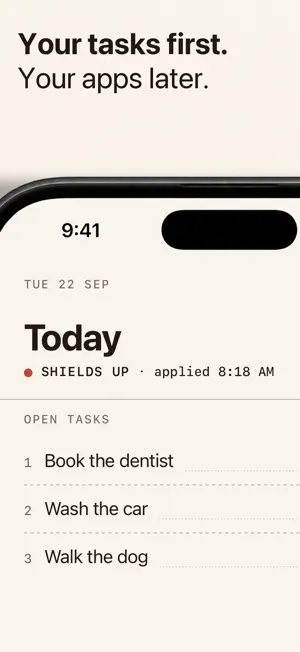
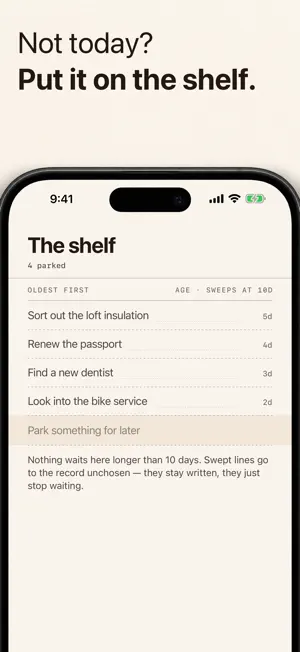
Finish what you planned. Consigo is a different kind of blocking app for iPhone: it starts with the tasks you want to finish. You choose which distracting apps to block while you work through your list. HOW IT WORKS 1. Write today's tasks and choose the distracting apps to block. Hold to commit to your list. 2. Your selected apps stay blocked after you commit. Complete each task and mark it done in Consigo. 3. When the whole list is done, those apps stay blocked until you hold to close. That hold ends the session and restores access to the apps you chose. Only the apps you select are blocked. Notifications from blocked apps are also silenced. FREE AND PRO Free includes up to 2 tasks per session, 1 committed session per day and 7 tasks on the shelf for later. Your streak, totals and full session history are included, along with the same app blocking as Pro. Pro gives you room for longer task lists, more sessions per day and more tasks on the shelf. It adds two views of your record: a month calendar and Hours You Keep. The blocking and commitment rules are the same on both plans. PRIVACY No Consigo account or login. Your lists, record and settings are stored on your device, with backup to your own private iCloud database when you're signed in to iCloud. Backup is included on both plans. We run no server of our own and cannot read that content. There is no export. Your blocked and allowed app selections stay on your device. RevenueCat checks whether Pro is active when the app opens and each time you return, for everyone, including free users. It receives device and app details: a device identifier, storefront country, device model, iOS and app versions, app build, preferred languages and IP address. Purchases or restores also send the App Store transaction. Consigo sends it no name, email, task list, shelf, record or app selections. Apple processes payments; we do not receive your card details. Privacy policy: https://useconsigo.com/privacy/ For iPhone with iOS 17 or later. Available in English and Brazilian Portuguese. Terms of Use (EULA): https://useconsigo.com/terms/ https://www.apple.com/legal/internet-services/itunes/dev/stdeula/
What’s new
Version 1.0.3 · Updated October 9, 2026
Holding a practice row in the first-run walkthrough now finishes it, as the walkthrough says. This version also sends anonymous usage statistics (which screens open, and when sessions are committed or won) so we can see what helps. They never include your tasks, your shelf, or which apps you block. Our privacy policy lists exactly what is counted.
App privacy
The developer, Marco Tulio De Avila Santos, reported these privacy practices to Apple.
Data Not Linked to You
The following data, which may be collected but is not linked to your identity, may be used for the following purposes:
- Purchases: Purchase History
- Location: Coarse Location
- Identifiers: Device ID
- Usage Data: Product Interaction, Other Usage Data
Used for: Analytics, App Functionality
Alternatives to Consigo — To-Do & App Blocker
Looking for apps like Consigo — To-Do & App Blocker? Here are 6 similar apps on the App Store. The highest rated is TodoLock: Focus App Blocker (5.0/5), and all 6 are free to download.
-
 Just One Thing: App Blocker
-
 Taskwall: Screen Time + To Do
-
 TodoLock: Focus App Blocker
5.0
TodoLock: Focus App Blocker
5.0
-
 Stowe: Voice Daily Planner
5.0
Stowe: Voice Daily Planner
5.0
-
 Diode Collab
4.4
Diode Collab
4.4
-
 To do Block: Simple To do List
| App | Rating | Price | Last updated | Compare |
|---|---|---|---|---|
| Consigo — To-Do & App Blocker | – | Free | October 9, 2026 | |
| Just One Thing: App Blocker | – | Free | Jun 7, 2026 | Compare |
| Taskwall: Screen Time + To Do | – | Free | Mar 26, 2026 | Compare |
| TodoLock: Focus App Blocker | 5.0 / 5 (2) | Free | Sep 30, 2026 | Compare |
| Stowe: Voice Daily Planner | 5.0 / 5 (1) | Free | Sep 27, 2026 | Compare |
| Diode Collab | 4.4 / 5 (8) | Free | Sep 30, 2026 | Compare |
| To do Block: Simple To do List | – | Free | Sep 26, 2026 | Compare |