

DayPlay: ADHD Alarm & Routine
HALIL BERKAY SAHIN Productivity iPhoneiPadiPod touchApple Watch
DayPlay: ADHD Alarm & Routine is a free Productivity app for iPhone and iPad by HALIL BERKAY SAHIN. Requires iOS 15.0. Updated November 1, 2026.
- Price
- Free
- on the App Store
- Size
- 72 MB
- Age 4+
- Updated
- Nov 1
- 2026 · v1.7
Screenshots



About DayPlay: ADHD Alarm & Routine
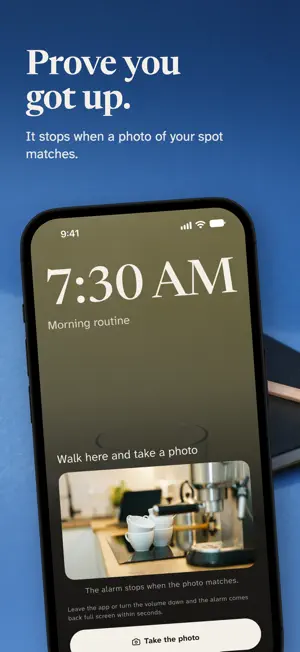
Turning the alarm off is easy. Getting up is hard. DayPlay is an alarm that does not end when you turn it off. It rings through Silent mode and Focus, and with mission lock on, the stop button sends you to your routine's first step instead of back to bed. It keeps ringing until you confirm that step or take a photo of a spot you picked in advance. A REAL ALARM, NOT A NOTIFICATION On iOS 26 and later DayPlay uses AlarmKit, Apple's system alarm framework: full screen alert, Lock Screen, Dynamic Island, and sound that cuts through Silent mode and Do Not Disturb. Mission lock, morning proof, counted snoozes and escape protection run on it, so they need iOS 26 or later. Older systems get a burst of notifications instead, and the app says so on screen. An alarm that does less than it promised without telling you is worse than none. MISSION LOCK AND MORNING PROOF You decide what "awake" means. With mission lock on, stopping the alarm opens the task instead of ending it. Confirm your first step, or set a morning proof: a photo of the place you walk to, like the bathroom sink or the coffee machine. When the alarm rings, the camera shows a faint copy of that photo so you can line up the same view, with a torch for dark rooms. A matching photo stops the sound. If the camera fails or the photos keep missing, confirming the first step works instead. Matching happens on your phone; the photo is never uploaded. COUNTED SNOOZES Unlimited snoozing is how mornings get lost. Allow zero to three snoozes per routine. When they run out, the snooze button disappears. ESCAPE PROTECTION Leave the app or turn the volume down while the mission is locked, and the system alarm comes back full screen within seconds. THEN THE ROUTINE PLAYS ITSELF Once you are up, DayPlay plays your routine like a music player plays an album. One step fills the screen, a large countdown runs, and there is one button. The countdown stays on your Lock Screen and Dynamic Island, and the Apple Watch app handles done, skip and a little more time. FOR THE BAD DAYS Short on time? Say how many minutes you have; DayPlay keeps your short version's steps and trims the rest. Or play the short version, skip today, or pause until a date. BUILT FOR MORNINGS THAT USUALLY FALL APART DayPlay is for people who sleep through three alarms, lose twenty minutes between waking and starting, and have been told to "just try harder". It is ADHD friendly: no shaming language, no streak drama. The Progress tab shows planned and actual minutes side by side. STAYS ON YOUR PHONE No account. No DayPlay server. Your routines, step names and history stay on your device and can be exported any time. Usage counters and crash reports can be switched off in Settings. The App Privacy section on this page lists what the purchase, analytics and crash services receive. FREE, AND WHAT PRO ADDS The real alarm, mission lock, escape protection, the player, reminders and the Lock Screen timer are all free for up to two routines. DayPlay Pro removes the routine limit, so morning, evening, study and workout can each have their own alarm. It also adds every timing suggestion, a 30-day comparison, two extra theme packs and flexible streak protection. SUBSCRIPTION DETAILS DayPlay Pro is an auto renewing subscription, billed monthly or yearly, with a 7 day free trial for eligible new subscribers. Payment is charged to your Apple ID at confirmation of purchase, or when the free trial ends. The subscription renews automatically unless it is turned off at least 24 hours before the end of the current period. You can manage or cancel it in your App Store account settings. DayPlay is a focus and routine tool. It is not a medical treatment or a diagnostic tool. Terms of Use (EULA): https://www.apple.com/legal/internet-services/itunes/dev/stdeula/ DayPlay Terms: https://halilberkayy.github.io/dayplay/terms.html Privacy Policy: https://halilberkayy.github.io/dayplay/privacy.html
What’s new
Version 1.7 · Updated November 1, 2026
Setting up a routine is now step by step, and the free trial comes with a reminder. New routine: one question per screen. Name and cover, the steps, the time, then what happens at that time. If you skip the time, you save on the third screen. Editing a routine you already have stays on one page. Trial reminder: when you start the free trial, DayPlay can send a single notification about 2 days before it ends, with the end date and the price. It is on by default; turn it off with the switch under "How the trial works" on the subscription screen. Your history now also notes whether a routine started from the alarm and when you turned the alarm off. This stays on your phone.
App privacy
The developer, HALIL BERKAY SAHIN, reported these privacy practices to Apple.
Data Linked to You
The following data, which may be collected and linked to your identity, may be used for the following purposes:
- Purchases: Purchase History
- Location: Coarse Location
- Identifiers: User ID, Device ID
- Usage Data: Product Interaction
- Diagnostics: Other Diagnostic Data, Crash Data
Used for: Analytics, App Functionality
Alternatives to DayPlay: ADHD Alarm & Routine
Looking for apps like DayPlay: ADHD Alarm & Routine? Here are 6 similar apps on the App Store.
-
 Tokibell: Reminders & Alarms
-
 Slotboard
-
 Foghorn: ADHD Routine Alarms
-
 remind4
-
 Cobra Chicken: Loud ADHD Alarm
-
 AM Routine: Morning Timer
| App | Rating | Price | Last updated | Compare |
|---|---|---|---|---|
| DayPlay: ADHD Alarm & Routine | – | Free | November 1, 2026 | |
| Tokibell: Reminders & Alarms | – | Free | Oct 18, 2026 | Compare |
| Slotboard | – | Free | Sep 22, 2026 | Compare |
| Foghorn: ADHD Routine Alarms | – | Free | Oct 25, 2026 | Compare |
| remind4 | – | Free | Oct 12, 2026 | Compare |
| Cobra Chicken: Loud ADHD Alarm | – | Free | Nov 2, 2026 | Compare |
| AM Routine: Morning Timer | – | Free | Oct 26, 2026 | Compare |