

ReelCut: Video Editor & Maker
EMRE KOTUN Photo & Video iPhoneiPadiPod touch
ReelCut: Video Editor & Maker is a free Photo & Video app for iPhone and iPad by EMRE KOTUN. Requires iOS 16.0. Updated October 19, 2026.
- Price
- Free
- on the App Store
- Size
- 22 MB
- Age 4+
- Updated
- Oct 19
- 2026 · v1.3
Screenshots



About ReelCut: Video Editor & Maker
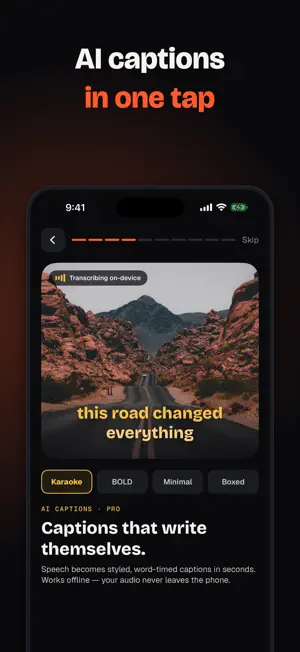
ReelCut is a fast, native video editor for iPhone and iPad. Cut clips on a real multi-track timeline, add captions, music, text and stickers, and export in up to 4K — all on your device, no account needed. EDIT ON A REAL TIMELINE • Multi-clip timeline with drag-to-reorder • Frame-accurate trim and split • Speed control and speed ramps, from slow motion to fast forward • Reverse clips • Mix photos and videos in one project AUTO CAPTIONS (PRO) • On-device speech transcription turns your audio into captions • Edit caption text and pick a style before export MUSIC AND VOICEOVER • Add music from your library or the built-in collection • Record voiceover straight onto the timeline (Pro) • Per-clip volume, fades and automatic music ducking • Waveforms so you can cut to the beat LOOK AND FEEL • Color filters with adjustable intensity • Visual effects, transitions and Ken Burns motion for photos • Crop, rotate, flip, zoom and pan • Aspect ratios for every platform: 9:16 for Reels, Shorts and TikTok, 1:1, 4:3, 16:9 TEXT, TITLES AND OVERLAYS • Text with fonts, colors, alignment and animations • Ready-made title templates • Stickers you can drag, pinch and rotate • Picture-in-picture overlays with chroma key (Pro) EXPORT • MP4 at 720p, 1080p or 4K, up to 60 fps • Animated GIF export • Save to Photos or share anywhere FREE VS PRO ReelCut is free to download and edit with. Free exports are up to 1080p at 30 fps and include a small ReelCut watermark. ReelCut Pro unlocks: • 4K and 60 fps export without watermark • Pro filters, effects and transitions • AI captions and voiceover • Picture-in-picture with chroma key Pro is available as a yearly subscription with a 7-day free trial, a monthly subscription, or a one-time lifetime purchase. Subscriptions renew automatically unless cancelled at least 24 hours before the end of the current period. Manage or cancel anytime in your App Store account settings. PRIVACY FIRST Editing, transcription and export all run on your device. Your footage is never uploaded to a server. Support: [email protected] Privacy Policy: https://ktnapps.com/reelcut/privacy Terms of Use: https://ktnapps.com/reelcut/terms
What’s new
Version 1.3 · Updated October 19, 2026
• All-new look: a darker, cleaner editor and a new app icon • New quick setup picks the right canvas for where you post • Timeline tracks are now color-coded by type • Bug fixes and performance improvements Questions or bug reports: [email protected]
App privacy
The developer, EMRE KOTUN, reported these privacy practices to Apple.
Data Not Collected
The developer does not collect any data from this app.
Alternatives to ReelCut: Video Editor & Maker
Looking for apps like ReelCut: Video Editor & Maker? Here are 6 similar apps on the App Store.
-
 ReelCut - Ai Video Editor
-
 EditLay
-
 ReelCut: Reel Video Maker
-
 Video Editor: Edit Paste Post
-
 BeatMotion: Reels on Beat
-
 VidKit - Video Editor
| App | Rating | Price | Last updated | Compare |
|---|---|---|---|---|
| ReelCut: Video Editor & Maker | – | Free | October 19, 2026 | |
| ReelCut - Ai Video Editor | – | Free | Sep 29, 2026 | Compare |
| EditLay | – | Free | Sep 28, 2026 | Compare |
| ReelCut: Reel Video Maker | – | Free | Oct 15, 2026 | Compare |
| Video Editor: Edit Paste Post | – | Free | Sep 3, 2026 | Compare |
| BeatMotion: Reels on Beat | – | Free | Oct 10, 2026 | Compare |
| VidKit - Video Editor | – | Free | Aug 1, 2026 | Compare |