

VidKit - Video Editor
Burak Bebek Photo & Video iPhoneiPadiPod touch
VidKit - Video Editor is a free Photo & Video app for iPhone and iPad by Burak Bebek. Requires iOS 16.0. Updated August 1, 2026.
- Price
- Free
- on the App Store
- Size
- 8 MB
- Age 4+
- Updated
- Aug 1
- 2026 · v1.0.5
Screenshots


About VidKit - Video Editor
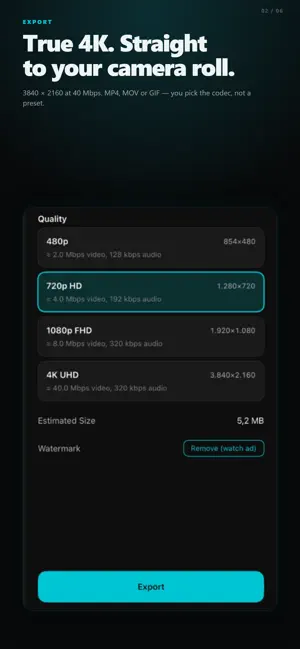
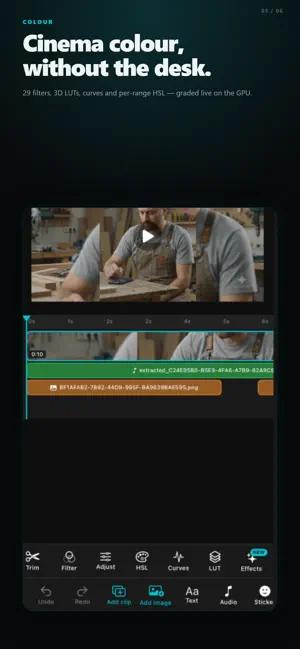
VidKit is a fast, private, offline video editor. Everything happens on your iPhone — no account, no upload, no server. EDITING • Trim, split, and reorder clips on a multi-track timeline • Add still images with adjustable display duration • 24+ transitions: dissolve, fade, slide, zoom, wipe, pixelize, radial, diagonal and more • Per-clip speed (0.1× – 4×), reverse, freeze frame • Rotate, flip, crop, mask (circle / rectangle) TEXT & OVERLAYS • Customizable text with font, size, color, bold, italic, alignment • Keyframeable position, scale, opacity, and rotation • Image and video overlays with chroma key (green screen) • Per-layer blend modes COLOR & FILTERS • Brightness, contrast, saturation, hue • HSL grading per color range • Curves with per-channel control • Import your own .cube 3D LUTs • Non-destructive — all adjustments are stored, never baked AUDIO • Multi-track audio (music, voiceover, extracted audio) • Per-track fade in/out, EQ (bass/treble), echo, reverb • Beat sync — auto-detect BPM and snap clips to the beat • In-app voiceover recording EXPORT • MP4 / MOV • Up to 4K at 60fps • Real bitrate control (not just presets) • Output saved to Photos PRIVACY • All processing happens on your device • No account or sign-in required • No analytics or tracking beyond ad requirements • Remove watermark with one short video ad Built for creators who want a full-featured editor without the subscription fatigue. Free with ads.
What’s new
Version 1.0.5 · Updated August 1, 2026
This update closes the gap between what you see in the preview and what lands in the exported file, and adds a new set of creative tools. EXPORT NOW MATCHES THE PREVIEW • Transitions between clips are rendered into the final video. • Picture-in-picture overlays — images, stickers and video — export with their blend modes and chroma key. • Keyframe animation on text and overlays is burned into the export. • Reverse, speed curves and freeze frames export correctly. • Mask, crop, flip and rotation are applied on export. • The project aspect ratio is honoured — 9:16, 1:1 and 4:5 no longer fall back to the source ratio. • Audio effects — EQ, reverb, echo, pitch, noise reduction and vocal isolation — are baked into the exported track. NEW • 14 creative effects that render live while you scrub: glitch, VHS, RGB split, blur, zoom blur, tilt-shift, duotone, posterize, halftone, invert, thermal, sharpen, bloom and edge detect. • Export as GIF alongside MP4 and MOV. • Save your own filter presets from any combination of adjustments, HSL and curves. • Remove the background from behind a person in an overlay clip, on device. • Auto-captions now work across multiple clips, transcribing only the part of each clip you kept. • Drag clips to reorder them on the timeline. • Deleted projects go to a trash that keeps them for 30 days. • Project backups now include the media files, so a restore brings back the whole edit. TIMELINE • The playhead follows playback and the timeline scrolls with it. • Tap anywhere on the ruler to seek there. • Audio, text, sticker and overlay bars can be selected and dragged; each type gets its own row instead of stacking on top of one another. • Dragging a bar past the edge scrolls the timeline instead of stopping. • Bars stay inside the timeline and can no longer be dragged out of view or duplicated by accident. • Effect and filter panels no longer cover the preview, so you can see what you are applying. FIXES • Stickers now appear in the preview and in the exported video. • Undo and redo keep working after switching projects. • The whole interface, including the user guide, is translated into all 38 supported languages.
App privacy
The developer, Burak Bebek, reported these privacy practices to Apple.
Data Used to Track You
The following data may be used to track you across apps and websites owned by other companies:
- Identifiers: Device ID
- Usage Data: Product Interaction, Advertising Data
- Diagnostics: Crash Data, Performance Data
Data Not Linked to You
The following data, which may be collected but is not linked to your identity, may be used for the following purposes:
- Identifiers: Device ID
- Usage Data: Product Interaction, Advertising Data
- Diagnostics: Crash Data, Performance Data
Used for: Third-Party Advertising
Alternatives to VidKit - Video Editor
Looking for apps like VidKit - Video Editor? Here are 6 similar apps on the App Store. The highest rated is Ocean: Video Editor (5.0/5), and all 6 are free to download.
-
 Ocean: Video Editor
5.0
Ocean: Video Editor
5.0
-
 ViLine Video Editor
5.0
ViLine Video Editor
5.0
-
 ExpoCut - Video Editor & Reels
-
 Smoothie: AI Video Enhancer
3.3
Smoothie: AI Video Enhancer
3.3
-
 Syn-FX: Video Editor & Effects
4.7
Syn-FX: Video Editor & Effects
4.7
-
 Flipagṙam
1.0
Flipagṙam
1.0
| App | Rating | Price | Last updated | Compare |
|---|---|---|---|---|
| VidKit - Video Editor | – | Free | August 1, 2026 | |
| Ocean: Video Editor | 5.0 / 5 (1) | Free | Jun 11, 2026 | Compare |
| ViLine Video Editor | 5.0 / 5 (1) | Free | Oct 23, 2026 | Compare |
| ExpoCut - Video Editor & Reels | – | Free | Oct 9, 2026 | Compare |
| Smoothie: AI Video Enhancer | 3.3 / 5 (7) | Free | Oct 14, 2026 | Compare |
| Syn-FX: Video Editor & Effects | 4.7 / 5 (51) | Free | Oct 14, 2026 | Compare |
| Flipagṙam | 1.0 / 5 (1) | Free | Sep 10, 2026 | Compare |