

ReelCut - Ai Video Editor
Ghetiya Khushbubahen Photo & Video iPhoneiPadiPod touch
ReelCut - Ai Video Editor is a free Photo & Video app for iPhone and iPad by Ghetiya Khushbubahen. Requires iOS 15.6. Updated September 29, 2026.
- Price
- Free
- on the App Store
- Size
- 134 MB
- Age 4+
- Updated
- Sep 29
- 2026 · v1.2
Screenshots
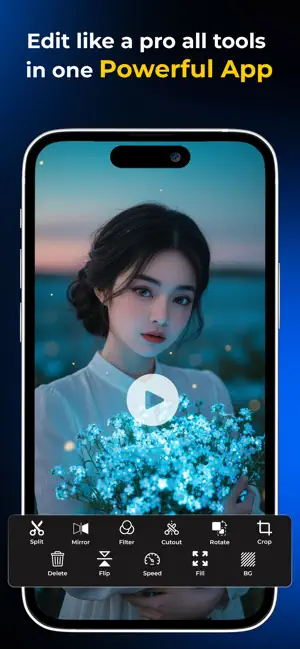
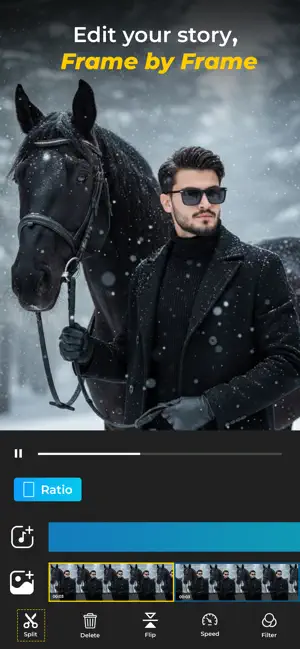


About ReelCut - Ai Video Editor
ReelCut - AI Video Editor is a powerful and easy-to-use video editing app designed for creators, influencers, vloggers, and anyone who wants to create professional-looking videos directly from their phone. Edit videos quickly using smart tools like merge, trim, split, crop, rotate, mirror, flip, speed control, filters, background fill, and more — all in one smooth and beginner-friendly app. Whether you’re creating content for Instagram, TikTok, YouTube, WhatsApp, or personal memories, ReelCut helps you make stunning videos in minutes. Powerful Video Editing Features Merge Videos Combine multiple video clips into one seamless video Perfect for vlogs, reels, and short videos Trim & Split Videos Cut unwanted parts easily Split videos into smaller clips with precision Delete Video Parts Remove unnecessary scenes instantly Clean and organize your edits quickly Filters & Effects Apply stylish filters to enhance your videos Create modern and cinematic looks easily Crop & Resize Crop videos for Instagram, TikTok, YouTube Shorts, and more Adjust aspect ratio with simple controls Rotate, Mirror & Flip Rotate videos to the correct angle Mirror and flip videos horizontally or vertically Speed Control Create slow-motion or fast-motion effects Perfect for reels and creative edits Background Fill Add custom background fill for vertical or square videos Make videos fit perfectly on social media platforms Why Choose ReelCut? Easy-to-use interface Fast and smooth editing experience Beginner-friendly controls High-quality export Perfect for social media creators Create professional videos without complicated software or editing skills. Perfect For Instagram Reels TikTok Videos YouTube Shorts Vlogs & Travel Videos Business & Marketing Videos Personal Video Editing How It Works Import your video clips Trim, split, merge, or crop Apply filters and speed effects Rotate, flip, or adjust background fill Export in high quality Share instantly on social media Why Users Love ReelCut Simple and beginner-friendly Fast editing with smooth performance Perfect for social media videos Easy trimming, splitting, and merging Create Stunning Videos Anytime With ReelCut - AI Video Editor, you can edit videos faster, easier, and smarter. Whether you’re making reels, shorts, vlogs, or fun videos, ReelCut gives you all the essential tools in one app. Merge & trim videos Apply filters & effects Crop, rotate & flip videos Control video speed Export high-quality videos Download ReelCut - AI Video Editor today and create amazing videos like a pro! Tag detail :- social media video editor professional video editor video trimmer app video merger app content creator tools video editor AI video editor video maker reels editor trim video merge video video cutter tiktok editor Terms And Condition:- https://reelcut.aireel.in/api/page/terms-and-condition Privacy Policy:- https://www.termsfeed.com/live/24a8f01d-0481-4518-8b17-d8f8687c8b67
What’s new
Version 1.2 · Updated September 29, 2026
We’ve improved ReelCut - AI Video Editor to make your video editing experience smoother, faster, and easier. Improvements • Enhanced video editing performance • Improved Trim, Split & Merge tools • Smoother Crop, Rotate, Mirror & Flip controls • Improved video speed controls for slow and fast motion • Enhanced Filters and Background Fill tools • Better overall editing experience Performance • Faster video processing • Improved app responsiveness • Smoother navigation and editing Bug Fixes • Fixed minor bugs and crashes • Improved overall app stability and reliability Update ReelCut today and enjoy a better video editing experience!
App privacy
The developer, Ghetiya Khushbubahen, reported these privacy practices to Apple.
Data Used to Track You
The following data may be used to track you across apps and websites owned by other companies:
- Usage Data: Advertising Data
Data Linked to You
The following data, which may be collected and linked to your identity, may be used for the following purposes:
- Usage Data: Advertising Data
Used for: Third-Party Advertising
Data Not Linked to You
The following data, which may be collected but is not linked to your identity, may be used for the following purposes:
- User Content: Photos or Videos
- Other Data: Other Data Types
Used for: App Functionality
Alternatives to ReelCut - Ai Video Editor
Looking for apps like ReelCut - Ai Video Editor? Here are 6 similar apps on the App Store.
-
 ReelCut: Video Editor & Maker
-
 ReelCut: Reel Video Maker
-
 Vibe Video — Video Editor
-
 Cutter - Auto Rough Cut
-
 AutoEdit
-
 Moments: Beat Video Editor
| App | Rating | Price | Last updated | Compare |
|---|---|---|---|---|
| ReelCut - Ai Video Editor | – | Free | September 29, 2026 | |
| ReelCut: Video Editor & Maker | – | Free | Oct 19, 2026 | Compare |
| ReelCut: Reel Video Maker | – | Free | Oct 15, 2026 | Compare |
| Vibe Video — Video Editor | – | Free | Sep 24, 2026 | Compare |
| Cutter - Auto Rough Cut | – | Free | Oct 11, 2026 | Compare |
| AutoEdit | – | Free | Oct 8, 2026 | Compare |
| Moments: Beat Video Editor | – | Free | Sep 8, 2026 | Compare |