

Universal TV Remote - Clicker
Wayne Mobile Utilities iPhoneiPadiPod touch
Universal TV Remote - Clicker is a free Utilities app for iPhone and iPad by Wayne Mobile. Rated 4.6/5 from 12 ratings. Requires iOS 15.0.
- Rating
- 4.6
- 12 ratings
- Price
- Free
- on the App Store
- Size
- 69 MB
- Age 4+
- Updated
- Oct 3
- 2026 · v1.1.8
Screenshots
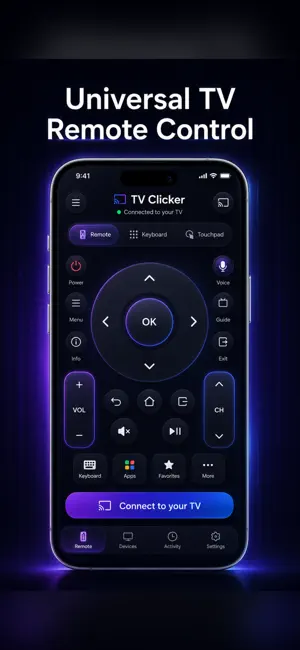

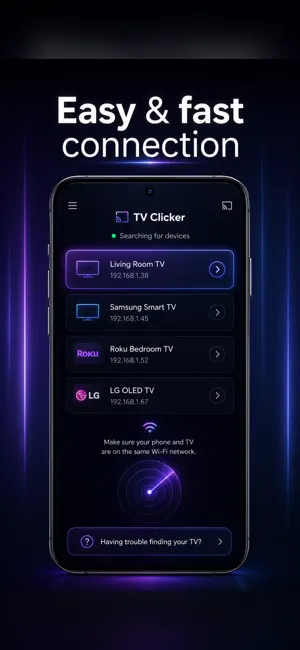

About Universal TV Remote - Clicker
Lost your TV remote? Turn your phone into a universal TV remote control for every Smart TV in your home. This universal TV remote control app replaces your physical remote when it's lost, broken, or out of batteries. Connect over Wi-Fi and control your TV in seconds — no pairing codes, no IR blaster needed. ONE TV REMOTE FOR EVERY BRAND Samsung TV Remote Full remote control for TV Samsung (Tizen Smart TV): power, volume, channels, apps, and keyboard input on all recent Samsung Smart TV models. LG TV Remote Complete LG remote control for LG webOS televisions — navigate menus, switch inputs, and type searches with your phone. Roku Remote Control Works as a Roku remote for Roku TV and Roku players: channel navigation, playback, and fast text entry — the easy Roku TV remote. Android TV & Google TV Remote Android TV remote and Google TV remote with D-pad, touchpad, and keyboard for Sony, TCL, Philips, and Chromecast with Google TV devices. More Supported Brands Vizio (SmartCast), Hisense, Panasonic, Toshiba and more — one universal remote control app for all TVs in your home. FULL CONTROL OF YOUR TV • Power, TV volume control, mute, and channel control. • Directional D-pad with OK, menu, home, back, and info. • Source/input selector (HDMI, AV, TV…) based on your model. • Playback controls: play, pause, fast-forward, and rewind. • Keyboard to type searches and passwords on your TV effortlessly. • Touchpad with gestures to glide through menus by swiping and tapping. CAST TO TV & SCREEN MIRRORING • Cast photos and videos from your phone to the big screen. • Mirror your phone's screen on your television. • Works with all major Smart TV brands and platforms over Wi-Fi. HOW TO USE THIS TV REMOTE APP 1. Download the universal TV remote control app for free. 2. Connect your phone to the same Wi-Fi network as your Smart TV. 3. The remote app auto-detects your TV — tap to connect. 4. Done! Your TV remote control is ready to use. TROUBLESHOOTING • Phone and Smart TV must be on the same Wi-Fi network. • TV not detected? Add it by IP — the TV remote app detects the brand for you. • Restarting your TV and router resolves most connection issues. • You can save multiple TVs and switch between them instantly. PREMIUM VERSION • No ads: a clean, uninterrupted remote control experience. • Advanced features and priority support. INDEPENDENT & TRUSTWORTHY This is an independent TV remote control app. All brand names and logos belong to their respective owners and are used only to describe compatibility; we are not officially affiliated with or endorsed by them. We test on many TV models but cannot guarantee compatibility with every model. Download this universal TV remote control for free and control your entire TV from your phone — the only smart TV remote you need. CONTACT Support: [email protected] Terms of use: https://waynemobile.com/terms/ Privacy policy: https://waynemobile.com/privacy-policy/
Ratings & reviews
4.6
12 ratings
What’s new
Version 1.1.8 · Updated October 3, 2026
You can now cast photos and videos to Chromecast and Google TV straight from the app, with full playback controls. Added support for older LG TVs. TVs are found faster and more reliably, and they appear and disappear from the list on their own as you turn them on and off. Various fixes and improvements.
App privacy
The developer, Wayne Mobile, reported these privacy practices to Apple.
Data Used to Track You
The following data may be used to track you across apps and websites owned by other companies:
- Location: Coarse Location
- Identifiers: Device ID
- Usage Data: Product Interaction
Data Linked to You
The following data, which may be collected and linked to your identity, may be used for the following purposes:
- Location: Coarse Location
- Identifiers: Device ID
- Usage Data: Product Interaction
Used for: Third-Party Advertising, Developer’s Advertising or Marketing, Analytics
Data Not Linked to You
The following data, which may be collected but is not linked to your identity, may be used for the following purposes:
- Diagnostics: Performance Data, Other Diagnostic Data
Used for: Analytics, App Functionality
Alternatives to Universal TV Remote - Clicker
Looking for apps like Universal TV Remote - Clicker? Here are 6 similar apps on the App Store. The highest rated is TV Remote - Universal Control™ (5.0/5), and all 6 are free to download.
-
 TV Remote - Universal Control™
5.0
TV Remote - Universal Control™
5.0
-
 Remotely - Universal TV Remote
-
 Remote Control for TV ‧
4.9
Remote Control for TV ‧
4.9
-
 Remote for Roku TV & Player
5.0
Remote for Roku TV & Player
5.0
-
 Remoto - Universal TV Control
4.9
Remoto - Universal TV Control
4.9
-
 Universal TV Remote: Smart TVs
4.6
Universal TV Remote: Smart TVs
4.6
| App | Rating | Price | Last updated | Compare |
|---|---|---|---|---|
| Universal TV Remote - Clicker | 4.6 / 5 (12 ratings) | Free | October 3, 2026 | |
| TV Remote - Universal Control™ | 5.0 / 5 (2) | Free | Oct 17, 2026 | Compare |
| Remotely - Universal TV Remote | – | Free | Oct 22, 2026 | Compare |
| Remote Control for TV ‧ | 4.9 / 5 (8) | Free | Jul 4, 2026 | Compare |
| Remote for Roku TV & Player | 5.0 / 5 (1) | Free | Sep 30, 2026 | Compare |
| Remoto - Universal TV Control | 4.9 / 5 (9) | Free | Oct 21, 2026 | Compare |
| Universal TV Remote: Smart TVs | 4.6 / 5 (13) | Free | Oct 8, 2026 | Compare |