

Remote for Roku TV & Player
Auxility, Inc. Utilities iPhoneiPadiPod touchApple Watch
Remote for Roku TV & Player is a free Utilities app for iPhone and iPad by Auxility, Inc. Rated 5.0/5 from 1 ratings. Requires iOS 18.0.
- Rating
- 5.0
- 1 ratings
- Price
- Free
- on the App Store
- Size
- 45 MB
- Age 4+
- Updated
- Sep 30
- 2026 · v1.0.3
Screenshots
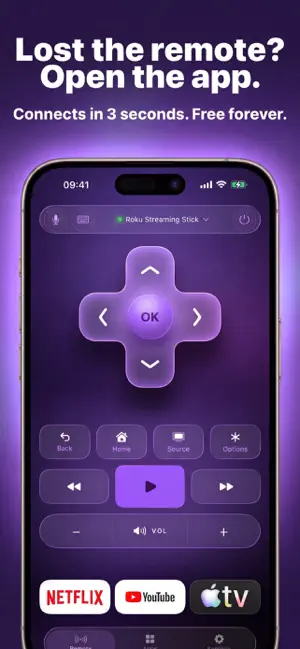


About Remote for Roku TV & Player
Lost the remote again? Open the app — your Roku is already there. Remote for Roku TV & Player finds your Roku on Wi-Fi in seconds. No codes, no cables, no account. The core remote is free forever. WORKS IN SECONDS — NOTHING TO SET UP Open the app and it is already looking for your Roku. Same Wi-Fi, and you are in control. If your router is difficult, type the IP by hand — the app checks it before saving. A REMOTE THAT FEELS LIKE A REMOTE A big D-pad you can hit without looking. Buttons that press back with a soft haptic tap. All on one screen: • Up / Down / Left / Right + OK • Back, Home, Options • Play / Pause, rewind, fast-forward, instant replay • Volume and instant Mute • Power TYPE WITH YOUR IPHONE KEYBOARD Anyone who has entered a password with arrow keys knows the pain. Tap the keyboard icon and type on your phone — letters land on the TV as you go. Logins, passwords, searches: seconds instead of minutes. SAY IT INSTEAD OF SPELLING IT Hold the mic, say the title, let go. The app opens search on your Roku and types it in for you — recognition happens on your iPhone. ON YOUR WRIST — THE APPLE WATCH APP A real remote on your watch, not a notification. • Full D-pad with OK, Back and Home • Play/Pause, skip, volume and power • Your channels — see what is installed and open it with a tap • Type or dictate straight into the search field on the TV • Find my remote — make the physical Roku remote chime from your wrist • Add a Roku by IP on the watch, so setup works without your phone It goes through your iPhone when the phone is nearby, and straight over Wi-Fi when it is not. Leave the phone in the kitchen. CAST & MIRROR (PRO) Put your iPhone on the TV, on Roku models that support AirPlay 2: • Photos — flip through a holiday album on the big screen • Videos — pick one from your library and play it on the TV • Your whole screen — the app checks your Roku, then walks you through the two taps in Control Center Screen mirroring is run by iOS itself, so there is no fake in-app button here — we show you where the real one is. EVERY CHANNEL, ONE TAP AWAY A tab with every channel installed on your Roku. Open the one you want instead of scrolling the TV home screen, and pin your favorites to the top. CONTROL IT FROM EVERYWHERE ELSE • Lock Screen widget — Play/Pause and volume without unlocking • StandBy — a bedside remote while your iPhone charges • Control Center — Play, Mute and Power next to your flashlight • Dynamic Island — a live mini-player when something is paused • Home Screen widgets — your key buttons, one tap away HEY SIRI, PAUSE ROKU "Hey Siri, pause Roku." "Volume up on Roku." "Open Netflix on Roku." Nothing to configure — Siri already knows your channels. ONE PURCHASE, THE WHOLE FAMILY Buy Pro once and Family Sharing covers your whole group. The core remote stays free forever, with no ads. BUILT FOR EVERYONE • VoiceOver announces every button and every event • Large text up to AX5 — the layout holds, the D-pad gains labels • Reduce Motion — animations calm down, controls stay instant • 50+ languages, switchable in the app without a restart YOUR TV IS YOUR BUSINESS Commands go from your iPhone straight to your Roku across your own Wi-Fi — never through our servers. We do not know what you watch. No account, no ad trackers. WORKS WITH • Roku TVs from TCL, Hisense, Sharp, Onn, Philips, JVC and RCA • Roku Streaming Stick and Express, including 4K / 4K+ • Roku Premiere and Roku Ultra, all generations • Roku Streambar and Smart Soundbar • Current and older models on the same Wi-Fi A remote should not make you think about it. Free to download, ten seconds to try, yours to keep. Made in Canada. Privacy Policy: https://roku.auxility.ca/privacy/ Terms of Use: https://roku.auxility.ca/terms/ An independent app by Auxility, Inc. Not affiliated with, endorsed by, or sponsored by Roku, Inc. Roku, Roku TV, Roku Streaming Stick and Roku Express are trademarks of Roku, Inc., used only to indicate device compatibility.
What’s new
Version 1.0.3 · Updated September 30, 2026
Faster to find your Roku, steadier on your wrist, and a new button for Control Center. PICK YOUR OWN CONTROL CENTER BUTTON • A new Control Center and Lock Screen control lets you choose which Roku button it sends — Home, Back, Play/Pause, Mute or any other key you use most FINDING YOUR ROKU • More reliable discovery right after you allow Local Network access — the app now retries instead of giving up the moment iOS asks • If Local Network access is turned off, you now see a clear card telling you how to turn it back on, instead of an empty search • Scanning again no longer briefly says no Roku was found while it is still looking APPLE WATCH • Fixed a crash on launch that could happen when a Roku was added by IP and your iPhone was nearby • The whole button area on the watch is now tappable, not just the icon ALSO IN THIS UPDATE • The Live Activity now closes when you are done instead of lingering or stacking up • Canceling your subscription can no longer happen by accident — it now asks you to confirm first • Streaming players without HDMI inputs get a Replay button instead of the input switcher • The main button on the first-run screens is no longer cut off on some iPhones • The input tile label is readable, translated into your language, and long-press to rename works again • Sheets and pop-up messages use the new glass look on iOS 26 and iOS 27, with no more light flash when they open • Ready for iOS 27 Thanks for the reviews and the bug reports — keep them coming.
App privacy
The developer, Auxility, Inc., reported these privacy practices to Apple.
Data Used to Track You
The following data may be used to track you across apps and websites owned by other companies:
- Purchases: Purchase History
- Identifiers: User ID, Device ID
- Usage Data: Product Interaction, Advertising Data, Other Usage Data
- Diagnostics: Crash Data, Performance Data, Other Diagnostic Data
Data Linked to You
The following data, which may be collected and linked to your identity, may be used for the following purposes:
- Purchases: Purchase History
- Identifiers: User ID, Device ID
- Usage Data: Product Interaction, Advertising Data, Other Usage Data
- Diagnostics: Crash Data, Performance Data, Other Diagnostic Data
Used for: Developer’s Advertising or Marketing, Analytics, App Functionality
Alternatives to Remote for Roku TV & Player
Looking for apps like Remote for Roku TV & Player? Here are 6 similar apps on the App Store. The highest rated is Smart TV Remote for Roku (5.0/5), and all 6 are free to download.
-
 Smart TV Remote for Roku
5.0
Smart TV Remote for Roku
5.0
-
 Universal TV Remote TelePad
5.0
Universal TV Remote TelePad
5.0
-
 TV Remote · Universal Cast
4.7
TV Remote · Universal Cast
4.7
-
 Remote Control for Roku TV |
5.0
Remote Control for Roku TV |
5.0
-
 Universal Remote TV Smart Roku
5.0
Universal Remote TV Smart Roku
5.0
-
 TV Remote Control - Zapping
5.0
TV Remote Control - Zapping
5.0
| App | Rating | Price | Last updated | Compare |
|---|---|---|---|---|
| Remote for Roku TV & Player | 5.0 / 5 (1 rating) | Free | September 30, 2026 | |
| Smart TV Remote for Roku | 5.0 / 5 (1) | Free | May 27, 2026 | Compare |
| Universal TV Remote TelePad | 5.0 / 5 (1) | Free | Aug 22, 2026 | Compare |
| TV Remote · Universal Cast | 4.7 / 5 (6) | Free | Oct 13, 2026 | Compare |
| Remote Control for Roku TV | | 5.0 / 5 (1) | Free | May 22, 2026 | Compare |
| Universal Remote TV Smart Roku | 5.0 / 5 (1) | Free | Jul 1, 2025 | Compare |
| TV Remote Control - Zapping | 5.0 / 5 (1) | Free | Sep 23, 2026 | Compare |