

Bricks Calendar
Taleschamber Limited Productivity iPhoneiPadiPod touch
Bricks Calendar is a free Productivity app for iPhone and iPad by Taleschamber Limited. Requires iOS 18.0. Updated September 20, 2026.
- Price
- Free
- on the App Store
- Size
- 66 MB
- Age 4+
- Updated
- Sep 20
- 2026 · v1.0.3
Screenshots
About Bricks Calendar
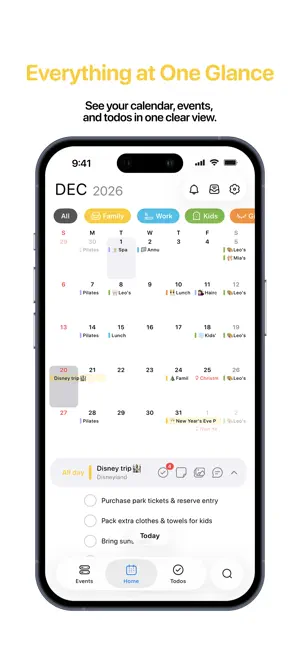
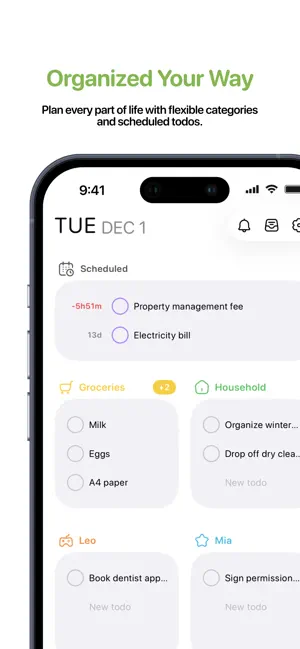
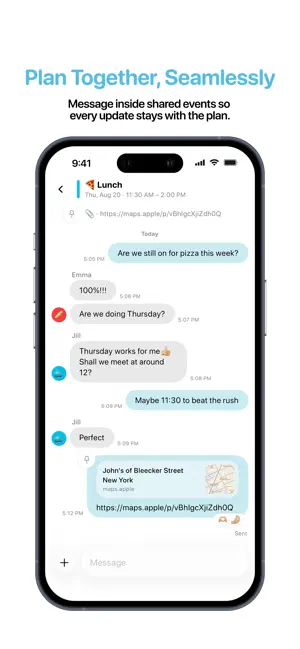
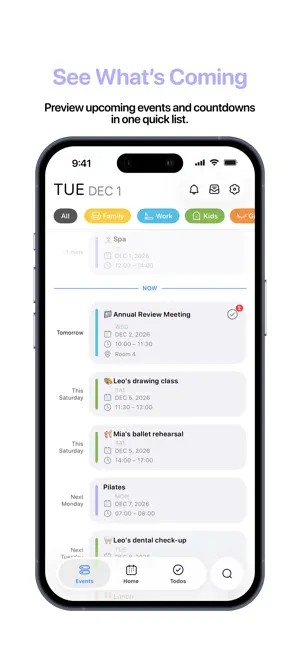
Plan your day without bouncing between a calendar, a todo app, and group chat. Bricks Calendar brings events, todos, shared plans, and conversations into one calm, color-coded view. Each Brick is a space for one part of life—personal plans, a partner, family, study, or work. Keep it private, or invite the people who need to be there. SEE EVERYTHING AT A GLANCE • Scan your month and agenda together • Preview upcoming events and countdowns • Keep scheduled todos and flexible lists beside your calendar • Add repeating events and todos, reminders, notes, photos, files, and links PLAN TOGETHER • Share a Brick with edit or view-only access • Keep todos and updates with the event they belong to • Message inside an event instead of searching through separate chats • Get notified when shared plans change MAKE IT YOURS • Organize plans with colors and icons • Link supported Apple Calendars and manage them from Bricks • Choose Home Screen widgets for calendars, events, and todos • Use Bricks in English, Traditional Chinese, Japanese, Korean, or German BRICKS PRO Create and manage your own Bricks with Bricks Pro. New accounts can try Bricks Pro for 7 days without a payment method. People invited to a shared Brick can view it and message for free. Editing Brick or event content requires Bricks Pro and edit access. Apple Family Sharing shares subscription eligibility only; each Brick still needs its own invitation. Privacy: https://bricks-calendar.com/privacy/ Terms: https://bricks-calendar.com/terms/ Support: https://bricks-calendar.com/support/
What’s new
Version 1.0.3 · Updated September 20, 2026
New Features • Seen status in messages when a collaborator has read yours Updates • Improved message page speed and reliability • Improved responsiveness when switching categories in the todo widget • Improved the feel of Home month swipes and the Events widget header • Improved text formatting in the event memo editor • Fixed todo categories disappearing after signing out and back in • Fixed layout on Home, the Events widget and shared todo categories • Fixed leftover local data copies
App privacy
The developer, Taleschamber Limited, reported these privacy practices to Apple.
Data Linked to You
The following data, which may be collected and linked to your identity, may be used for the following purposes:
- Purchases: Purchase History
- Contact Info: Email Address, Name
- User Content: Emails or Text Messages, Photos or Videos, Customer Support, Other User Content
- Identifiers: User ID, Device ID
- Diagnostics: Other Diagnostic Data
Used for: App Functionality
Alternatives to Bricks Calendar
Looking for apps like Bricks Calendar? Here are 6 similar apps on the App Store. The highest rated is Kenotex: AI Task Planner (5.0/5), and all 6 are free to download.
-
 Pulse Family
-
 TidyList - Task by category
-
 키피럽 - 커플,계획,목표,다이어리
-
 BLISS Note: Notes PDF Planner
-
 Kenotex: AI Task Planner
5.0
Kenotex: AI Task Planner
5.0
-
 Sequence: Time Block Planner
| App | Rating | Price | Last updated | Compare |
|---|---|---|---|---|
| Bricks Calendar | – | Free | September 20, 2026 | |
| Pulse Family | – | Free | Oct 24, 2026 | Compare |
| TidyList - Task by category | – | Free | Aug 11, 2026 | Compare |
| 키피럽 - 커플,계획,목표,다이어리 | – | Free | Jun 26, 2026 | Compare |
| BLISS Note: Notes PDF Planner | – | Free | Oct 22, 2026 | Compare |
| Kenotex: AI Task Planner | 5.0 / 5 (1) | Free | Oct 15, 2026 | Compare |
| Sequence: Time Block Planner | – | Free | Oct 12, 2026 | Compare |
Compare Bricks Calendar with the top alternatives: ratings, updates, ASO score and keyword gaps →