

BLISS Note: Notes PDF Planner
BLISS AI Inc. Productivity iPhoneiPadiPod touchMac
BLISS Note: Notes PDF Planner is a free Productivity app for iPhone and iPad by BLISS AI Inc. Requires iOS 15.5. Updated October 20, 2026.
- Price
- Free
- on the App Store
- Size
- 173 MB
- Age 4+
- Updated
- Oct 20
- 2026 · v1.7.1
Screenshots
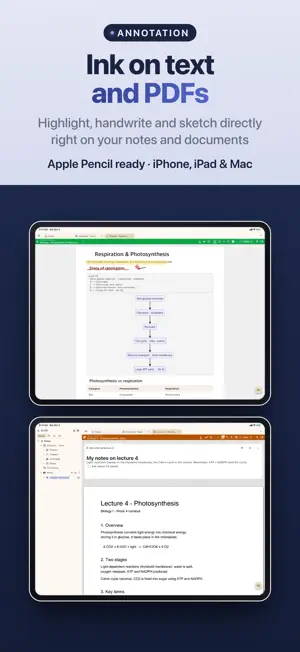


About BLISS Note: Notes PDF Planner
One pencil across every note — ink on text notes, PDFs, slides and sheets, open Word, PowerPoint and Google files as notes, and keep notes inside notes. An all-in-one notebook for iPad, iPhone and Mac, built for Apple Pencil. ■ One pencil, every note • The same pens, highlighter and tools on text notes, PDFs, drawings and sheets — ballpoint, fountain pen and more • Write over your typed notes — ink stays on its page as you edit • Free canvas, or A4, Letter, B5, square and slide paper, with lasso select & move • Vector shapes and flowcharts with connectors, lock and group • Handwriting to text, handwritten titles, and a zoom-write strip for small text ■ Bring in what you already have • Word as a page note that keeps its layout, Excel and CSV as a sheet note, PowerPoint as editable slides to write on • Google Docs, Sheets and Slides — from a link or your own Google Drive • Notion pages and exports, and Markdown files — with sub-pages, databases and media • Export to PDF, PPTX and Excel, or AirDrop a note as a .blissnote file ■ Slides & spreadsheets • Slide paper with title and body layouts; present with pen and laser pointer • Sheet notes — formulas that recalculate, sort & filter, find & replace, a fill handle, and ink on top ■ Write together, nearby • Share a note live with devices on the same Wi-Fi. Guests can view, write on their own layer, or edit together ■ Planner, timetable & tasks • Tasks, planner notes synced with your iCloud calendar, and a note for every event • Project dashboard — progress, overdue tasks and next deadlines at a glance, with a period and status for each project • Class timetable — tap a period to open its notes • Recurring events, lunar anniversaries and D-day countdowns ■ Exam prep & memorization • Question bank & wrong-answer notes — split an exam PDF into questions; missed ones return on a 1, 3, 7, 14 and 30-day schedule • Vocabulary flashcards and a memorization sheet (red sheet) ■ Counseling notes • For school counseling and HR one-on-ones — records, statistics, group sessions, reminders, PDF reports and a Face ID lock, kept only on your devices and your own cloud ■ Record, transcribe & translate • Turn meetings and lectures into text, and translate on-device, even offline (59 languages) • Tap ink you wrote while recording to play from that moment ■ Find & connect • Search text and PDFs, plus your handwriting, recording transcripts and #tags • Embed PDFs, drawings, videos and other notes inside a note; link notes and see what links back • Shelves, six view modes, a page grid, split view and YouTube playlists • Headings, lists, tables, checklists, code blocks — and clean paste from AI answers ■ PDFs & the web • Pen, highlighter and underline; note pages between PDF pages; Sepia, Dim and Night reading modes • Automatic paper citations in APA, MLA, IEEE & BibTeX • Annotate web pages with highlights, notes and pen — only your annotations are stored ■ Make it your own • Covers and paper from your own images or Unsplash, stickers, washi tape you draw like a pen, and your drawing behind the Home screen ■ Free & Pro • Free: every tool, for up to 7 notes and 5 PDFs • Bliss Note Pro (monthly or yearly subscription): unlimited notes and PDFs, plus cloud and calendar sync ■ Privacy first • No sign-up to start — your notes live on your device • Pro sync goes only through your own iCloud or Google Drive • Available in 24 languages Terms of Service: https://blissnote.app/terms.html Privacy Policy: https://blissnote.app/privacy.html Terms of Use (EULA): https://www.apple.com/legal/internet-services/itunes/dev/stdeula/
What’s new
Version 1.7.1 · Updated October 20, 2026
Bliss Note v1.7.1 — see what AI apps did in your notes, live transcription on Mac, and annotated PDFs that keep text boxes and stickers. • AI activity (Mac · Pro) — what AI apps read, searched and wrote, shown like a conversation for each app and device; click to open the note. The log stays on this computer • Write access per device (Mac) — in the 'Devices that connect' table of AI connections, choose read-only or 'Can write' for each device; the recommended address for other devices comes first • Live transcription on Mac — transcribe while you record, and the recording carries on when you switch microphones • PDF with annotations — text boxes, images, stickers, tape and sticky notes on the PDF now export too • Paste several lines into the title — the first line becomes the title, the rest goes into the body with its formatting • Tap the empty paper below a text note to start writing right there • Move, duplicate or delete a code block as a whole, and type straight into new text boxes • Right-click a note in the sidebar to delete it • Note lock — on Mac, notes no longer lock a minute after the window is covered; they lock when the computer locks or sleeps • Plus fixes, such as a project table column acting as the title after being dragged to the front, and better stability See all updates: https://blissnote.app/updates.html?lang=en
App privacy
The developer, BLISS AI Inc., reported these privacy practices to Apple.
Data Not Linked to You
The following data, which may be collected but is not linked to your identity, may be used for the following purposes:
- Purchases: Purchase History
- Identifiers: User ID
Used for: App Functionality
Alternatives to BLISS Note: Notes PDF Planner
Looking for apps like BLISS Note: Notes PDF Planner? Here are 6 similar apps on the App Store. The highest rated is Pronotes: Notes & PDF (5.0/5), and 5 of the 6 are free to download.
-
 Scribbl: Notes & PDF Markup
-
 Amazing Notes: Lecture & PDF
-
 Mena: Notes, Mind Map & Study
-
 Pronotes: Notes & PDF
5.0
-
 Nib - Handwritten Diary
-
 Infinite Canvas Notes: Canvio
5.0
| App | Rating | Price | Last updated | Compare |
|---|---|---|---|---|
| BLISS Note: Notes PDF Planner | – | Free | October 20, 2026 | |
| Scribbl: Notes & PDF Markup | – | Free | Oct 14, 2026 | Compare |
| Amazing Notes: Lecture & PDF | – | Free | Jun 25, 2026 | Compare |
| Mena: Notes, Mind Map & Study | – | Free | Oct 21, 2026 | Compare |
| Pronotes: Notes & PDF | 5.0 / 5 (1) | 9.99 USD | Oct 21, 2026 | Compare |
| Nib - Handwritten Diary | – | Free | Oct 16, 2026 | Compare |
| Infinite Canvas Notes: Canvio | 5.0 / 5 (2) | Free | Oct 21, 2026 | Compare |