

Canvio: Mind Maps & Notes
Aftab fazal Qayum Productivity iPhoneiPadiPod touchMac
Canvio: Mind Maps & Notes is a free Productivity app for iPhone and iPad by Aftab fazal Qayum. Rated 5.0/5 from 2 ratings. Requires iOS 17.0.
- Rating
- 5.0
- 2 ratings
- Price
- Free
- on the App Store
- Size
- 15 MB
- Age 4+
- Updated
- Sep 2
- 2026 · v5.5
Screenshots


About Canvio: Mind Maps & Notes
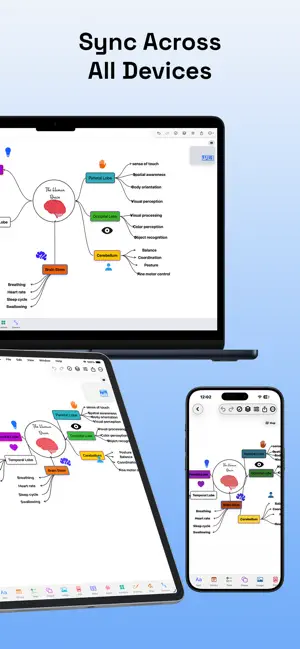
Canvio is a notes, whiteboard, PDF annotation and planning app for iPhone, iPad and Mac. Create an infinite canvas where you can write, draw, type, connect ideas, organize research, annotate PDFs, plan projects and keep everything in one flexible workspace. CREATE YOUR OWN CANVAS Start by creating a canvas, naming it and choosing an icon. Use an infinite canvas for open thinking, or choose structured sizes like A4, A5, Letter, iPad or a custom canvas size. Each canvas can also include multiple pages, so one project, subject or idea can stay organized in one place. WRITE, TYPE AND CUSTOMIZE TEXT • Double tap anywhere on the canvas to start writing quickly • Add text with fonts, custom fonts, font size, styles and colors • Customize text background colors, borders and strokes • Place text anywhere and move it freely on the canvas • Use Canvio for class notes, study notes, ideas, planning and visual thinking DRAW WITH APPLE PENCIL • Draw with pen, pencil, marker, highlighter and ruler tools • Use Apple Pencil for smooth handwriting, sketching and annotation • Draw directly on the canvas or inside separate drawing cards • Convert handwriting or drawing text into editable text objects • Use smart shapes to turn rough hand-drawn shapes into clean shapes BUILD MIND MAPS, DIAGRAMS AND FLOWCHARTS • Connect ideas with smooth connectors • Add lines, rectangles, triangles, polygons, circles and arrows • Create mind maps, concept maps, flowcharts and diagrams • Add sticky notes, symbols, images and text blocks • Organize everything with layers, grouping, multi-select, move and delete tools PLAN PROJECTS AND TASKS Canvio is not only for notes. It also helps you plan and organize work visually. • Add to-dos with due dates, priority and subtasks • Use templates for comparison, project boards, mind maps, meeting notes, weekly planning and study planning • Build project boards, research boards, study plans and brainstorming spaces • Keep tasks, notes, diagrams and references together on the same canvas ANNOTATE PDFS AND DOCUMENTS • Open PDFs page by page like a book • Swipe or scroll through PDF pages • Draw, highlight and write directly on PDF pages • Extract PDF pages or content back onto your canvas • Use PDFs together with notes, images, drawings, audio and tasks SCAN, IMPORT AND CAPTURE IDEAS Bring different types of content into one place instead of switching between many apps. • Add images from your gallery or camera • Scan images and turn them into PDF-style documents • Extract text from images using OCR • Add tables for structured information • Record audio notes or import audio files • Play audio directly from the canvas • Add YouTube links and watch videos inside your workspace CUSTOMIZE YOUR WORKSPACE • Choose canvas background palettes • Use dots, grid, lines, columns or blank backgrounds • Switch between light mode and dark mode • Organize large ideas with pages inside each canvas • Zoom in for details or zoom out to see the full picture EXPORT, SHARE AND SYNC When your work is ready, export it easily. • Export the full canvas as PNG or PDF • Save clean, high-quality notes, diagrams, plans and boards • Sync across iPhone, iPad and Mac BUILT FOR STUDENTS, CREATORS AND PROFESSIONALS Students can create study notes, mind maps, PDF annotations, research boards and exam plans. Professionals can plan projects, create meeting notes, organize tasks, build diagrams and present ideas clearly. Creators and designers can collect inspiration, sketch concepts, create mood boards, organize references and brainstorm visually. Canvio gives your ideas more room than a normal notes app. Write by hand, type, draw, annotate, plan, connect and organize everything on one powerful canvas. Free to download. No account is required to start. Create your first canvas and give your ideas room to grow. Terms of Use: https://ak375456.github.io/canvio-site/terms.html Privacy Policy: https://ak375456.github.io/canvio-site/privacy.html
What’s new
Version 5.5 · Updated September 2, 2026
• Draw and handwrite directly on sticky notes with Apple Pencil or your finger. • Sticky-note drawings now sync across your devices. • New smart alignment guides snap items to matching edges and centers. • Improved shape resizing with dimension locking and directional resizing. • Faster, smoother lasso selection on busy canvases. • Added drawing support to exports and canvas previews. • General performance improvements and bug fixes.
App privacy
The developer, Aftab fazal Qayum, reported these privacy practices to Apple.
Data Linked to You
The following data, which may be collected and linked to your identity, may be used for the following purposes:
- Contact Info: Email Address
- Identifiers: User ID
Used for: App Functionality
Data Not Linked to You
The following data, which may be collected but is not linked to your identity, may be used for the following purposes:
- User Content: Photos or Videos, Audio Data
Used for: App Functionality
Alternatives to Canvio: Mind Maps & Notes
Looking for apps like Canvio: Mind Maps & Notes? Here are 6 similar apps on the App Store. The highest rated is LocalNotebook (5.0/5), and 5 of the 6 are free to download.
-
 BLISS Note: Notes PDF Planner
-
 AiX (62b03d)
-
 BaseMind
-
 PlotWeaver RPG
-
 LocalNotebook
5.0
LocalNotebook
5.0
-
 Focus Music Timer
5.0
Focus Music Timer
5.0
| App | Rating | Price | Last updated | Compare |
|---|---|---|---|---|
| Canvio: Mind Maps & Notes | 5.0 / 5 (2 ratings) | Free | September 2, 2026 | |
| BLISS Note: Notes PDF Planner | – | Free | Oct 6, 2026 | Compare |
| AiX (62b03d) | – | Free | Jul 14, 2026 | Compare |
| BaseMind | – | 4.99 USD | Jul 2, 2025 | Compare |
| PlotWeaver RPG | – | Free | Sep 3, 2026 | Compare |
| LocalNotebook | 5.0 / 5 (1) | Free | Jun 29, 2026 | Compare |
| Focus Music Timer | 5.0 / 5 (1) | Free | Feb 11, 2026 | Compare |