

em — Markdown Writer & Editor
Justin Cox Productivity iPhoneiPadiPod touchMac
em — Markdown Writer & Editor is a paid Productivity app for iPhone and iPad by Justin Cox. Rated 5.0/5 from 1 ratings. Requires iOS 26.0.
- Rating
- 5.0
- 1 ratings
- Price
- 14.99 USD
- on the App Store
- Size
- 21 MB
- Age 4+
- Updated
- Oct 30
- 2026 · v1.4.1
Screenshots
Save to Pinterest

About em — Markdown Writer & Editor
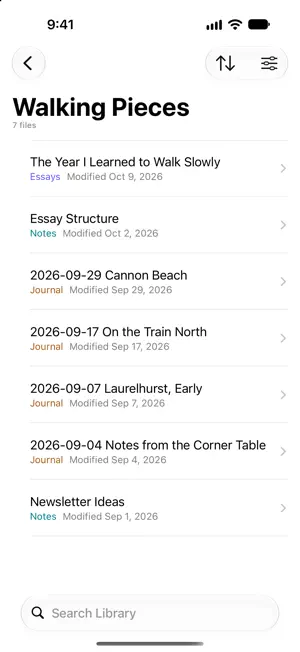
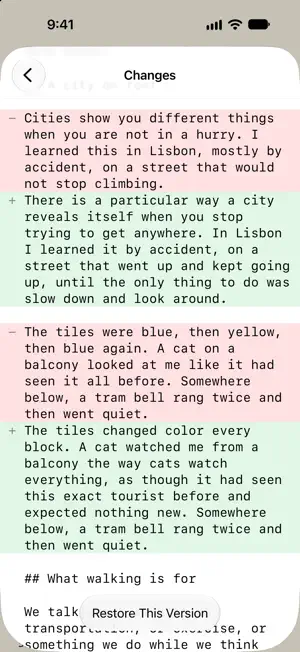
em is a privacy-first universal Markdown writing app for Mac, iPad, and iPhone that takes advantage of Apple's Foundation Models to give you editorial feedback. It also connects to the Ghost API to publish and edit your website. Your files are yours, and you're the only one who should decide what to do with 'em. WRITE 'EM WITH MARKDOWN Capture your thoughts in a distraction-free Markdown editor tuned for each device, including the iPhone Duo. em counts your words and reading time, but only if you want it to. TRACK 'EM Set a word goal or a deadline for a file, or a daily, weekly, or monthly goal for everything you write. Want 500 words a day? 50,000 by the end of the month? em keeps track, shows your pace and your streak, and holds you to it. MAP 'EM em can remember where you started writing each file, including every place you worked on 'em. See all of them on a map and follow your writing journey in a whole new way. Location is off until you turn it on for a library, and it stays out of anything you share or send to AI. FIND 'EM WITH SMART SEARCH Smart Search lists every file holding your words. Use quotes, +, -, OR, and * for precision, filter by library, tag, status, or year, and save any search as a Smart Folder that stays current. Only remember what a piece was about? Ask em. PROTECT 'EM WITH VERSION HISTORY Every edit is automatically versioned and backed up to iCloud. Compare and restore versions from any device, so an accidental deletion never costs you your writing. PUBLISH 'EM WITH GHOST Connect em to your Ghost site to edit, back up, and publish natively in Markdown that maps to Ghost's cards. em supports 19 Ghost editorial cards, drafts, scheduling, newsletters, and Ghost pages. EXPLORE 'EM WITH AI (BUT ONLY IF YOU WANT TO) Ask em questions and get answers grounded in your files, not the internet. On OS 27, Siri can search, add, or edit notes in the libraries you approve. Get an Editorial Review from a prompt you can read and edit. em doesn't write your drafts; it helps you edit 'em. ALL FEATURES - GOALS: Word and deadline goals, daily, weekly, and monthly, with pace and streaks - CALENDAR: Every day you wrote, in one place - PLACES: Every place you've written, on a map - SMART SEARCH: Search operators, filters, and Smart Folders - VERSION HISTORY: Automatic versioning, stored in iCloud - GHOST SITES: Sync, edit, publish, and send newsletters, for posts and pages - AI ON YOUR TERMS: On-device Apple Intelligence by default; optionally Claude, ChatGPT, or Gemini with your API key - SIRI AI: Search, add, or edit notes in approved libraries (OS 27) - ASK EM AND EDITORIAL REVIEW: Answers and feedback from your own writing - APPLE SHORTCUTS: Create files, add visits, or publish to Ghost - APPLE JOURNALING SUGGESTIONS: Capture memories in Markdown (iOS) - READ ALOUD: Hear your draft to catch what your eyes miss - CUSTOMIZATION: Reader and Editor fonts and colors - OFFLINE EDITING: Works without an iCloud or Ghost connection PRIVACY, PLAINLY em has no server. That's not a promise about what the developer does with your data. There's no backend, no account, and no company database where your writing could end up. Your writing syncs through your iCloud and nowhere else. AI features are off by default and, if turned on, run on-device with Apple Intelligence. Want a larger model? Connect Claude, ChatGPT, or Gemini with your own API key; your account, your billing, revocable anytime. em names the model answering, every time. Location data is never sent from em with your AI requests. Transparency Statement: AI was used in developing this app, but every feature idea, design call, and architectural decision was made by a human.
What’s new
Version 1.4.1 · Updated October 30, 2026
em 1.4.1 fixes a touch area bug on iPad, plus all of the great features that came with em 1.4, which keeps track of where you write, how much, and what the weather was like, and it's our biggest update yet. - Goals: Set word- or date-based goals for a single file or your whole library, and track your progress and streaks in the new Calendar collection. - Places: Turn on location for a library to record where you write, both when a file is made and throughout your writing, and see it all in the new Places collection. - Weather: See the weather where you wrote each file in its Info pane, recorded as you write and looked up back to 1940 for older files. - The Info Pane: Open Info beside any file to look at its places, track its goals, and use Ask em without leaving your draft. - Ghost Pages: Edit and create the evergreen pages on your Ghost site right in em, or send a file to Ghost as a page instead of a post. - iPhone Duo: em now fits both screens of the iPhone Duo. - Named Places: Give the spots you write most a name of your own, like Home or Studio, and find every file written there. - Writing: See how your draft reads, from its reading level to the words you lean on most. - Contents: Jump to any heading in a long file from Info. - Links: See the files a file links to and the ones that link back, and fix links when you move a file. - Find Writing by Place, Date, and Goal: Search and Smart Folders can now find files by place, by distance, by publish date, by reading level, or by how their goals stand. - Post Info: Edit a Ghost post's title, excerpt, tags, and feature image from Info, and save it all with one press. - Shortcuts: Create files with a location and a name, add visits, rename files, and read their names from your own shortcuts. - Private by Default: Location stays out of anything you share, copy, or send to Ask em unless you choose to include it. - Swipes: Swipe a file or a Ghost post all the way to delete it. - Update Every Device: Keep em up to date on all your devices, since an older version can turn a library's new settings off when it saves them. - Bug Fixes and Other Improvements: You know, the usual stuff.
App privacy
The developer, Justin Cox, reported these privacy practices to Apple.
Data Not Collected
The developer does not collect any data from this app.
Alternatives to em — Markdown Writer & Editor
Looking for apps like em — Markdown Writer & Editor? Here are 6 similar apps on the App Store. The highest rated is cyberWriter - Markdown Studio (5.0/5), and 3 of the 6 are free to download.
-
 Stillwater Focus
-
 cyberWriter - Markdown Studio
5.0
-
 Raven: Markdown Notes & Editor
4.0
-
 Outerline
5.0
-
 LogPad: Quick Notes
-
 Aloud — Text to Speech Reader
5.0
| App | Rating | Price | Last updated | Compare |
|---|---|---|---|---|
| em — Markdown Writer & Editor | 5.0 / 5 (1 rating) | 14.99 USD | October 30, 2026 | |
| Stillwater Focus | – | Free | Oct 13, 2026 | Compare |
| cyberWriter - Markdown Studio | 5.0 / 5 (6) | 14.99 USD | Sep 10, 2026 | Compare |
| Raven: Markdown Notes & Editor | 4.0 / 5 (4) | 19.99 USD | Oct 31, 2026 | Compare |
| Outerline | 5.0 / 5 (3) | 9.99 USD | Oct 30, 2026 | Compare |
| LogPad: Quick Notes | – | Free | Jun 19, 2026 | Compare |
| Aloud — Text to Speech Reader | 5.0 / 5 (2) | Free | Nov 1, 2026 | Compare |