

cyberWriter - Markdown Studio
John Taverna Productivity iPhoneiPadiPod touch
cyberWriter - Markdown Studio is a paid Productivity app for iPhone and iPad by John Taverna. Rated 5.0/5 from 6 ratings. Requires iOS 17.0.
- Rating
- 5.0
- 6 ratings
- Price
- 14.99 USD
- on the App Store
- Size
- 48 MB
- Age 4+
- Updated
- Sep 10
- 2026 · v1.2.2
Screenshots
About cyberWriter - Markdown Studio
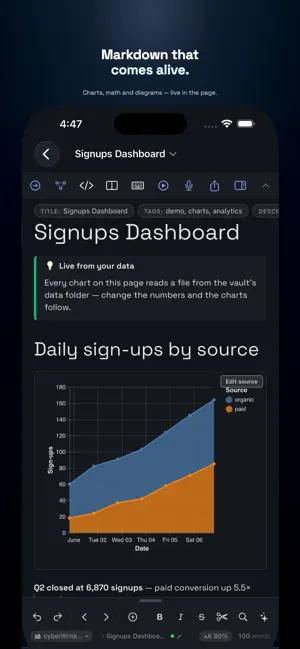
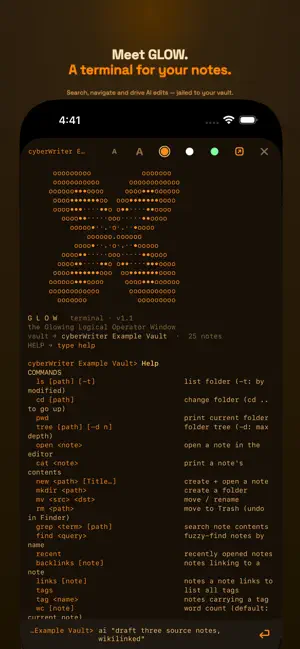
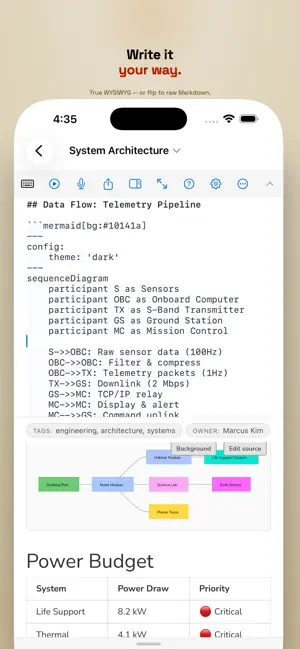
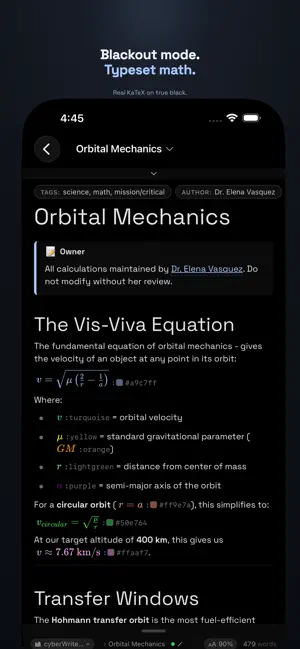
cyberWriter turns plain Markdown into a live studio - write in true WYSIWYG, split screen editing, link your notes into a knowledge graph, and drop in diagrams, charts, drawings from excalidraw, and KaTeX math. All native, all offline, no account required. Even use the built in GLOW terminal to manage, script and create docs in your vault, with your own AI models if you'd like. Bring your own vault from any popular markdown editor and unleash your potential. It reads and writes ordinary .md files in your own folders - including iCloud Drive - so your notes stay portable, future-proof, and yours. WRITE • Live WYSIWYG editing with a one-tap raw-Markdown toggle • Tables, callouts, task lists, footnotes, code blocks • Split view, focus mode, and beautiful themes • Clip a web page → clean Markdown, images and all * New TOML Support and Pageless PDF exports POWER TOOLS • GLOW terminal - a built-in command line for your vault, with your AI model on the prompt • Live data blocks - pull from any API straight into a note • Typed YAML properties with an inline editor • Dataview-style query blocks to list and filter across your vault • Templates, find & replace, snippets, and media embeds (audio, video, PDF, CSV) LINK • [[Wikilinks]] and automatic backlinks across your vault • #tags, a quick-open switcher, and hover previews • An interactive 3D knowledge graph of your notes SHOW • Mermaid diagrams - flowcharts, sequence, Gantt, and more • Vega-Lite charts straight from your data • Excalidraw hand-drawn diagrams • LaTeX math, beautifully typeset • Play any note as slides or spaced-repetition flash cards CAPTURE & EXPORT • Voice notes and on-device dictation • Export to PDF, Word, and HTML - no external tools, no cloud PRIVATE BY DESIGN • Fully offline. No account, no sign-up, no telemetry, no ads • Optional AI connects only to a provider you choose - a local server (Ollama, LM Studio, oMLX etc), your own API key, or Apple Intelligence on supported devices. Nothing leaves your device unless you set it up. One purchase. Your notes, your device, your rules.
Ratings & reviews
5.0
6 ratings
What’s new
Version 1.2.2 · Updated September 10, 2026
FRONT MATTER IN TOML Notes that open with a +++ block - the form Hugo and Zola write - are now read like any other. The block stays out of the note, its fields are editable in Properties, and an edit writes TOML back rather than converting your file to YAML. PDF EXPORTS KEEP THEIR RIGHT EDGE Exporting to PDF on iPhone cut off the end of every line, whatever the margins or paper size were set to. Plain notes, not just wide tables. Fixed, and the page now measures the same on iPhone, iPad and Mac. CONNECT AN AI SERVICE WITHOUT LOOKING UP ITS ADDRESS Add Connection starts with the services people actually use - OpenAI, Claude, OpenRouter, DeepSeek, Groq, Mistral and GLM. Tap one and its API address and a starting model are filled in; the key button opens that service's key page, so getting a key is one tap instead of a search. GLOW COMPLETES NOTE NAMES On the vault terminal, TAB now finishes an @note reference as well as a path, including names with spaces. Attaching a note to an AI turn no longer means typing it exactly. HIDE THE VAULT PANEL ON IPAD The file browser can be collapsed again. There was no way to hide it at all - no button, no gesture, no shortcut - so on a smaller iPad the editor never got the full screen. The toggle now sits in the sidebar's own header next to the vault name, and reopens from the top left. Plus fixes throughout.
App privacy
The developer, John Taverna, reported these privacy practices to Apple.
Data Not Collected
The developer does not collect any data from this app.
Alternatives to cyberWriter - Markdown Studio
Looking for apps like cyberWriter - Markdown Studio? Here are 6 similar apps on the App Store. The highest rated is em — Markdown Writer & Editor (5.0/5), and 1 of the 6 are free to download.
-
 em — Markdown Writer & Editor
5.0
em — Markdown Writer & Editor
5.0
-
 MyBooksQuotes
4.0
MyBooksQuotes
4.0
-
 Margin: Plan in Plain Words
-
 Soluna Calendar
-
 Raven - Markdown Notes
4.0
Raven - Markdown Notes
4.0
-
 KinicWiki: AI Memory
| App | Rating | Price | Last updated | Compare |
|---|---|---|---|---|
| cyberWriter - Markdown Studio | 5.0 / 5 (6 ratings) | 14.99 USD | September 10, 2026 | |
| em — Markdown Writer & Editor | 5.0 / 5 (1) | 19.99 USD | Oct 9, 2026 | Compare |
| MyBooksQuotes | 4.0 / 5 (1) | 3.99 USD | Dec 24, 2025 | Compare |
| Margin: Plan in Plain Words | – | 5.99 USD | Oct 23, 2026 | Compare |
| Soluna Calendar | – | 9.99 USD | Oct 23, 2026 | Compare |
| Raven - Markdown Notes | 4.0 / 5 (4) | 19.99 USD | Oct 26, 2026 | Compare |
| KinicWiki: AI Memory | – | Free | Oct 8, 2026 | Compare |