

Outerline
Adam Goehrig-Bawany Productivity iPhoneiPadiPod touchMac
Outerline is a paid Productivity app for iPhone and iPad by Adam Goehrig-Bawany. Rated 5.0/5 from 3 ratings. Requires iOS 26.0. Updated October 23, 2026.
- Rating
- 5.0
- 3 ratings
- Price
- 9.99 USD
- on the App Store
- Size
- 34 MB
- Age 12+
- Updated
- Oct 23
- 2026 · v1.2.10
Screenshots

About Outerline
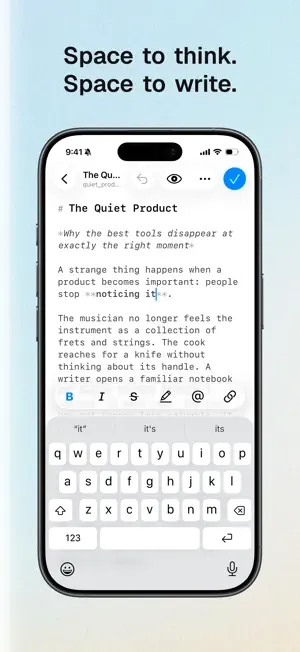
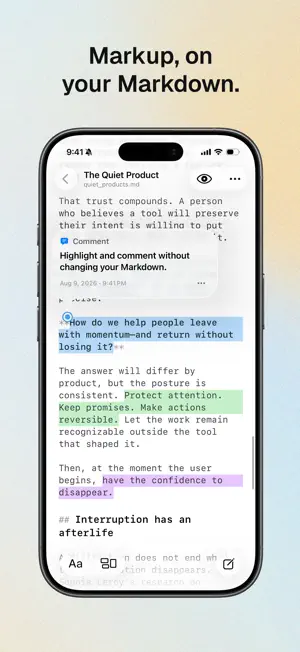
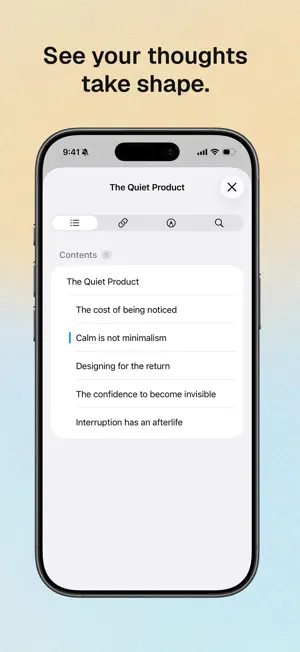
Outerline gives you space to think and space to write. A fast, fluid Markdown editor with no server, no database, and no clutter. Truly native on macOS and iOS. It works offline, opens instantly, and stays out of your way so you can just write. YOUR FILES STAY YOURS Every note is an ordinary .md file in a folder you choose, on your iPhone, in iCloud Drive, or anywhere in Files. No proprietary format and no account required to write. Open the same folder in any other Markdown app whenever you like, and take your work with you if you ever leave. A WRITING SURFACE, NOT A DASHBOARD • Live syntax highlighting, with each heading level at its own size • A keyboard toolbar with the formatting you actually reach for • Smart lists that continue, indent, and break out the way you expect • Auto-pairing brackets, quotes, and backticks • In-document search, word count, and reading time • Editor and preview, a tap apart • Choose your typeface, size, line height, and preview theme • Autosave, so a draft is never waiting on you to remember FIND ANYTHING FAST Full-text search across your whole library. Nested folders, Starred and All Documents views, and colored #tags you write inline and filter by later. Swipe to star, move, or delete. CONNECT YOUR IDEAS Link notes with [[wiki links]] and an autocomplete palette. The inspector shows what points here, each with a line of context and the folder it came from, keeps every external link in one place, and jumps you to any heading in the document. ANNOTATE WITHOUT TOUCHING THE MARKDOWN Highlight passages in five colors, attach notes to them, and leave anchored comments on any selection. Annotations live beside your files, so your Markdown stays clean and portable. NEVER LOSE A DRAFT Automatic timestamped snapshots, a diff viewer, and one-tap restore. Deleted notes move to Recently Deleted, where you can bring them back. WORK WITH SIRI AND SHORTCUTS Ask Siri to create or find a note, and use Shortcuts to open or append to one. On iOS 27, Siri and Apple Intelligence can use the open document as context on supported devices. Availability depends on language, region, and system settings. No Outerline account or subscription required. EXPORT, DIAGRAM, AND BACK UP Export any note as Markdown, HTML, or PDF. Write Mermaid diagrams in fenced code blocks and see them render in preview and in exports, entirely offline. Zip your whole library, metadata included, whenever you want a backup. THE SAME NOTES ON YOUR MAC This is the whole app, not a companion. Outerline for macOS syncs the same library as iOS, while adding split view, Quick Look, and an optional local Model Context Protocol server for AI assistants. Buy Outerline once on either platform and use it on both. Your Outerline account and Publish subscription carry across seamlessly. OUTERLINE PUBLISH (OPTIONAL) Publish a note to a link anyone can open, then keep it current as you save. Publishing needs a free Outerline account and an Outerline Publish subscription. Everything else in Outerline works without either. Outerline Publish is an auto-renewing monthly subscription. Payment is charged to your Apple Account at confirmation of purchase, and renews automatically unless you turn it off at least 24 hours before the end of the current period. Manage or cancel in your Apple Account settings. Terms of Use: https://outerline.so/support/terms/ Privacy Policy: https://outerline.so/support/privacy/
What’s new
Version 1.2.10 · Updated October 23, 2026
What's New in Outerline 1.2.10 • Outerline is ready for iPhone Duo. Your library and editor adapt to however you feel like writing. • Multiple libraries in iCloud: keep work, personal notes, and other projects in separate libraries inside Outerline’s iCloud folder. Create libraries and switch between them on your iPhone and Mac. Your existing iCloud library moves into the new structure automatically, preserving your notes and organization. • Pick up where you left off: the side-by-side editor reopens the last note you used in each library. • Save articles from Safari: share a web page to Outerline, choose a folder, and tap Save to create a Markdown note. Also improves formatting-bar visibility with hardware keyboards on Duo, keeps comment drafts and focus steady across layout changes, and makes notes saved through web import appear promptly on the creating iPhone.
App privacy
The developer, Adam Goehrig-Bawany, reported these privacy practices to Apple.
Data Linked to You
The following data, which may be collected and linked to your identity, may be used for the following purposes:
- Purchases: Purchase History
- Contact Info: Email Address, Name
- User Content: Other User Content
- Identifiers: User ID
Used for: App Functionality
Alternatives to Outerline
Looking for apps like Outerline? Here are 6 similar apps on the App Store. The highest rated is em — Markdown Writer & Editor (5.0/5), and 2 of the 6 are free to download.
-
 em — Markdown Writer & Editor
5.0
-
 Cross: Sync tasks
-
 Today - Focused Task Manager
-
 Focus 101: To Do
5.0
-
 Diddit: Shareable Logbook
5.0
-
 Slate - Notes & Canvas
4.5
| App | Rating | Price | Last updated | Compare |
|---|---|---|---|---|
| Outerline | 5.0 / 5 (3 ratings) | 9.99 USD | October 23, 2026 | |
| em — Markdown Writer & Editor | 5.0 / 5 (1) | 19.99 USD | Oct 9, 2026 | Compare |
| Cross: Sync tasks | – | 4.99 USD | May 6, 2026 | Compare |
| Today - Focused Task Manager | – | 2.99 USD | May 3, 2025 | Compare |
| Focus 101: To Do | 5.0 / 5 (10) | 1.99 USD | Jun 16, 2026 | Compare |
| Diddit: Shareable Logbook | 5.0 / 5 (6) | Free | Sep 30, 2026 | Compare |
| Slate - Notes & Canvas | 4.5 / 5 (2) | Free | Feb 12, 2026 | Compare |
Compare Outerline with the top alternatives: ratings, updates, ASO score and keyword gaps →