

Wood Framing Planner
OLDRICH KUCINA Productivity iPhoneiPadiPod touch
Wood Framing Planner is a free Productivity app for iPhone and iPad by OLDRICH KUCINA. Requires iOS 15.1. Updated October 7, 2026.
- Price
- Free
- on the App Store
- Size
- 66 MB
- Age 4+
- Updated
- Oct 7
- 2026 · v1.1.3
Screenshots
About Wood Framing Planner
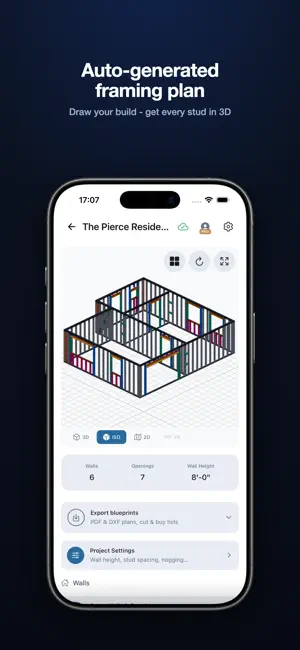
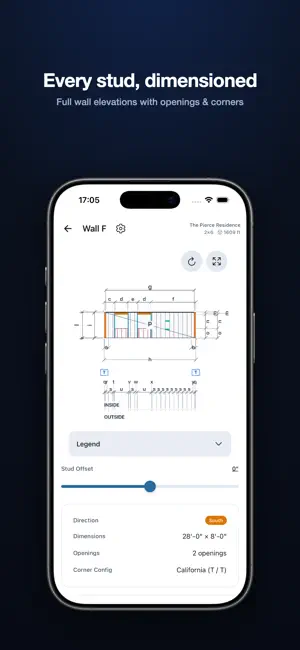
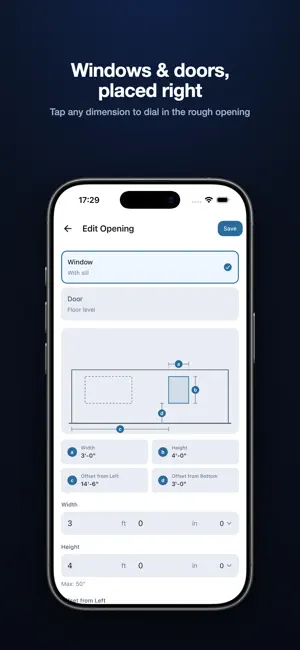
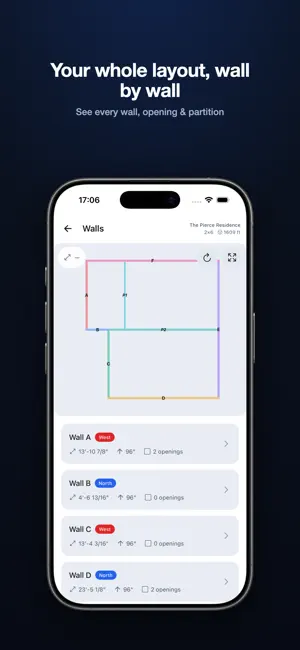
Plan your wood framing before you pick up a single board. Wood Framing Planner turns wall dimensions into a complete, buildable framing plan - studs, plates, openings, and corners - with a live 3D model, a precise cut list, and a lumber buy list that cuts waste. Everything runs on your phone, on the job site or at the workbench. WHY BUILDERS USE IT • Skip the napkin math - enter your walls and get a stud-by-stud layout instantly. • See it in 3D - rotate an isometric model of your whole build before you cut. • Order the right amount - a buy list optimized to your supplier's stock lengths means fewer offcuts and less money wasted. • Take it to the shop - export clean PDF & DXF blueprints, cut lists, and buy lists. DESIGN YOUR WALLS • Rectangle or any custom floor plan - draw the shape you're actually building. • Full wall elevations, fully dimensioned, down to 1/16". • Windows & doors with proper rough openings, placed exactly where you want them. • Size headers over every window and door, with adjustable offsets. • Interior partitions with real junctions and nailers. • Corner configurations, including California / three-stud corners. • Set wall height, stud spacing, and nogging/blocking to match your build. • Switch between 3D, isometric, and 2D views of your build. MATERIALS THAT MATCH YOUR STOCK • Standard timber profiles (2x4, 2x6, and more) or your own custom profiles. • Works in imperial (ft / in) or metric - your choice per project. GET REAL OUTPUTS • Cut list broken down by length, type, or wall. • Waste-optimized buy list tied to real stock lengths. • Pro blueprints: PDF, DXF, and 3D - ready for the workshop or the crew. SAVE YOUR WORK • Manage multiple projects side by side - houses, sheds, cabins, extensions. • Create an account to keep every project safe and come back anytime. • Sign in with Apple - your builds live in your account, not just one device. WHO IT'S FOR DIY builders, carpenters, framers, contractors, shed and cabin builders - anyone who wants an accurate framing plan and material list without a desktop CAD program. Available in 13 languages. Free to start - design your first build, explore the 3D model, and see your plan. Upgrade to Pro to unlock computed dimensions, full cut & buy lists, and blueprint exports. Start your build in seconds. Frame it right the first time. Pro is offered as an auto-renewable subscription (monthly or yearly). Payment is charged to your Apple ID at confirmation of purchase. It renews automatically unless canceled at least 24 hours before the end of the current period; manage or cancel anytime in your App Store account settings. Terms of Use (EULA): https://www.apple.com/legal/internet-services/itunes/dev/stdeula/ Privacy Policy: https://www.woodframingplanner.com/privacy/
What’s new
Version 1.1.3 · Updated October 7, 2026
What's new in 1.1.3 • Fixes the app closing right after launch on iOS 27 • The isometric view opens first, so the framing reads right away • A new info button explains how to move the 3D view and the floor plan • Print the PDF blueprint straight from the export • Partitions get a height of their own, one number for the whole project, in partition settings • The 3D viewer answers the first drag instead of waiting out the double tap
App privacy
The developer, OLDRICH KUCINA, reported these privacy practices to Apple.
Data Linked to You
The following data, which may be collected and linked to your identity, may be used for the following purposes:
- Purchases: Purchase History
- Contact Info: Email Address
- Identifiers: User ID
- Usage Data: Product Interaction
- Diagnostics: Crash Data, Performance Data
Used for: Analytics, App Functionality
Data Not Linked to You
The following data, which may be collected but is not linked to your identity, may be used for the following purposes:
- Identifiers: User ID
Used for: Analytics
Alternatives to Wood Framing Planner
Looking for apps like Wood Framing Planner? Here are 6 similar apps on the App Store. The highest rated is ArcSite: Quick CAD Floor Plans (4.7/5), and all 6 are free to download.
-
 Holzbau2.0 – Carpenter Calc
-
 WoodCraft: Wood Plans & Guides
4.1
WoodCraft: Wood Plans & Guides
4.1
-
 HomeCAD — Design your home
3.0
HomeCAD — Design your home
3.0
-
 Draft Paper
4.4
Draft Paper
4.4
-
 RenoPlan - Floor Plan Creator
4.5
RenoPlan - Floor Plan Creator
4.5
-
 ArcSite: Quick CAD Floor Plans
4.7
ArcSite: Quick CAD Floor Plans
4.7
| App | Rating | Price | Last updated | Compare |
|---|---|---|---|---|
| Wood Framing Planner | – | Free | October 7, 2026 | |
| Holzbau2.0 – Carpenter Calc | – | Free | Apr 5, 2026 | Compare |
| WoodCraft: Wood Plans & Guides | 4.1 / 5 (35) | Free | Jul 15, 2026 | Compare |
| HomeCAD — Design your home | 3.0 / 5 (25) | Free | Sep 14, 2026 | Compare |
| Draft Paper | 4.4 / 5 (15,830) | Free | Sep 13, 2026 | Compare |
| RenoPlan - Floor Plan Creator | 4.5 / 5 (748) | Free | Feb 13, 2025 | Compare |
| ArcSite: Quick CAD Floor Plans | 4.7 / 5 (9,150) | Free | Sep 30, 2026 | Compare |