

HomeCAD — Design your home
Aleksei Unshchikov Productivity iPad
HomeCAD — Design your home is a free Productivity app for iPad by Aleksei Unshchikov. Rated 3.0/5 from 25 ratings. Requires iOS 15.6.
- Rating
- 3.0
- 25 ratings
- Price
- Free
- on the App Store
- Size
- 34 MB
- Age 4+
- Updated
- Sep 14
- 2026 · v8.3
Screenshots

About HomeCAD — Design your home
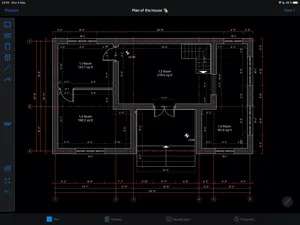
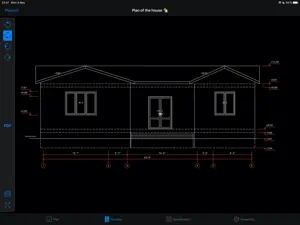
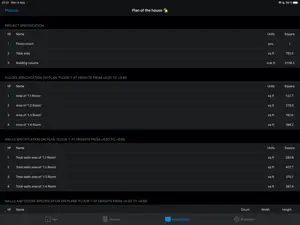
Working drawings of your house — right on iPad, without complex CAD. HomeCAD is a simple professional tool for low-rise construction. Draw a floor plan in minutes and get dimensioned drawings your builders can actually work with: plans with dimension lines and axes, facade views and a complete PDF drawing package. MADE FOR • Small construction companies, architects and designers: sketch and adjust a house project right on site and send the PDF to your client — no desktop CAD needed. • Self-builders: plan your own house without special knowledge and speak the same language with your builders. WHAT YOU GET • Floor plans with automatic dimension lines, axes and room areas • Walls and partitions, doors, windows, inner and entrance staircases • Multiple floors, foundation and roof • Facade views from four sides with level marks • Project specification: rooms, doors, windows • Multi-page PDF drawing package (A4/A3) with a title sheet — ready to print and share • Metric and imperial units FREE AND PRO The free version includes up to 3 projects. The Pro subscription unlocks PDF export and unlimited projects. Available subscriptions: - monthly subscription - annual subscription Subscription price varies by region. Questions or ideas? We answer every email: [email protected] The subscription fee will be charged from the bank card associated with your iTunes account. Subscriptions automatically renew unless auto-renew is turned off at least 24 hours before the end of the current active subscription. You can manage subscriptions in your iTunes account settings. Terms of Use: https://homecad.app/en/terms.php Privacy Policy: https://homecad.app/en/privacy_policy.php
Ratings & reviews
3.0
25 ratings
What’s new
Version 8.3 · Updated September 14, 2026
Roofs are easier to work with now: pinch to zoom and drag to pan the roof view, and move the roof ridge up and down freely while editing. Thanks for using HomeCAD!
App privacy
The developer, Aleksei Unshchikov, reported these privacy practices to Apple.
Data Not Linked to You
The following data, which may be collected but is not linked to your identity, may be used for the following purposes:
- Usage Data: Product Interaction
- Diagnostics: Crash Data, Performance Data, Other Diagnostic Data
Used for: Analytics
Alternatives to HomeCAD — Design your home
Looking for apps like HomeCAD — Design your home? Here are 6 similar apps on the App Store. The highest rated is RenoPlan - Floor Plan Creator (4.5/5), and all 6 are free to download.
-
 ArchiTouch 3D - Home Design
4.0
ArchiTouch 3D - Home Design
4.0
-
 iPocket Draw Lite
3.6
iPocket Draw Lite
3.6
-
 OrthoGraph – Floor Plan
2.4
OrthoGraph – Floor Plan
2.4
-
 Planit2d Lite
2.0
Planit2d Lite
2.0
-
 iDesign
2.6
iDesign
2.6
-
 RenoPlan - Floor Plan Creator
4.5
RenoPlan - Floor Plan Creator
4.5
| App | Rating | Price | Last updated | Compare |
|---|---|---|---|---|
| HomeCAD — Design your home | 3.0 / 5 (25 ratings) | Free | September 14, 2026 | |
| ArchiTouch 3D - Home Design | 4.0 / 5 (372) | Free | Oct 11, 2024 | Compare |
| iPocket Draw Lite | 3.6 / 5 (16) | Free | Aug 3, 2026 | Compare |
| OrthoGraph – Floor Plan | 2.4 / 5 (9) | Free | Oct 12, 2026 | Compare |
| Planit2d Lite | 2.0 / 5 (231) | Free | Jan 10, 2026 | Compare |
| iDesign | 2.6 / 5 (87) | Free | Oct 17, 2026 | Compare |
| RenoPlan - Floor Plan Creator | 4.5 / 5 (750) | Free | Feb 13, 2025 | Compare |