

Mosaic - Blur Faces & Photos
forYou inc. Photo & Video iPhoneiPadiPod touchMac
Mosaic - Blur Faces & Photos is a free Photo & Video app for iPhone and iPad by forYou inc. Requires iOS 26.0. Updated October 10, 2026.
- Price
- Free
- on the App Store
- Size
- 4 MB
- Age 4+
- Updated
- Oct 10
- 2026 · v1.3
Screenshots
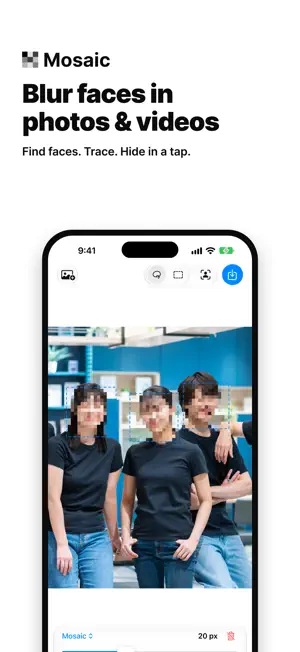


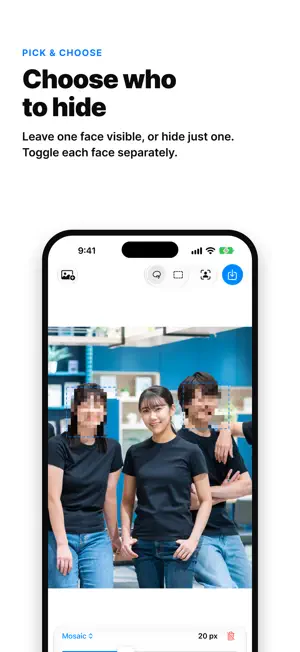
About Mosaic - Blur Faces & Photos
Mosaic is a quick way to hide the parts of a photo or video you don't want to share. ■ Three ways to choose what to hide ・Lasso: trace around an area with your finger ・Rectangle: drag a box over it ・Faces: Mosaic finds every face for you and covers them all at once ■ Choose who stays visible When several people are in the shot, keep one face visible, or hide just one. Each face can be switched on and off. ■ Six styles ・Mosaic: the classic pixelated look ・Blur: soft and natural ・Pixel Blur: pixelated, with softened edges ・Scribble: hand-drawn lines that scribble it out ・Emoji: a different emoji for each face ・Black Bar: covers just the eyes Adjust the strength with a slider. It scales with the size of your photo, so small and large images both look right. ■ Video, too Open a video and Mosaic follows faces and the areas you drew, hiding them frame by frame. Check the tracking before you export, and redraw a box wherever it drifts. Audio is kept, and video is exported at full quality. ■ Precise control Pinch to zoom, drag with two fingers to move around, and double-tap to see the whole picture. Move any area with your finger, or delete just the one you selected. On Mac, zoom with the mouse wheel or ⌘+ / ⌘−. ■ Your photos stay on your device All processing happens on your iPhone, iPad or Mac. Mosaic never uploads your photos or videos. No account, no ads, no tracking. ■ Pricing Anyone can try every tool. A subscription is required to save to your Photos library. ・1-week free trial ・Then a monthly auto-renewing subscription (the price is shown in the app before you subscribe) ・Cancel anytime in Settings ▸ Apple Account ▸ Subscriptions ・Cancel at least 24 hours before the trial ends and you won't be charged ・The subscription renews automatically unless canceled Terms of Use (EULA): https://www.apple.com/legal/internet-services/itunes/dev/stdeula/ Privacy Policy: https://uuuu.to/mosaic-privacy-policy/ Works on iPhone, iPad and Macs with Apple silicon.
What’s new
Version 1.3 · Updated October 10, 2026
Mosaic now supports iPhone Duo. • On the outer screen, tools line up along the right edge, clear of the camera
App privacy
The developer, forYou inc., reported these privacy practices to Apple.
Data Not Collected
The developer does not collect any data from this app.
Alternatives to Mosaic - Blur Faces & Photos
Looking for apps like Mosaic - Blur Faces & Photos? Here are 6 similar apps on the App Store.
-
 MosaicPro - Batch Blur
-
 Paparazzi -Blur &Censor Faces
-
 Mosa: Blur, Pixelate & Redact
-
 AI Vintage Photo Restore
-
 Mosaic / Blur Photo
-
 Blur & Mosaic
| App | Rating | Price | Last updated | Compare |
|---|---|---|---|---|
| Mosaic - Blur Faces & Photos | – | Free | October 10, 2026 | |
| MosaicPro - Batch Blur | – | Free | Dec 22, 2025 | Compare |
| Paparazzi -Blur &Censor Faces | – | Free | May 15, 2026 | Compare |
| Mosa: Blur, Pixelate & Redact | – | Free | Sep 18, 2026 | Compare |
| AI Vintage Photo Restore | – | Free | Aug 23, 2026 | Compare |
| Mosaic / Blur Photo | – | Free | Sep 4, 2026 | Compare |
| Blur & Mosaic | – | Free | Sep 30, 2026 | Compare |