

Blur & Mosaic
FORTE, Inc. Photo & Video iPhoneiPadiPod touch
Blur & Mosaic is a free Photo & Video app for iPhone and iPad by FORTE, Inc. Requires iOS 26.0. Updated September 30, 2026.
- Price
- Free
- on the App Store
- Size
- 13 MB
- Age 4+
- Updated
- Sep 30
- 2026 · v1.5
Screenshots


About Blur & Mosaic
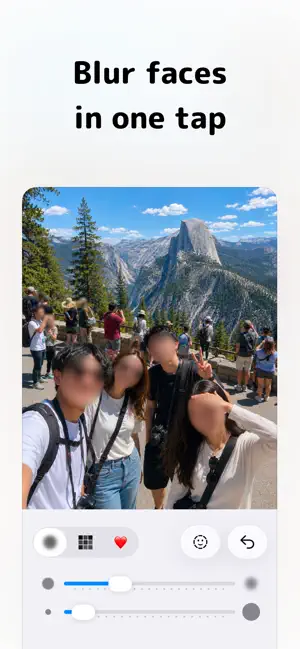
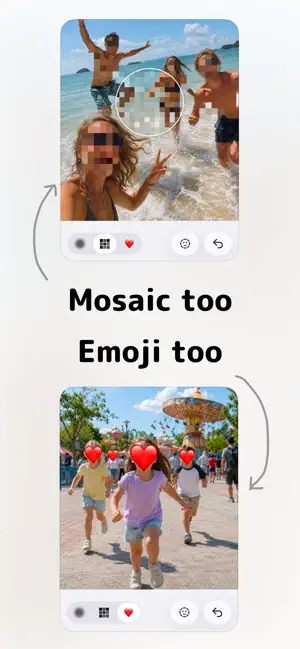
Photos and videos. It follows the face and hides it for you. Blur & Mosaic hides the faces in your photos and videos. One button finds the faces and covers them, and in video it keeps following each face as it moves. There is no fixing it frame by frame. For the shot you want to post with someone in it who never asked to be. For the video of your kid you want to send without leaving their face in it. It takes a few taps. ■ What it does [In video, it follows the face and keeps it covered] ・The cover sticks to the face as it moves ・No frame-by-frame work. Even a long take — just leave it running ・It keeps treating a face as the same person when they turn away, or leave the frame and come back [It finds the faces for you] ・One button covers every face in the shot ・In video you get a list of everyone who appears, so you choose who to hide and who to leave ・Photos and videos work the same way [Three ways to hide] ・Blur … soft ・Mosaic … solid ・Emoji … drop an emoji over the face. 1,900 to pick from [Trace with your finger for everything else] ・Hide more than faces: name plates, documents, a screen in the background ・Change the strength and the brush size as you go ・The eraser brings back anything you covered too much ■ When it helps ・Posting a photo or video on social media ・Sending family a video of your kid with the face hidden ・Taking personal details out of a screenshot ・Removing an address or a name from a listing photo ・Posting a photo with a car's license plate in it ■ It all happens on your iPhone Every bit of the hiding runs on your iPhone. Your photos and videos are never sent anywhere. The original is left exactly as it was, and the edited copy is saved separately. ■ Premium (one-time purchase) ・Hide the text in a photo all at once: license plates, name plates, documents ・No more ads ・Hide videos up to 10 minutes without trimming (1 minute for free) ・Pay once. No monthly charges
What’s new
Version 1.5 · Updated September 30, 2026
• Premium now includes “Hide text”: it finds the text in a photo and covers license plates, name plates and documents all at once • The Premium screen is easier to read
App privacy
The developer, FORTE, Inc., reported these privacy practices to Apple.
Data Used to Track You
The following data may be used to track you across apps and websites owned by other companies:
- Location: Coarse Location
- Identifiers: Device ID
- Usage Data: Advertising Data
Data Not Linked to You
The following data, which may be collected but is not linked to your identity, may be used for the following purposes:
- Location: Coarse Location
- Identifiers: Device ID
- Usage Data: Product Interaction, Advertising Data
- Diagnostics: Performance Data, Other Diagnostic Data, Crash Data
- User Content: Other User Content
Used for: Third-Party Advertising, Developer’s Advertising or Marketing, Analytics, App Functionality
Alternatives to Blur & Mosaic
Looking for apps like Blur & Mosaic? Here are 6 similar apps on the App Store. The highest rated is Face Blur & Mosaic - Mosamosa (5.0/5), and all 6 are free to download.
-
 Auto Face Blur: Video Mosaic
-
 Blur Video: Face Art & Mosaic
-
 Face Blur & Mosaic - Mosamosa
5.0
Face Blur & Mosaic - Mosamosa
5.0
-
 Poof Auto Blur Faces in Video
-
 FaceRedact Video
-
 Face Blur Video: Auto Tracking
5.0
Face Blur Video: Auto Tracking
5.0
| App | Rating | Price | Last updated | Compare |
|---|---|---|---|---|
| Blur & Mosaic | – | Free | September 30, 2026 | |
| Auto Face Blur: Video Mosaic | – | Free | Sep 7, 2026 | Compare |
| Blur Video: Face Art & Mosaic | – | Free | Oct 19, 2026 | Compare |
| Face Blur & Mosaic - Mosamosa | 5.0 / 5 (1) | Free | Oct 21, 2026 | Compare |
| Poof Auto Blur Faces in Video | – | Free | Jun 16, 2026 | Compare |
| FaceRedact Video | – | Free | Sep 9, 2026 | Compare |
| Face Blur Video: Auto Tracking | 5.0 / 5 (2) | Free | Oct 7, 2026 | Compare |
Compare Blur & Mosaic with the top alternatives: ratings, updates, ASO score and keyword gaps →