

AirTape - AR Measure
丽佳 施 Utilities iPhoneiPadiPod touch
AirTape - AR Measure is a free Utilities app for iPhone and iPad by 丽佳 施. Requires iOS 17.0. Updated October 22, 2026.
- Price
- Free
- on the App Store
- Size
- 4 MB
- Age 4+
- Updated
- Oct 22
- 2026 · v1.0.1
Screenshots


About AirTape - AR Measure
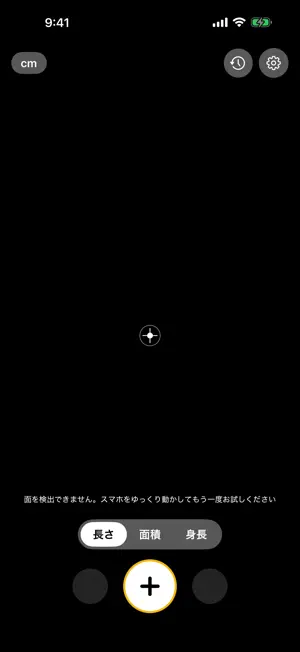
Point your iPhone, tap twice, and get the measurement. AirTape turns your phone into a tape measure that floats in the air: measure furniture, rooms, and people — no tape, no helper needed. Three everyday modes, all open with no limits: - Length: tap two points for a distance, keep adding points for baseboards or around a table, with a live readout as you move - Area: outline a polygon on any floor, table, or wall; it closes automatically and gives you area, perimeter, and every edge length - Height: tap the ground, then the top. AirTape uses the vertical difference between the two points, so holding the phone at an angle does not change the reading and there is no need to stand flat against a wall Save your rooms and generate a 2D floor plan with dimension labels, then export it as PNG or A4 PDF for your contractor, landlord, or records. There is no limit on how many measurements you keep or how many plans you export, and the footer credit can be turned off at any time. READINGS ARE FOR REFERENCE AR measurements depend on lighting, surface texture, your device, and how you move the phone, so treat every reading as a reference. For anything that matters — ordering materials, checking whether furniture fits — measure again with a real tape. ADS AND PRIVACY Measuring and floor plans run entirely on this device and work offline. The only thing that needs a connection is a single banner ad at the bottom of the screen. If you would rather not see it, there is a one-time Remove Ads purchase — it removes the banner and nothing else, because every feature is already open to you. Your measurements, notes, and screenshots stay on this iPhone. There is no account and no server, and deleting the app deletes everything. AirTape does not track you and never asks for ad tracking permission. HARDWARE Requires an AR-capable iPhone (iPhone XS and later). LiDAR models (iPhone 12 Pro and later Pro models) automatically use finer scene reconstruction.
What’s new
Version 1.0.1 · Updated October 22, 2026
- Improved AR measurement controls and measurement history readability. - Enhanced overall stability and layout spacing.
App privacy
The developer, 丽佳 施, reported these privacy practices to Apple.
Data Used to Track You
The following data may be used to track you across apps and websites owned by other companies:
- Identifiers: Device ID
Data Linked to You
The following data, which may be collected and linked to your identity, may be used for the following purposes:
- Identifiers: Device ID
Used for: Third-Party Advertising
Alternatives to AirTape - AR Measure
Looking for apps like AirTape - AR Measure? Here are 6 similar apps on the App Store. The highest rated is SurfacePro - Area Caculator (5.0/5), and all 6 are free to download.
-
 Acota · Measure
-
 土地面積メジャー
-
 Tape Measure Pro - Ruler AR
-
 SurfacePro - Area Caculator
5.0
-
 Ruler: Tape Measure & Level
-
 Tapely: Tape Measure & Ruler
| App | Rating | Price | Last updated | Compare |
|---|---|---|---|---|
| AirTape - AR Measure | – | Free | October 22, 2026 | |
| Acota · Measure | – | Free | Jul 11, 2026 | Compare |
| 土地面積メジャー | – | Free | Jul 16, 2026 | Compare |
| Tape Measure Pro - Ruler AR | – | Free | Sep 5, 2026 | Compare |
| SurfacePro - Area Caculator | 5.0 / 5 (1) | Free | Jul 30, 2026 | Compare |
| Ruler: Tape Measure & Level | – | Free | Aug 18, 2026 | Compare |
| Tapely: Tape Measure & Ruler | – | Free | Oct 12, 2026 | Compare |