

Daily Diary Notes
Official Vishwateja Lifestyle iPhoneiPadiPod touch
Daily Diary Notes is a free Lifestyle app for iPhone and iPad by Official Vishwateja. Requires iOS 17.0. Updated September 29, 2026.
- Price
- Free
- on the App Store
- Size
- 12 MB
- Age 4+
- Updated
- Sep 29
- 2026 · v1.1
Screenshots


About Daily Diary Notes
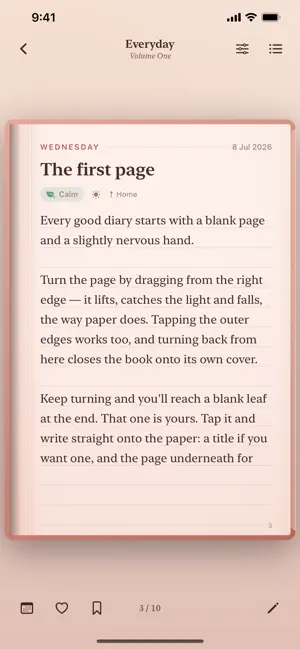
A private diary that behaves like a real book. Paper has grain. Ink sits on the line. Leaves turn in 3D with weight and a whisper of haptics. Every volume is bound differently, with its own paper stock, its own ink and its own foil stamping on the cover. Nothing ever leaves your phone. No account. No sync. No server. No analytics. Your diary is a file on your device and nowhere else. BOUND, NOT TEMPLATED • Fourteen bindings: Midnight Velvet, Rose Gold, Sakura, Emerald Library, Vintage Parchment, Nordic Frost and more • Six paper textures and five rulings, from single line to dotted to blank • Foil-stamped titles, raised spine bands, silk ribbon markers • Bind as many volumes as you like, one for each part of your life WRITING THAT FEELS LIKE WRITING • Real page turns, with perspective, weight and haptics • Ink that sits on the ruled line rather than floating between • Write straight onto the paper, with no forms and no boxes • 42 prompts for the days you do not know where to start WHAT A DAY HOLDS • Mood and weather, place and tags • Photographs, and 32 decorations to place, drag and resize • Bookmark any page, favourite any entry • Per-page paper and ruling, when one entry wants its own FIND IT AGAIN • Search every volume at once, each result cut from its own book's paper • A calendar with a mood-coloured dot on every day you wrote • Streaks, word counts, a mood line and a 91-day heat map YOURS ALONE • Face ID or Touch ID lock • A daily reminder at whatever hour suits you • Export everything as plain text, whenever you want • Use your own photograph for the home screen and arrange it how you like Built entirely in SwiftUI, with no third-party code, no trackers and no ads.
What’s new
Version 1.1 · Updated September 29, 2026
Writing in your diary is now simpler and feels more like real paper. • Double-tap any words on a page to edit them. The cursor lands right where you tapped. • Tap a blank page to start a new entry, or carry on with your last one. • No more Done button. Close the keyboard and your writing is saved. • When a page is full, the keyboard closes with a soft tap. Turn the page and tap Continue to keep writing the same entry. • Long pasted text now flows neatly across pages. • On iPad, you can edit both pages of the open book, and the pages stay full size above the keyboard in landscape. • Tap the outer edge of a page or swipe to turn it. Tapping your words no longer turns the page by accident. • Fixed text jumping to the next page after closing the keyboard. • The app now shows as "Daily Diary" on your Home Screen. • Other fixes and improvements.
App privacy
The developer, Official Vishwateja, reported these privacy practices to Apple.
Data Not Collected
The developer does not collect any data from this app.
Alternatives to Daily Diary Notes
Looking for apps like Daily Diary Notes? Here are 6 similar apps on the App Store. The highest rated is Penjo: Pencil Journal, Planner (4.7/5), and all 6 are free to download.
-
 Kartka Journal
-
 PaperWords
4.5
PaperWords
4.5
-
 Goji Active
-
 Penjo: Pencil Journal, Planner
4.7
Penjo: Pencil Journal, Planner
4.7
-
 Looksglo - The Glow Up App
4.3
Looksglo - The Glow Up App
4.3
-
 Palette - Color Analysis
4.3
Palette - Color Analysis
4.3
| App | Rating | Price | Last updated | Compare |
|---|---|---|---|---|
| Daily Diary Notes | – | Free | September 29, 2026 | |
| Kartka Journal | – | Free | Sep 14, 2026 | Compare |
| PaperWords | 4.5 / 5 (4) | Free | Dec 15, 2024 | Compare |
| Goji Active | – | Free | Dec 16, 2024 | Compare |
| Penjo: Pencil Journal, Planner | 4.7 / 5 (280) | Free | Oct 20, 2026 | Compare |
| Looksglo - The Glow Up App | 4.3 / 5 (223) | Free | Jan 10, 2026 | Compare |
| Palette - Color Analysis | 4.3 / 5 (1,854) | Free | May 20, 2026 | Compare |
Compare Daily Diary Notes with the top alternatives: ratings, updates, ASO score and keyword gaps →