

Penjo: Pencil Journal, Planner
Zafer ARICAN Lifestyle iPhoneiPadiPod touch
Penjo: Pencil Journal, Planner is a free Lifestyle app for iPhone and iPad by Zafer ARICAN. Rated 4.7/5 from 281 ratings. Requires iOS 17.0.
- Rating
- 4.7
- 281 ratings
- Price
- Free
- on the App Store
- Size
- 30 MB
- Age 4+
- Updated
- Oct 27
- 2026 · v3.8.1
Screenshots


About Penjo: Pencil Journal, Planner
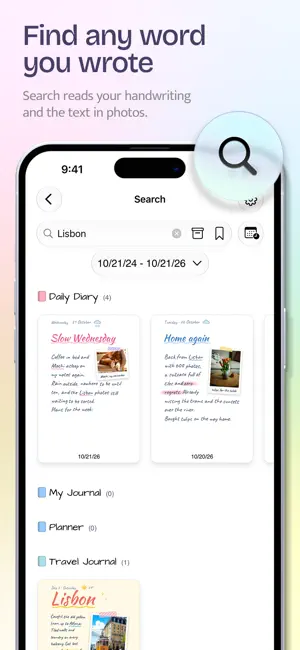
Penjo is a digital journal and planner you write by hand. In the morning, today's page shows your Apple Calendar events and reminders, and you plan around them with Apple Pencil or your finger. By evening, the same page is your diary, with notes, sketches and photos of the day, and iCloud keeps it on your iPad, iPhone and Mac. Later, search finds the words you wrote, even in your handwriting. In September 2026, the App Store featured Penjo in "Make the Most of Apple Pencil" in 173 countries. PLAN WITH YOUR CALENDAR • See your Apple Calendar events and Apple Reminders on the day page and in the week and month views, including Google and Exchange calendars. Add, edit and complete them without leaving Penjo. • Reminders you haven't finished from earlier days appear under Overdue on today's page. • On iPad and Mac, the day drawer keeps the day's plans beside your page as you move from day to day. • See your week at a glance, with each day's page and plans. The month page is a canvas too, for a habit tracker or a mood chart. MAKE IT YOURS • Give each journal its own look: 18 cover colors, 20 paper colors, and blank, lined, grid or dotted paper in different spacings. • Use Day Mode for a page every day, or List Mode for occasional notes, class notes, trips or scrapbooks. • Choose fonts and colors for your text, set up your own Apple Pencil tool palette, and pick light or dark. WRITE YOUR DAY • Every page starts blank on the paper you chose, and you decide what goes where. Add more pages to a day when you need them. • Penjo can straighten the lines you draw, and you can scribble over words to erase them. • Photos: remove the background, add a sticker effect or an instant photo frame, flip a photo or clip it to a shape, right on the page. Add text boxes, shapes and maps too. • Add moments from your day and gratitude prompts with Journaling Suggestions, and use Writing Tools and Image Playground on supported devices. SYNCED AND PRIVATE • iCloud keeps your journals in sync on iPad, iPhone, Mac and Apple Vision Pro. They stay in your own iCloud, and we never see what you write. • Lock the app or a single journal with Face ID, Touch ID or your device passcode. • Export a day, week or month as a PDF, or back up and transfer whole journals as .penjo files. LOOK BACK • Search also finds the text in your photos, with text recognition on your device. • On This Day shows what you wrote on the same date in earlier years. READY FOR THE NEWEST APPLE DEVICES • The Liquid Glass design on iOS 26, iPadOS 26 and later, in your journal's colors. • iPhone Duo: open it like a book, with the page on one side and the day's events and reminders on the other, or set it half open on a table and write on the flat half. Fold it shut and the journal closes. • Home Screen widgets, and Penjo in 22 languages. FREE AND UNLIMITED Penjo is free to start, with no account to create: 3 journals and 14 day pages in each. Penjo Unlimited adds Apple Calendar and Reminders, iCloud sync, unlimited journals and pages, app and journal locks, PDF export and .penjo backups, on all your devices. Choose a monthly or yearly subscription, or pay once with Lifetime. Family Sharing is available on the monthly plan. Questions? Every message gets a personal reply. [email protected] Privacy Policy: https://penjoapp.com/privacy-policy Terms of Use: https://www.apple.com/legal/internet-services/itunes/dev/stdeula/
Ratings & reviews
4.7
281 ratings
What’s new
Version 3.8.1 · Updated October 27, 2026
- Select several days: organizing your journals is now quicker. In a journal's Sheet List, tap Select, pick the days, then copy or move them to another journal, export them or delete them together (Penjo Unlimited). Long-press a page for the same actions and a larger preview. - Handwriting in more languages: handwriting search and Copy As Text now cover every language your device can read. Choose yours in a journal's Text Recognition settings, and Penjo can re-read your existing pages. New ones include Turkish, Polish, Dutch, Czech, Romanian and the Scandinavian languages (iOS 26 or later) and Finnish (iOS 27). - iPhone Duo: with iOS 27.2, write on your pages with Apple Pencil (USB-C) on the inner and the outer display. Turn on drawing in the toolbar, then write. - Bug fixes and improvements.
App privacy
The developer, Zafer ARICAN, reported these privacy practices to Apple.
Data Not Linked to You
The following data, which may be collected but is not linked to your identity, may be used for the following purposes:
- Usage Data: Product Interaction, Other Usage Data
- Diagnostics: Crash Data
Used for: Analytics, App Functionality
Alternatives to Penjo: Pencil Journal, Planner
Looking for apps like Penjo: Pencil Journal, Planner? Here are 6 similar apps on the App Store. The highest rated is Lettre.app - PenPals for life (4.8/5), and all 6 are free to download.
-
 Bujo - Bullet Journal&Planner
4.6
Bujo - Bullet Journal&Planner
4.6
-
 Journal & Planner - Whatting
4.5
Journal & Planner - Whatting
4.5
-
 AJournal - Planner & Journal
4.7
AJournal - Planner & Journal
4.7
-
 Journal for iPad - Diary+
4.6
Journal for iPad - Diary+
4.6
-
 Lettre.app - PenPals for life
4.8
Lettre.app - PenPals for life
4.8
-
 Diarium Journal: Private Diary
4.8
Diarium Journal: Private Diary
4.8
| App | Rating | Price | Last updated | Compare |
|---|---|---|---|---|
| Penjo: Pencil Journal, Planner | 4.7 / 5 (281 ratings) | Free | October 27, 2026 | |
| Bujo - Bullet Journal&Planner | 4.6 / 5 (1,156) | Free | Oct 28, 2026 | Compare |
| Journal & Planner - Whatting | 4.5 / 5 (87) | Free | Oct 26, 2026 | Compare |
| AJournal - Planner & Journal | 4.7 / 5 (5,339) | Free | Oct 26, 2026 | Compare |
| Journal for iPad - Diary+ | 4.6 / 5 (129) | Free | Aug 21, 2026 | Compare |
| Lettre.app - PenPals for life | 4.8 / 5 (1,582) | Free | Oct 21, 2026 | Compare |
| Diarium Journal: Private Diary | 4.8 / 5 (2,062) | Free | Oct 28, 2026 | Compare |