

MODE 1090: Flight Tracker
Alexander Stolte Travel iPhoneiPadiPod touchApple Watch
MODE 1090: Flight Tracker is a free Travel app for iPhone and iPad by Alexander Stolte. Requires iOS 15.0. Updated October 7, 2026.
- Price
- Free
- on the App Store
- Size
- 201 MB
- Age 4+
- Updated
- Oct 7
- 2026 · v2.0.0
Screenshots
About MODE 1090: Flight Tracker
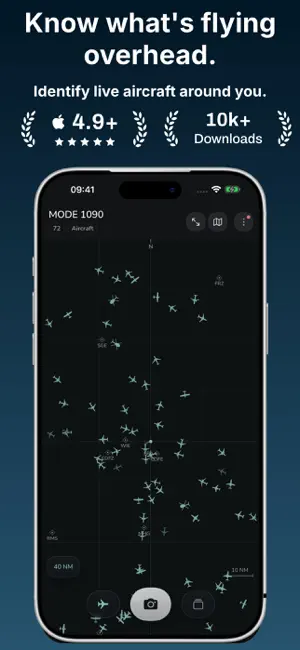
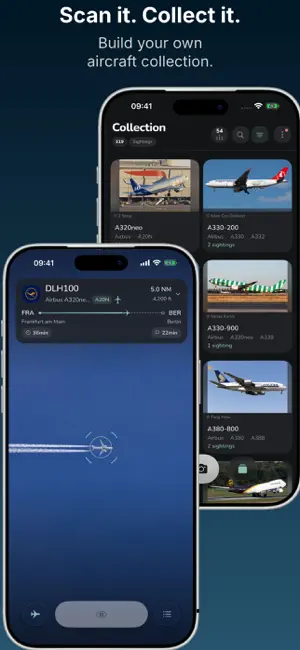
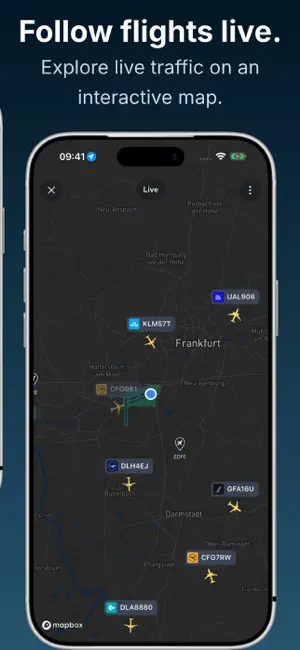
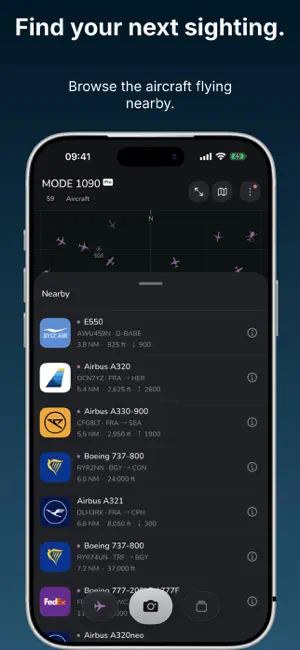
Know what's flying overhead. Track aircraft live, point your iPhone at the sky and turn real sightings into your own aircraft collection. Start with live radar, scanning and collecting for free. No account needed to get started. YOUR SKY, LIVE • See nearby aircraft on a clear radar with altitude, speed and aircraft photos when available. • Explore the interactive flight map, browse the list of nearby aircraft and watch aircraft arriving at or departing from an airport. • Switch between aircraft silhouettes, ATC data blocks and a minimal radar view. SCAN IT. COLLECT IT. • Point your iPhone at an aircraft to find out what you're looking at. No photo upload needed. • Collect real sightings across aircraft types, airlines and registrations. Add notes and revisit your scan history. • See your collected aircraft on the map, complete daily missions, earn XP, level up and unlock achievements. • Share the hobby with friends and compare your progress. GET CLOSER WITH MODE 1090 PRO • Rotate, zoom and explore available 3D aircraft models and liveries. • Search live aircraft worldwide by callsign, registration or ICAO code, then follow a flight on the map. • Discover flight routes when available, save more aircraft favorites and revisit flight history. • Keep airport spotting in view with Live Activities on supported iPhones, where available. • Enjoy radar without the inactivity pause, spoken aviation callouts in English, custom radar colors and app icons. • Export your sighting notes for use beyond the app. ON YOUR PHONE, TABLET AND WRIST Enjoy spotting on iPhone and iPad, with a live radar on Apple Watch. With an optional account, you can sync your collection for free between iPhone and iPad. You can also export your collection data. No ads. Camera images stay on your device. Flight coverage, routes and model availability vary. MODE 1090 is for plane spotting and observation, not navigation or flight operations. MODE 1090 Pro is an optional subscription. It renews automatically unless canceled at least 24 hours before the end of the current period. Manage or cancel it in your App Store account settings. Privacy: https://mode1090.com/privacy/ Terms of Use: https://www.apple.com/legal/internet-services/itunes/dev/stdeula/ Support: https://mode1090.com/support
What’s new
Version 2.0.0 · Updated October 7, 2026
New in MODE1090 2.0: • New flight radar on the world map: Explore live aircraft, move freely around the map and zoom out to the globe. ◦ Filter the map to show aircraft you've already scanned or your favorites. • 2D and 3D views: Choose between aircraft icons and 3D aircraft on the map. • Worldwide aircraft search: Search by callsign, registration or ICAO identifier. Pro • Interactive 3D aircraft models: Rotate available models with matching liveries, zoom in and view them full screen. Pro • New aircraft details: See a model or photo, the flight route, live flight data and your scans together on one clear page. • Airport spotting: Follow current arrivals and departures, with runway information and a countdown when the relevant data is available. • Live Activities: Keep an eye on airport traffic on your Lock Screen and in the Dynamic Island. Tap to open the relevant airport. Pro, on compatible iPhones • New collection statistics: See your most frequent aircraft, airlines and manufacturers, and track your scans and active days. • Shareable statistics cards: Create personal cards with a choice of designs, backgrounds and colors. • Friends and spotting comparisons: Invite friends and compare your scans and aircraft types. • Private updates and monthly recaps: Share selected scans and personal recaps with your friends. • Refreshed daily quests: A daily mission with three scans and a clearer view of your progress toward the next level and rank. • Redesigned badges: Explore updated medals you can rotate and view from both sides. • Refreshed scan completion: A new presentation of your rewards, XP and progress after spotting. • Airline logos on the radar: See the logo right next to the selected aircraft. Improvements and bug fixes: • Correct camera preview aspect ratio in portrait and landscape. • Fixed scanner display issues when Reduce Motion is enabled. • Improved readability in your collection and scan history with larger text. • The map keeps its position after a search and when the keyboard closes. • More stable radar and map data during brief reception gaps and delayed updates. • More natural English flight announcements, with improved pauses and pronunciation of callsigns, airlines and aircraft types. Pro • The Apple Watch app now reliably follows your chosen light or dark appearance.
App privacy
The developer, Alexander Stolte, reported these privacy practices to Apple.
Data Linked to You
The following data, which may be collected and linked to your identity, may be used for the following purposes:
- Purchases: Purchase History
- Identifiers: User ID
- Location: Coarse Location
- Contact Info: Email Address, Name
- User Content: Other User Content
Used for: Analytics, App Functionality
Alternatives to MODE 1090: Flight Tracker
Looking for apps like MODE 1090: Flight Tracker? Here are 6 similar apps on the App Store.
-
 Spotter Log: Plane Spotting
-
 SKYGATE: Flight Delay Claim
-
 Skyfield: Airport Atlas
-
 Spotterra: Plane Spotting
-
 Runway: Airport Companion
-
 AI Spotter
| App | Rating | Price | Last updated | Compare |
|---|---|---|---|---|
| MODE 1090: Flight Tracker | – | Free | October 7, 2026 | |
| Spotter Log: Plane Spotting | – | Free | Jul 24, 2026 | Compare |
| SKYGATE: Flight Delay Claim | – | Free | Sep 16, 2026 | Compare |
| Skyfield: Airport Atlas | – | Free | Sep 29, 2026 | Compare |
| Spotterra: Plane Spotting | – | Free | Sep 15, 2026 | Compare |
| Runway: Airport Companion | – | Free | Aug 9, 2026 | Compare |
| AI Spotter | – | Free | Dec 12, 2025 | Compare |